

Green printing for business means cutting the paper, ink, energy and waste your printing generates, without slowing down the office. The three fastest wins cost nothing to implement: set every device to duplex and monochrome by default, shift routine jobs to recycled or FSC-certified paper, and turn on secure or pull-printing so nothing prints until someone’s standing at the machine. Certifications like SGP and ISO 14001 give you a quick way to check whether a supplier’s environmental claims actually hold up.
TL;DR:
- Default settings such as duplex and monochrome printing can reduce paper and toner use by 20 to 50 percent within the first few weeks.
- Using certified recycled paper, high-yield cartridges, and responsible suppliers minimizes the environmental impact of supplies and reduces lifecycle emissions.
- Retrofit, consolidate, or replace aging devices with ENERGY STAR or EPEAT labels to lower hardware-related energy consumption and embodied carbon.
- Regular tracking of print volume, cost per page, and device idle time helps measure progress and ensures policies stay effective over time.
- Choosing suppliers certified with standards like SGP or ISO 14001 and establishing proper end-of-life disposal prevents unnecessary waste and supports sustainability claims.
Table of Contents
- Operational changes that cut paper, toner and energy now
- Choosing sustainable supplies: paper, inks and consumables that lower the life-cycle impact
- Device strategy: retrofit, consolidate or replace?
- Print management tools and the metrics that prove it’s working
- Standards and certification to trust when choosing a printing partner
- How Global Office Machines helps deliver these green printing outcomes
- Getting staff to actually follow the policy
- Selecting and evaluating printing vendors and partners based on environmental criteria
- Creating and maintaining a sustainable printing policy with regular audits
- Waste management and end-of-life printer disposal
- What actually moves the needle on green printing
- Get a fleet assessment or Green+ quote
Operational changes that cut paper, toner and energy now
Most of the environmental cost of office printing comes from behaviour, not hardware. Change the defaults and you change the outcome, often within the first billing cycle.
Start with the settings every device already has:
- Set duplex printing as the default across every printer and via your print-management software, not just on the machines people remember to check.
- Switch internal drafts to monochrome and draft mode — colour and high-resolution settings burn through toner for documents nobody keeps.
- Turn on secure print release (pull-printing) so jobs sit in a queue until the user authenticates at the device, killing the abandoned-job pile that ends up in the recycling bin unread.
- Set print quotas by department or user to flag unusual volume before it becomes a habit.
- Brief staff in ten minutes, not a training day. A one-page policy pinned near the printer, explaining why duplex is default and how to release a pull-print job, locks in the behaviour faster than any email ever will.
Industry data backs the effort. Combining these defaults with fleet consolidation and managed oversight commonly delivers 20–50% reductions in print volume and 20–30% reductions in print costs — figures that hold up whether you’re running five printers or fifty. Our own breakdown of duplex printing savings shows how quickly double-sided defaults pay for themselves in paper alone.
Pro Tip: Don’t just flip the default and walk away. Check back after two weeks — some legacy applications reset to single-sided printing every time they update, quietly undoing the whole policy.
Choosing sustainable supplies: paper, inks and consumables that lower the life-cycle impact
Paper and ink are where most of the hidden environmental cost sits, because production and delivery, not the printing itself, generate the bulk of the footprint. Life cycle research on print and mail materials confirms that material choice, ink use and delivery are the biggest levers you can pull.
A few things to check before you order:
- Post-consumer recycled (PCR) content — look for the percentage on the spec sheet, not just a green logo. Government procurement guides commonly target around 30% PCR content as a baseline.
- FSC chain-of-custody certification — this traces the paper back through every stage of production, confirming the fibre came from responsibly managed forests.
- Ink coverage and formulation — heavy colour coverage and certain solvent-based inks carry a higher carbon and VOC cost than soy or vegetable-based alternatives where they’re available.
- Remanufactured or high-yield cartridges — these cut both cost per page and landfill waste, especially when paired with a supplier take-back programme.
- Bulk ordering and reduced packaging — fewer, larger deliveries cut transport emissions compared with frequent small top-ups.
Good design choices reduce ink coverage before a single page prints, something the graphic design side of your business can influence directly. A partner resource on business design is worth a look if your marketing materials are driving a disproportionate share of your ink spend.
Device strategy: retrofit, consolidate or replace?
The right call depends on what you already own, not on chasing the newest model. A five-year-old MFD with a broken duplexer might be worth $150 to fix; a fleet of ageing single-function printers scattered across departments is a different problem entirely.
Weigh these before deciding:
- Retrofit first if the device supports it. Adding an automatic duplexer to an existing printer is usually far cheaper than replacement and can halve paper use immediately.
- Consolidate multi-function devices where several single-purpose printers currently do the job of one. Fewer machines mean fewer standby power draws and less consumable duplication.
- Consider leasing or refurbished units through a programme like Global Office Machines’s Green+ range, which extends a machine’s working life and avoids the embodied carbon cost of manufacturing new hardware.
- Check for ENERGY STAR or EPEAT labels and prioritise devices with genuine sleep and warm-up power-save modes, not just a marketing sticker.
Our printer fleet management guide walks through how to audit an existing fleet before committing to either path.
Pro Tip: If more than half your fleet is over five years old, run the retrofit-versus-replace numbers device by device — a blanket decision either way usually wastes money in one direction or the other.
Print management tools and the metrics that prove it’s working
You can’t manage what you don’t measure, and print is one of the easiest office costs to lose track of entirely.
Five numbers matter most:
- Monthly print volume — the baseline everything else measures against.
- Sheets per employee — flags outliers faster than a total volume figure ever will.
- Cost per page — blends paper, toner and device wear into one comparable figure across your fleet.
- Toner and ink usage rates — tracks whether draft mode and monochrome defaults are actually sticking.
- Device idle time — reveals whether you’re running more hardware than the office needs.
Prioritise software with secure print, automated reporting, rules-based printing (redirecting large jobs to the cheapest-per-page device) and departmental quotas. Most businesses see measurable movement in these numbers within six to eight weeks of switching on tracking, well before any hardware changes take effect. These same figures slot directly into broader ESG or sustainability reporting, giving you a paper trail (ironically) for board-level claims about environmental performance.
Standards and certification to trust when choosing a printing partner
Marketing claims about “eco-friendly printing” are cheap to make and hard to verify unless you know what to ask for.
Sustainable Green Print (SGP) is a nationally recognised certification for print businesses, structured across Levels 1 to 3, with higher levels requiring deeper audited controls over energy, waste and supply chain management. A supplier holding Level 3 has been through considerably more scrutiny than one that simply mentions sustainability on its homepage.
ISO 14001 covers environmental management systems generally, while ISO 16759 provides the specific life cycle assessment framework used to calculate the carbon footprint of print media products. Together they’re the backbone of any credible supplier carbon claim.
FSC chain-of-custody certifies that paper can be traced back through every processing stage to a responsibly managed forest.
Before signing with any printing partner, ask to see:
- Current SGP or ISO certificates, not just logos on a website
- Actual KPIs behind any “reduced emissions” claim
- Details of cartridge and consumables take-back programmes
How Global Office Machines helps deliver these green printing outcomes
Some authorised dealers for major printer brands have national coverage across multiple Australian states, which matters when you’re trying to standardise green settings across multiple sites rather than one office.
Consumables, including genuine and compatible toners and inks, can arrive with nationwide delivery integrated into supply logistics.
Getting staff to actually follow the policy
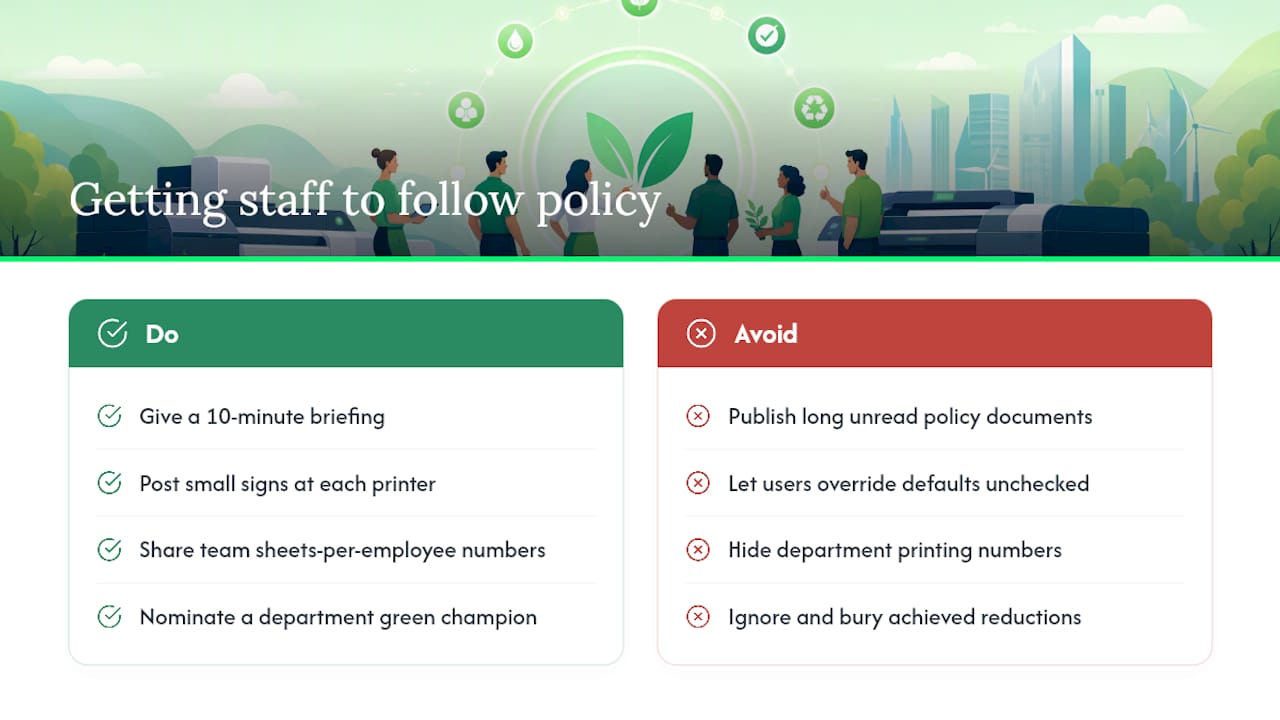
Settings and software only work if people don’t quietly override them. Employee behaviour is the variable that decides whether a duplex default survives its first month or gets reset the moment someone finds it inconvenient.
Start with a short briefing, not a policy document nobody reads. Ten minutes explaining why duplex is now default, how pull-printing works, and where the quota threshold sits does more than a page of fine print buried in the staff handbook.
Visual cues reinforce the message without needing constant reminders. A small sign near each printer, showing the default settings and a quick “why” line, keeps the policy visible long after the original announcement is forgotten.
Give departments visibility into their own numbers. Sharing sheets-per-employee or cost-per-page figures by team, even informally, tends to change behaviour faster than a blanket company memo, because nobody wants to be the outlier on the monthly printout.
Nominate a green printing champion in each office or department. This doesn’t need to be a formal role. It just needs to be someone who notices when the duplex setting has quietly reverted to single-sided, or when a printer’s been left in colour mode for weeks, and flags it before it becomes the new normal.
Recognise progress publicly where it happens. If a department cuts its print volume noticeably, say so at the next team meeting. Behaviour that gets acknowledged tends to stick; behaviour that vanishes into a spreadsheet nobody looks at doesn’t.
Selecting and evaluating printing vendors and partners based on environmental criteria
Choosing a print partner on price alone is how businesses end up locked into cheap toner and expensive waste. Environmental criteria deserve equal weight in the vendor selection process, not an afterthought bolted onto the final decision.
Ask every prospective vendor for their certification status first. A supplier that holds SGP Level 2 or 3, or can demonstrate ISO 14001 compliance, has already been through independent verification of its environmental management systems. One that simply claims to be “eco-conscious” in its marketing has not.
Check what happens to consumables at end of life. A genuine cartridge take-back or recycling programme, not a vague promise to “recycle where possible,” is a fair test of whether sustainability is operational or just decorative.
Look at the paper and ink options offered as standard, not as a premium add-on. Vendors serious about sustainable printing solutions make FSC-certified and recycled stock the default recommendation, not a special request that costs extra and takes longer to arrive.
Ask about device efficiency credentials too. A vendor selling ENERGY STAR or EPEAT-rated hardware, alongside refurbished or remanufactured options, is thinking about the full equipment lifecycle rather than just the next sale.
Finally, request references or documented KPIs. Any supplier confident in its environmental performance should be able to show real numbers, not just a certification logo on a proposal document.
Creating and maintaining a sustainable printing policy with regular audits
A green printing policy that never gets revisited becomes a green printing policy in name only. Settings drift, staff turn over, and new devices arrive without the same configuration as the rest of the fleet.
Write the policy down, even briefly. It should cover default settings (duplex, monochrome, draft mode), approved paper and consumables specifications, quota thresholds, and who’s responsible for checking compliance. A one-page document beats a ten-page one that nobody finishes reading.
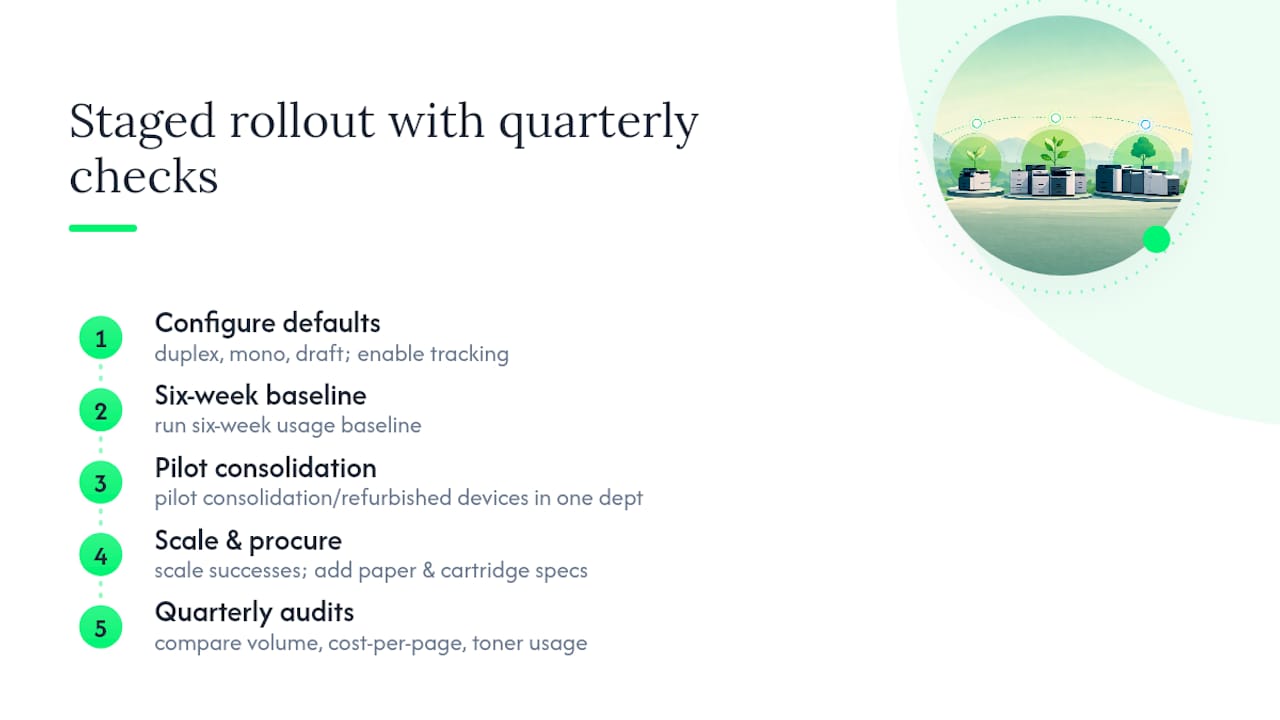
Set a recurring audit, ideally quarterly. Pull the volume, cost-per-page and toner usage numbers from your print-management software and compare them against the previous quarter. A pragmatic rollout works in stages: configure defaults and tracking first, run a six-week usage baseline, pilot fleet consolidation or refurbished devices in one department, then scale what works and add procurement specifications for paper and cartridges.
Update the policy when circumstances change, not on a fixed annual cycle regardless of relevance. New hires, new devices, or a new supplier contract are all natural trigger points to revisit whether the defaults still make sense.
Treat continuous improvement as the point, not a bonus. The businesses that get the most out of green printing over Time aren’t the ones with the best policy on day one. They’re the ones still checking the numbers eighteen months later.
Waste management and end-of-life printer disposal
Printers and cartridges don’t belong in general waste, and in most cases, they shouldn’t need to end up there at all. E-waste from printing equipment contains circuit boards, plastics and metals that require proper processing, not a spot in a landfill skip.
Cartridge recycling is the easiest win and the one most businesses already have access to. Many suppliers run take-back programmes where empty toner and ink cartridges are returned through the same channel they arrived in, often at no extra cost. Ask your current supplier whether this exists before assuming it doesn’t.
End-of-life printers and photocopiers need a different path. Look for a supplier or e-waste processor that can certify responsible disposal or recycling of the hardware itself, not just point you toward a general electronics recycling bin. Machines with recoverable value are sometimes better redirected toward a refurbishment programme rather than disposal, extending their working life instead of writing them off entirely.
Build disposal into your device strategy from the start, rather than treating it as a problem for whenever a printer finally stops working. Knowing in advance how a machine will be retired, whether through take-back, refurbishment or certified recycling, avoids the scramble that usually ends with hardware sitting in a storeroom for years because nobody knew what to do with it.
What actually moves the needle on green printing
The conventional advice on green printing spends too much time on hardware and not enough on habits. Every guide mentions energy-efficient devices and recycled paper. Few mention that a duplex default left unchecked reverts within weeks, or that pull-printing does more for waste reduction than any paper spec ever will, because it stops the print job existing in the first place.
My view, based on how these levers actually interact: sequence matters more than ambition. Businesses that try to overhaul paper procurement, replace half the fleet and roll out a full sustainability policy in the same quarter tend to stall, because there’s too much to track and no baseline to measure against. The ones that succeed configure defaults and tracking first, watch six weeks of real data, then make device and supply decisions based on what that data actually shows rather than what a brochure promises.
The other underrated point: certification isn’t decoration, it’s a shortcut. Asking a supplier for their SGP level or ISO 14001 status saves you from having to verify every claim yourself. Skip that step, and you’re taking marketing copy on faith.
Get a fleet assessment or Green+ quote
Some suppliers offer ways to act on all of this without hiring a sustainability consultant by combining fleet assessments, refurbished machine options, and managed print services into one national supplier relationship.
Managed print services can handle ongoing tasks like tracking volume, enforcing quotas, and keeping supplies stocked, helping ensure that policies remain effective over time. If you’re ready to move past defaults and settings, browse the current printer and consumables range to see what a Green+ or managed print option looks like for your office.