

For most Australian offices, the fastest path to lower print costs and fewer supply emergencies is a cloud-enabled print-fleet platform paired with a local managed print service (MPS). The industry term is managed print services, although “printer fleet management” captures the broader discipline of monitoring, optimising, and governing every device in your office.
Two things that make the biggest difference:
-
Remote monitoring with automated meter reads keeps devices available and eliminates manual stocktaking.
-
Consumables automation (low-toner triggers and auto-replenishment) cuts the ad-hoc ordering that inflates supply budgets.
Your immediate next step: Run a 30–60 minute fleet audit to map every device, its monthly volume, and its cost-per-page. Or request a no-obligation print assessment from a local MPS provider this week.
Table of Contents
-
What features should every printer fleet management platform include?
-
What does a managed approach actually deliver for your office?
-
Global Office Machines: a local managed-print option for Australian businesses
What features should every printer fleet management platform include?
The feature set separates a genuine fleet management platform from a basic print server. Optimising printer fleet management for medium-sized businesses consistently points to right-sizing, secure release, and analytics as the three levers that move the needle fastest.
| Feature | What it does | Why it matters |
|---|---|---|
| Remote device monitoring | Polls device health via SNMP or embedded agent | Catches faults before users notice |
| Automated meter reads | Pulls page counts on a schedule | Eliminates manual reads and billing disputes |
| Alerts and service ticketing | Triggers tickets on error codes or low supplies | Reduces mean-time-to-repair |
| Consumables automation | Sends toner orders when threshold is reached | Prevents stockouts without over-ordering |
| Usage and cost-per-page reporting | Breaks down volume by device, user, and department | Exposes waste and supports chargebacks |
| Secure release (PIN/proximity/mobile) | Holds jobs until user authenticates at device | Prevents uncollected documents and data exposure |
| Active Directory / LDAP integration | Syncs user identities and access policies | Enforces print rules without manual user management |
Pro Tip: Ask vendors whether their meter reads are push (device-initiated) or pull (server-polled). Push reads are more reliable on segmented networks where firewalls block inbound polling.
Consumables management deserves more attention than most buyers give it. A low-toner trigger set at 15% remaining, tied to a device’s physical location and shipping address, means toner arrives before the cartridge fails rather than after a user raises a ticket. That single workflow change removes one of the most common sources of unplanned downtime in shared office environments.
How are modern print-fleet platforms actually built?
Understanding the architecture helps IT assess whether a platform will fit inside an existing network without creating security gaps or requiring a full print-server rebuild.
Three deployment patterns
Cloud-native portal with lightweight agents. A small software agent installs on a Windows print server or directly on a network-connected device. It collects telemetry (SNMP, device status, page counts) and sends it to a cloud portal over an outbound HTTPS/REST connection. No inbound firewall rules are needed. The portal handles dashboards, alerting, and consumables workflows. This is the most common model for distributed Australian offices.
Embedded device connectors (OEM embedded apps). Some manufacturers ship devices with a native app slot. The MPS platform installs directly into the device firmware, removing the need for a separate agent host. Telemetry is richer (real-time ink levels, paper path errors) and the footprint on your network is smaller.
Hybrid gateway/print server. A physical or virtual appliance sits on-premises and acts as both a print server and a telemetry aggregator. Useful when data must stay within a specific network segment or when cloud connectivity is unreliable. The gateway syncs summary data to a cloud portal on a schedule, keeping reporting centralised without routing live print jobs through the internet.
Key integration touchpoints
-
Active Directory or LDAP for user authentication and policy enforcement
-
Existing print servers (Windows Print Spooler or CUPS) for job routing
-
Accounting or ERP systems for departmental cost allocation via REST API or CSV export
-
Consumables and logistics platforms for automated toner dispatch
| Protocol / Channel | Purpose | Typical source |
|---|---|---|
| SNMP v2c / v3 | Device health and supply levels | Network-connected printers |
| Syslog | Error and event logging | Devices and print servers |
| REST API | Portal integration and consumables ordering | Cloud platform |
| Embedded app | Rich telemetry, secure release | OEM-supported devices |
The Cloud Security Alliance STAR registry is a practical place to check whether a cloud print platform has published third-party security attestations before you hand it network credentials.
What does a managed approach actually deliver for your office?
The business case for moving from unmanaged printers to a governed fleet comes down to three areas: cost, availability, and sustainability.
Cost control is the headline benefit. MPS vendors commonly cite significant cost reductions for SMEs when moving from unmanaged to fully managed fleets, driven by eliminating over-ordering, consolidating devices, and switching to predictable per-page billing. The shift from unpredictable capital and supply spend to a fixed monthly or per-page cost also makes budget forecasting straightforward.
Availability and uptime improve because the platform is watching devices continuously. Proactive alerts mean a technician can be dispatched or a remote fix applied before a device goes offline during a busy period. Automated meter reads also remove the billing disputes that arise when a service provider and a client disagree on page counts at invoice time.
Sustainability gains are real and increasingly relevant for Australian businesses with ESG reporting obligations. Duplex-by-default rules, pull printing (where jobs print only when the user is physically present), and cartridge recycling programs together reduce paper consumption, toner waste, and the carbon footprint of consumables logistics.
-
Fewer ad-hoc supply purchases mean less emergency freight and less packaging waste.
-
Consolidated billing replaces multiple vendor invoices with a single monthly statement.
-
Department-level reporting makes it possible to allocate print costs accurately to cost centres or projects.
Which deployment model fits your office?
The right architecture depends on your office’s size, compliance requirements, and how much local IT overhead you want to carry.
-
Cloud-native SaaS suits distributed offices with multiple sites, low local IT headcount, and no data-residency mandate. Onboarding typically takes days rather than weeks, and the vendor handles platform maintenance and updates.
-
On-premises or private cloud is necessary when a government contract requires data to stay within Australian borders, when network segmentation rules prevent outbound telemetry, or when the organisation operates under strict information-security frameworks. Expect higher initial setup effort and ongoing internal maintenance.
-
Hybrid (gateway appliance) works well for offices that need offline capability at a remote site but still want centralised reporting. The gateway buffers telemetry locally and syncs when connectivity allows.
Decision checklist:
-
Do you have a data-residency requirement under Australian Privacy Act obligations or a government contract? If yes, on-premises or private cloud.
-
Do you have more than one office location? Cloud-native simplifies multi-site visibility.
-
Is your IT team small (fewer than three people managing print)? Cloud-native reduces your maintenance burden.
-
Do you need offline printing at any site? Hybrid or on-premises.
Gartner’s midmarket enterprise definitions are useful here: a midsize organisation typically lacks the internal IT depth to run a fully on-premises print platform without vendor support, which is one reason cloud-native MPS has grown quickly in this segment.
Printer security and Australian compliance considerations
Networked printers are endpoints, and they carry the same risks as any other networked device. Most Australian offices underestimate this.
Network and data controls to verify:
-
TLS encryption on all telemetry and portal traffic (TLS 1.2 minimum, 1.3 preferred)
-
Device hardening: disable unused ports and protocols, enforce firmware update schedules
-
Secure boot and SSD encryption on devices that store job data locally
Pro Tip: Ensure your MPS provider contractually commits to third-party security standards (such as CSA STAR attestation or ISO 27001 compliance) directly within your Service Level Agreement
Secure release workflows matter beyond security. In a shared office, uncollected print jobs sitting in an output tray are a data-exposure risk. PIN release, proximity card release, or mobile release via an app each solve this, and the right choice depends on your existing access-card infrastructure.
Australian Privacy Act considerations. If your print environment processes personal information (HR documents, client records, financial statements), you need to know where that data is stored and for how long. For cloud platforms, ask whether data is hosted in Australian data centres and whether the vendor’s data-processing agreement is compatible with the Australian Privacy Principles. For government or health sector clients, this is non-negotiable.
SLA-backed response times and logging are the operational side of compliance. A well-structured MPS contract specifies response time by fault severity (e.g., a device-down fault vs. a paper jam) and retains audit logs for a defined period.
How do you evaluate vendors and avoid common pitfalls?
A structured evaluation prevents the most common procurement mistake: choosing a vendor based on hardware brand loyalty rather than service capability.
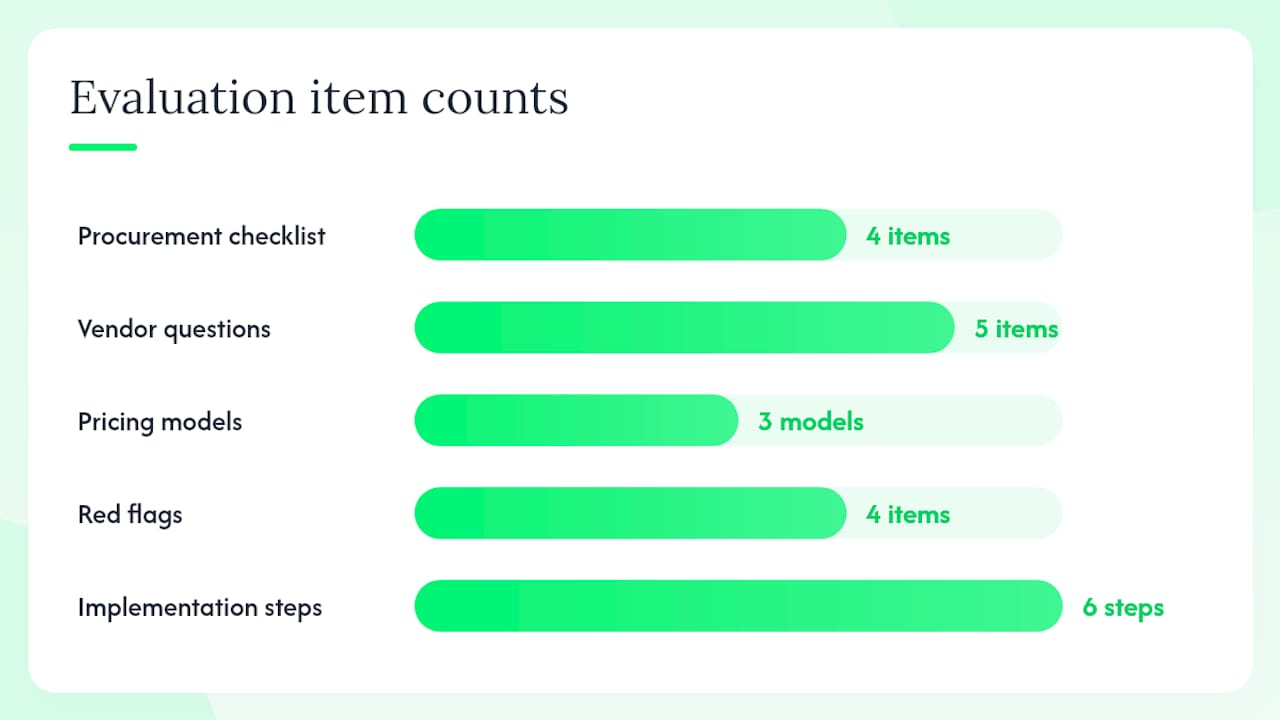
Procurement checklist:
-
Complete a baseline device audit: List every printer, its age, monthly volume, and current cost-per-page.
-
Break down volume by mono vs. colour and identify any A3 requirements.
-
Map required integrations (Active Directory, ERP, accounting system).
-
Define your data-residency and security requirements before issuing an RFP.
Questions to ask every vendor:
-
How does your platform collect telemetry: agent, embedded app, or SNMP polling?
-
What is your consumables SLA (time from low-toner alert to delivery)?
-
What are your SLA response times by fault severity, and are they contractually guaranteed?
-
How granular is your reporting: can you break down cost-per-page by user, department, and device?
-
Do you offer a trial period or a no-obligation audit before contract signing?
Pricing models explained. Cost-per-page (CPP) bundles hardware, consumables, and service into a single per-page rate. It is predictable and easy to allocate to departments, but watch for colour page surcharges and minimum volume commitments. Per-device subscription charges a flat monthly fee per device regardless of volume, which suits low-volume offices. Software-only licensing gives you the platform without hardware or consumables support, which works if you already have a hardware relationship and just need visibility.
Red flags in the Australian market:
-
Opaque billing with no itemised cost-per-page breakdown.
-
No audit or trial period offered before a multi-year contract.
-
SLAs with no financial remedy for missed response times.
-
Consumables supplied only through a single locked channel with no price transparency.
Kyocera’s 6-step MPS implementation plan is a practical template for structuring your evaluation and rollout phases.
Global Office Machines: A local managed-print option for Australian businesses
GOM (Global Office Machines) is a 100% Australian-owned company that has operated since 1996, built around on-site printer repairs and managed print services. As an authorised dealership for major hardware brands, GOM supplies, services, and manages fleets of printers, plotters, photocopiers, and multifunction devices across Australia.
What GOM brings to a printer fleet engagement:
-
Nationwide delivery of genuine and compatible toner, ink, drums, and printheads
-
Authorised dealership status, meaning hardware is sourced and serviced to manufacturer specifications
-
On-site technicians with extensive brand-specific training
-
MPS contracts covering hardware lifecycle, consumables replenishment, and service SLAs
-
A managed colour A3 device option for offices that need high-volume colour output under a managed contract
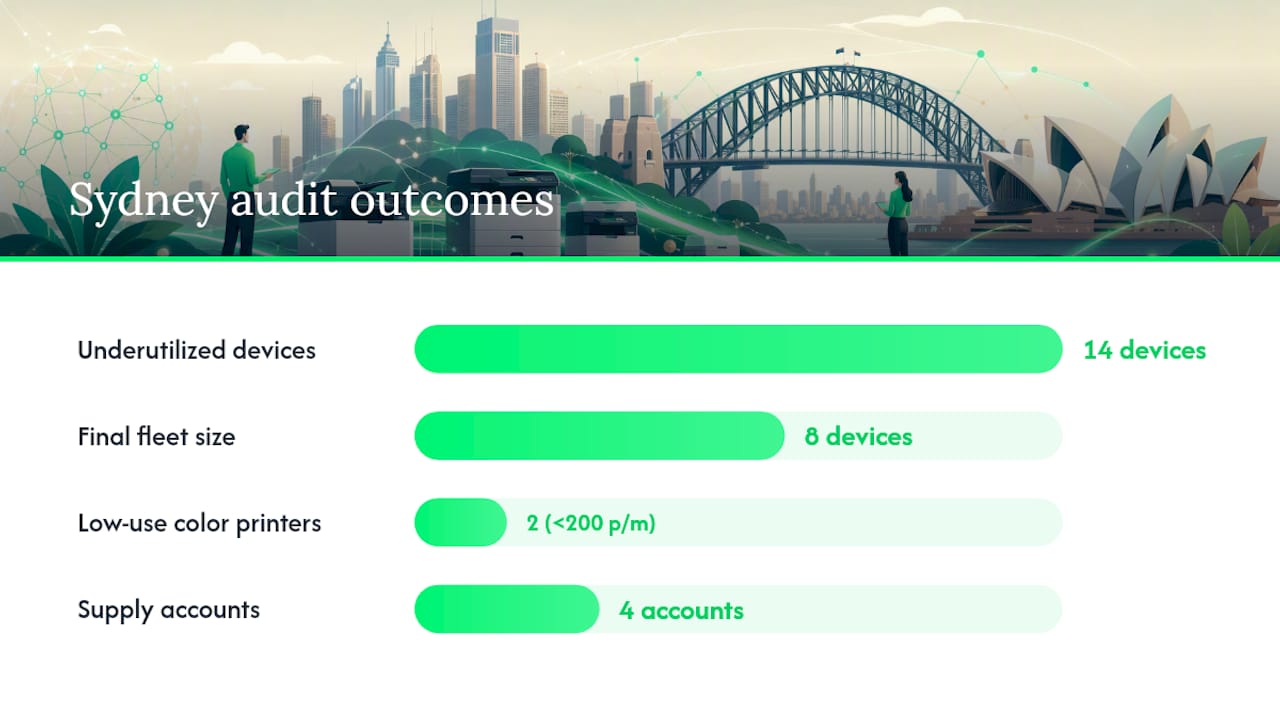
A short Australian example. A mid-sized Sydney professional services firm engaged GOM for a fleet audit. The audit identified 14 underutilised devices across three floors, two of which were colour printers generating less than 200 pages per month. GOM right-sized the fleet to eight devices, installed remote monitoring agents, and set up automated toner replenishment. The result: a single monthly invoice replacing four separate supply accounts, and device availability above 98% in the first quarter post-rollout.
Pro Tip: Start with the audit. GOM offers a no-obligation print assessment that maps your current fleet, identifies waste, and produces a cost-per-page baseline before any contract is signed. That baseline is the single most useful document you can bring into a procurement conversation.
To request an assessment or browse managed hardware options, visit shop.gom.com.au.
What should you do this week?
The verdict is straightforward: cloud-enabled printer fleet management, delivered through a local MPS provider, is the most practical path for Australian offices to control costs, maintain uptime, and meet compliance obligations.
Two actions worth taking this week:
-
Run a device audit: List every printer, its monthly volume, and its current cost-per-page. Even a spreadsheet is enough to start the conversation.
-
Book a 30–60 minute assessment with a local MPS provider. Bring your device list and your last three months of supply invoices.
Internally, involve procurement (for contract terms and billing model), IT (for network architecture and integration requirements), and facilities (for device placement and user access). Getting all three in the same room for the vendor briefing saves weeks of back-and-forth.
Key Takeaways
Effective printer fleet management requires a baseline audit, cloud-enabled remote monitoring, automated consumables replenishment, and a local service partner who can back SLAs with on-the-ground technicians.
| Point | Details |
|---|---|
| Start with a fleet audit | Map every device, its monthly volume, and cost-per-page before choosing a platform or vendor. |
| Prioritise remote monitoring | Automated meter reads and real-time alerts reduce downtime and eliminate billing disputes. |
| Automate consumables | Low-toner triggers tied to device location prevent stockouts without over-ordering. |
| Match deployment to compliance needs | Cloud-native suits most offices; on-premises or hybrid is required when data residency is mandated. |
| GOM as local MPS partner | GOM offers no-obligation fleet audits, authorised hardware, and nationwide MPS contracts for Australian businesses. |
Why local service changes the equation
The conventional wisdom in managed print is that the platform does the heavy lifting and the provider is interchangeable. After watching how Australian offices actually experience print failures, that framing misses something important.
A cloud dashboard can tell you a device is down in seconds. What it cannot do is dispatch a trained technician who knows the building, the device model, and the quirks of your network segment. That last mile is where uptime is actually won or lost, and it is where offshore or purely software-based MPS arrangements consistently fall short for Australian businesses.
Local authorised dealerships carry parts. They have technicians who have been trained on the specific hardware in your fleet, not just the generic service manual. When a fuser unit fails on a Friday afternoon before a deadline, the difference between a same-day fix and a three-day wait is almost always a function of local inventory and local presence, not platform sophistication.
GOM’s model, Australian-owned and operating since 1996 with authorised dealership status and nationwide service reach, is built around exactly that premise. The technology matters. The local technician matters more.
GOM’s managed print assessment: a concrete next step
GOM delivers managed print services built for Australian offices that need more than a software subscription. You get a no-obligation fleet audit, a cost-per-page baseline, and a clear proposal covering hardware, consumables, and service SLAs, all under one contract. Monthly billing and per-page options are available, with no requirement to replace hardware you already own.
For offices that need managed A3 colour output or a full fleet refresh, GOM’s authorised dealership status means hardware is sourced and warranted to manufacturer specifications. Consumables, including genuine toner and ink, ship nationwide with automated replenishment once your fleet is under management.
Request your no-obligation print assessment at shop.gom.com.au and bring your current device list. The audit takes under an hour and produces the cost baseline your procurement team needs to make a decision.
Useful sources and further reading
-
Optimising printer fleet management for medium-sized businesses
-
GOM Shop | Business Printers, Plotters & Office Equipment – Global Office Machines