

Duplex printing cuts paper consumption and lowers printing costs for most offices, usually by making one setting change rather than buying new hardware. The EPA’s automatic duplexing guidance puts realistic paper reductions in the 30 to 50 percent range for suitable documents, and a separate field experiment found that simply switching the printer default from single-sided to double-sided cut paper use by about 15% on average, with the effect holding for six months.
- Do this first: set duplex as the default on your network printers or main multifunction device today. It costs nothing and it is the single biggest lever most offices have.
This guide walks through the mechanics, the setup steps for Windows and macOS, a worked savings calculation you can copy with your own numbers, and when it makes sense to buy duplex-capable equipment (including refurbished options through Global Office Machines) instead of retrofitting what you already own.
Key Takeaways
Duplex printing lowers paper and printing costs mainly through one policy change, default settings, backed by measurable, lasting reductions in sheet use.
| Point | Details |
|---|---|
| Flip the default first | Setting duplex as the printer default cuts paper use by about 15% on average with no hardware spend. |
| Know your real savings range | Full duplex adoption on suitable documents can cut paper use 30 to 50%, but document mix decides where you land. |
| Count sheets, not pages | Use logical pages and your actual duplex share to avoid overestimating savings from a simple 50/50 split. |
| Toner savings are smaller | Ink and toner cost tracks page coverage, not which side it prints on, so expect most savings in paper alone. |
| Match hardware to volume | Low-volume offices should fix defaults first; medium-to-high volume offices often get better payback from a refurbished or managed multifunction device through Global Office Machines. |
Table of Contents
- What duplex printing means and the main types
- How duplex printing actually works
- How to set up duplex printing on any device
- Realistic savings: paper, postage, storage and a worked example
- Common issues and when duplex isn’t the right call
- Should you buy duplex-capable hardware? Payback and procurement
- Editorial take: what the numbers actually tell you
- Get duplex-ready hardware without the new-equipment price tag
- Frequently asked questions
What duplex printing means and the main types
Duplex printing is simply printing on both sides of a sheet of paper instead of one. The opposite, printing on one side only, is called simplex.
There are two ways to get there:
- Automatic duplexing — the printer or a multifunction device has a built-in duplex unit that flips the sheet internally, so a two-sided job runs without the operator touching the paper tray.
- Manual duplexing — the printer sends odd pages first, the operator reinserts the stack, and the even pages print on the reverse. Slower, but it works on devices without a duplex unit.
Two terms matter for estimating savings accurately: a logical page is one side of content, while a sheet is the physical piece of paper. A 100-page document at 50% duplex share uses 75 sheets, not 50, because half the pages still print single sided. Getting this distinction right is the difference between a realistic savings estimate and an inflated one.
Most modern laser multifunction devices from brands like HP and Epson ship with duplex built in, or offer it as an add-on unit. Global Office Machines stocks both new and refurbished duplex-capable devices for businesses that want the feature without paying for a brand-new unit.
How duplex printing actually works
An automatic duplex unit uses a second paper path inside the printer. Once the first side prints, rollers pull the sheet back through, flip it, and feed it past the print head again for the reverse side. There’s no operator involvement beyond loading the tray and hitting print.
Manual duplexing skips that mechanism entirely. The print driver sends every second page (or a prompt tells you to flip the stack), and you feed the paper back in by hand, matching the correct orientation so page two lands on the back of page one, not upside down.
- Print speed can drop slightly on automatic duplex jobs because of the extra paper path, though this is minor on most business-grade devices.
- Energy use is a common worry, but HP’s own guidance notes the penalty on modern printers is negligible, and paper savings dwarf any difference in power draw.
- Orientation matters more than people expect: for portrait documents, “flip on long edge” keeps text right-side up on both sides; landscape documents usually need “flip on short edge.” Get this wrong and you’ll produce a stack of upside-down backs.
- Most laser MFDs and many business inkjets support automatic duplex out of the box; if yours doesn’t, an add-on duplex unit is often available for the same model.
Pro Tip: Print a three-page test file before rolling out a duplex default across a whole floor. It takes thirty seconds and catches orientation mistakes before they burn through a ream of paper.
How to set up duplex printing on any device
Turning duplex on takes a couple of minutes per computer, and pushing it as the default for a whole office takes a bit more planning — learn more about high-impact print design for modern brands to optimize your print layouts and settings. Here’s how to handle both.
Windows, one-off job:
- Open the document and go to Print.
- Click Printer Properties or Preferences.
- Find the Finishing or Layout tab and select “Print on Both Sides” or “Duplex.”
- Choose “Flip on Long Edge” for portrait documents, “Flip on Short Edge” for landscape.
- Print as normal.
Windows, changing the default:
- Go to Settings > Devices > Printers & Scanners.
- Select the printer and click Printer Properties.
- Open the Device Settings or Advanced tab and set duplex as the default print mode.
- Apply and close. Every job from that machine now prints double-sided unless someone overrides it.
macOS, one-off job and saved preset:
- Open Print, then click “Show Details” if the dialog is collapsed.
- Select “Two-Sided” from the layout options (long edge or short edge binding).
- Click the Presets dropdown and choose “Save Current Settings as Preset.”
- Name it “Duplex Default” so anyone in the office can select it in one click.
No automatic duplex unit? Print the odd pages first, note which way the sheets sit in the tray, then reload the stack and print the even pages. Test with a two-page file first so you know which orientation the tray needs.
For a whole fleet, don’t rely on individual staff remembering to tick a box. Push duplex as the default through your print server, Group Policy, or MDM platform, and set the walk-up default on the multifunction device’s own control panel — that catches guest users and anyone printing from a phone or tablet.
Pro Tip: A one-line email plus a small sticky note on the printer (“This machine now prints double-sided by default”) does more for adoption than any policy document. People need to know the change happened before they’ll stop hunting for the old setting.
Realistic savings: paper, postage, storage and a worked example
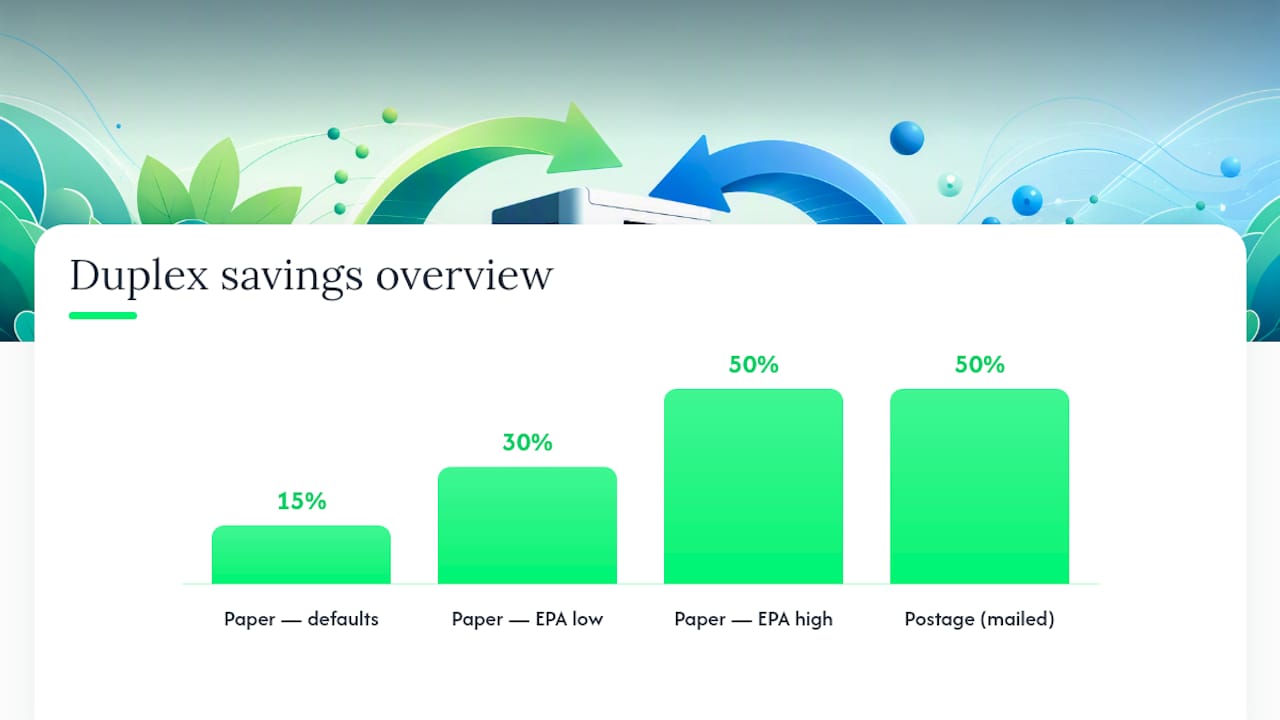
The EPA’s benchmark puts paper reductions from full duplex adoption at 30 to 50 percent for documents suited to double-sided printing. That’s a wide range because it depends entirely on document mix. A defaults-only change, without any other intervention, produced a measured 15% drop in paper consumption that held steady for six months. The gap between those two figures is the gap between flipping a switch and actively managing which documents print duplex.
Here’s a simple calculation you can run with your own numbers:
- Take your monthly print volume in impressions (check your device’s usage report or MPS billing).
- Estimate your realistic duplex adoption rate. Post-default-change offices typically land around 60 to 70 percent duplex share, not 100%, because some documents genuinely need to stay single-sided.
- Multiply monthly impressions by your duplex share, divide by two, and add the remaining simplex impressions to get sheets used per month.
- Multiply the sheets saved by your cost per sheet (paper plus a share of toner and depreciation) to get monthly dollar savings, then annualise it.
An office running 20,000 impressions a month at a moderate duplex share saves a substantial number of sheets monthly compared with printing everything single-sided, at a cost per sheet that usually runs a few cents once paper and consumables are counted together.
A few things shift that number in practice:
- Document mix — single-page forms, signed contracts and courier labels resist duplexing; multi-page reports and internal memos don’t.
- Postage and storage — half the paper thickness means half the postage weight on mailed documents and less physical filing space, a saving that rarely shows up in a pure paper-cost calculation.
- Toner is a smaller lever than paper. Toner and ink usage depends on ink coverage per page, not on which side of the sheet it lands on, so duplexing barely touches consumables cost even though it can roughly halve sheet count.
Common issues and when duplex isn’t the right call
Duplex printing runs into a handful of predictable problems, most of which are quick to fix once you know what to look for.
- Paper jams — often caused by paper that’s too heavy or too light for the duplex unit’s rated range; check your device’s spec sheet against the stock you’re loading.
- Margins shifting or text bleeding through — usually a calibration issue, or paper stock that’s too thin for the ink or toner load on both sides.
- Dense images looking washed out on the reverse — heavy graphics or photo-quality output sometimes needs a lower resolution setting when duplexed.
- Single-page legal documents, signed originals, and sticky label sheets — skip duplex entirely here. These need to stay single-sided, or duplexing simply isn’t physically possible.
Pro Tip: Run a short test batch on any new document type and jot down the page order before committing a whole print run. It’s a five-minute habit that saves a full ream when a booklet job comes out in the wrong sequence.
Should you buy duplex-capable hardware? Payback and procurement
If your current printer already handles automatic duplex, the answer is simple: change the default and you’re done. The harder question is what to do when it doesn’t.
A basic payback formula: divide the cost of a duplex-capable device or add-on duplex unit by your expected monthly sheet savings in dollars. If a duplex unit costs $400 and duplexing saves you $50 a month in paper, that’s an eight-month payback. Industry guidance on duplexing unit economics shows this payback shortens fast on devices running near their rated monthly volume, and stretches out on lightly used printers, where the unit may never fully pay for itself.
Procurement options, in order of typical capital outlay:
- Enable defaults on existing hardware — zero cost, the highest-leverage move for any office with duplex already built in.
- Fit an add-on duplex unit to an existing device, where the model supports one.
- Buy refurbished through a program like GOM’s Green+ refurbished range, which gets duplex-capable devices at a fraction of new pricing.
- Buy new or move to managed print services for high-volume offices, where a device like the HP LaserJet M5035x or an enterprise MFD handles duplex natively at scale.
The decision comes down to volume and device lifecycle. Low-volume offices should focus on defaults and staff behaviour before spending a cent. Medium to high-volume offices generally get the best return from a refurbished or managed multifunction device. Very high-volume operations, printing tens of thousands of pages monthly, usually justify a new enterprise-grade device or a full managed print services arrangement.
Editorial take: what the numbers actually tell you
Most advice on this topic jumps straight to buying new hardware. That’s backwards. The 15% saving from a default change alone shows the cheapest win is sitting in your print driver settings right now, not in a procurement budget.
Where the conventional advice falls down is treating the EPA’s 30 to 50 percent range as guaranteed. It isn’t. That figure assumes most of your document mix is duplex-friendly, and plenty of offices run a heavier share of single-page forms and signed originals than they realise. Run the sheet math on your own volume before you promise finance a specific dollar figure.
Prioritise in this order: flip the default, measure the actual sheet drop after a month, then decide whether hardware spend is even necessary. Most offices find the answer is no, at least until volume or device age forces the question.
Get duplex-ready hardware without the new-equipment price tag
Global Office Machines gives cost-conscious offices a way to get duplex-capable equipment without committing to full retail pricing, through refurbished devices, new multifunction printers, and the consumables that keep them running.
If your current printer can’t duplex at all, or it’s ageing out and jamming on double-sided jobs, browsing the GOM shop shows both new and Green+ refurbished multifunction devices built for offices making the switch. For teams already running duplex and just needing to keep ink and toner stocked, GOM also delivers genuine consumables like HP 975A Black Ink direct to your door. Check the refurbished range or request a quote on a duplex-capable multifunction device before your next print budget review.
Frequently asked questions
Does duplex printing really save money, or just paper? Both. Fewer sheets means lower paper spend directly, plus secondary savings on postage weight and physical filing and storage space, though toner costs barely change since they depend on page coverage rather than sides printed.
What’s a realistic duplex printing savings figure to tell my finance team? Expect roughly 15% from a default change alone, rising toward the EPA’s 30 to 50 percent range if most of your documents suit double-sided printing. Run the sheet-count formula on your own volume rather than quoting either figure blind.
Do I need to buy a new printer to get duplex printing savings? Not necessarily. Many laser multifunction devices already have a duplex unit built in and just need the setting changed. If yours doesn’t, a refurbished duplex-capable device is often cheaper than fitting an add-on unit to an older printer.
Which documents should stay single-sided? Signed legal originals, courier and shipping labels, and heavy coated stock generally shouldn’t be duplexed. Multi-page internal reports, memos and drafts are the easiest wins.