

Rules-based printing lets a print system automatically apply settings (duplex, greyscale, routing) based on conditions you define, like job size, user, or department, without anyone lifting a finger. The single biggest reason to adopt it is cost control: colour, oversized, and abandoned jobs quietly drain office budgets, and rules stop them before they hit paper. It also tightens security by keeping sensitive documents off the output tray until the right person shows up to collect them.
TL;DR:
- Implementing default duplex settings can significantly reduce paper usage across all print jobs without disrupting workflow.
- Routing large or color jobs to more economical devices prevents unnecessary expenses and lowers environmental impact.
- Soft prompts and confirmation dialogs help curb wasteful printing, but hard blocks are necessary for policy violations, like unauthorized color use.
- Rules-based printing enhances security by requiring user authentication before documents are released, protecting sensitive information.
- Starting with simple, widely accepted rules like duplex and routing ensures smoother adoption and quicker cost savings.
Table of Contents
- What is rules-based printing and how does it work?
- What rules should you set up first?
- What are the real cost, security, and sustainability benefits?
- How do you roll out rules-based printing without a revolt?
- What features should print management software actually have?
- What are the privacy and security obligations to know?
- How does Global Office Machines support print rule projects?
- What most teams get wrong when they start
- Ready to set up rules-based printing in your office?
- FAQ
What is rules-based printing and how does it work?
Rules-based printing runs on a trigger–condition–action model. A print job (the trigger) gets checked against conditions you set, then an action fires automatically if those conditions match. This structure comes straight from how trigger-action rule systems are built more broadly: define the criteria, define the response, let the system handle the rest.
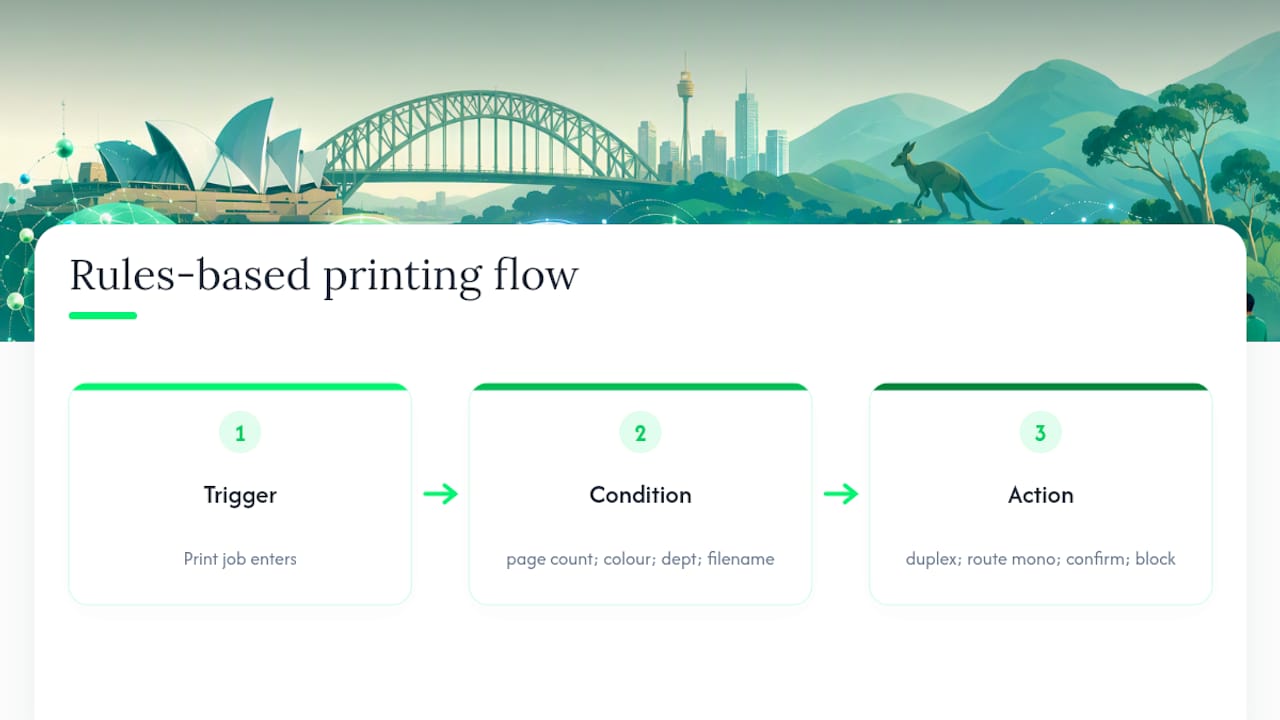
Say a 40-page PowerPoint lands in the print queue from the marketing team. The condition might be “file size over 20 pages AND colour AND department = marketing.” The action could be “force duplex and prompt the user to confirm colour before releasing.”
Common conditions include the application used, file size, requesting user or department, and even filename patterns (a rule that flags anything containing “DRAFT” for monochrome, for instance). Typical actions range from simple routing (send large jobs to a cheaper mono device) to changing settings automatically (force duplex, downgrade to greyscale) to harder interventions like popping up a confirmation dialog or blocking the job outright. The system supports well over 70 conditional attributes in some enterprise platforms, which is more granularity than most offices will ever need, but it means almost any print behaviour can be shaped without touching a single device manually.
What rules should you set up first?
Start with the rules that touch the most jobs, not the most dramatic ones. A handful of well-chosen defaults will catch the bulk of wasteful printing before you need anything clever.
- Default duplex for all jobs — halves paper use on multi-page documents without anyone noticing.
- Force greyscale for internal documents — reserve colour for client-facing material only.
- Route jobs over 20 pages to a designated mono device — keeps bulk printing off expensive colour units.
- Block colour printing from specific departments — useful for back-office teams with no genuine colour need.
- Prompt confirmation for larger print jobs — a simple pop-up asking “are you sure?” cuts accidental reprints.
- Restrict mobile and guest printing to designated release stations — stops walk-up devices being flooded by BYOD traffic.
- Cap personal print quotas per user or department — supports chargeback and highlights outliers early.
- Redirect large-format jobs to plotters, not standard MFDs — avoids jammed trays and wasted stock.
Use soft nudges (a cost pop-up, a confirmation prompt) for behaviour you want to discourage without banning outright. Save hard blocks for genuine policy breaches, like colour printing from a department that has none. One finance team we’ve seen described in industry case studies applied duplex-by-default plus a colour confirmation prompt and watched colour volume drop within the first billing cycle, simply because staff saw the cost before hitting print. A legal team, by contrast, needed a hard block on colour for a specific matter-management system because staff kept overriding soft prompts out of habit.
What are the real cost, security, and sustainability benefits?
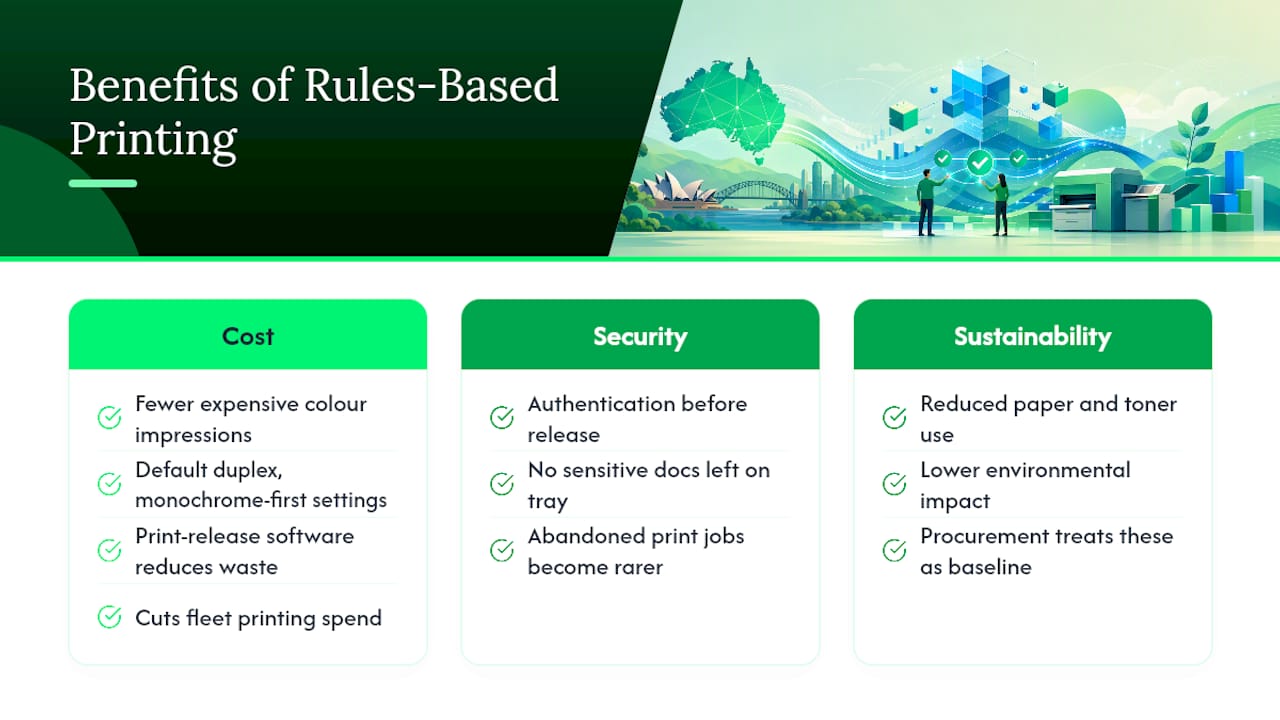
Cost is where rules-based printing earns its keep fastest, as explained in Property Marketing Should Start With the Entire Campaign, Not Just the Photos, which highlights the benefits of reducing unnecessary printed marketing collateral. Colour impressions cost considerably more than mono ones, and the Better Printing Guide points to default duplex, monochrome-first settings, and print release software as the combination most likely to cut both spend and environmental impact across a fleet. Abandoned print jobs, the ones left sitting in the tray because someone walked away, also become far rarer once secure release requires authentication before anything comes out.
Security improves for the same reason. A document containing payroll data or a client contract no longer sits exposed on a shared tray; it only prints once the right person authenticates at the device. Sustainability follows naturally from reduced paper and toner use, and government procurement guidance increasingly treats these settings as baseline expectations rather than optional extras.
How do you roll out rules-based printing without a revolt?
Get the right people in the room before you touch a single device setting. IT owns the technical deployment, procurement understands whole-of-life device costs, security needs visibility into what’s being restricted and why, and business unit champions will tell you which rules will cause genuine workflow problems before you find out the hard way.
- Assess the current fleet and print behaviour. Pull baseline reports on colour ratio, total impressions, and device costs before changing anything.
- Run a small pilot. A handful of devices across two or three departments over four to eight weeks usually surfaces edge cases, like a design team that legitimately needs colour, without disrupting the whole office.
- Refine rules based on pilot feedback. Expect to loosen a few restrictions and tighten others once real usage data comes in.
- Deploy fleet-wide with clear communication. Posters near devices, pop-up explanations at the point of printing, and a short training session go a long way toward preventing complaints.
- Measure against KPIs monthly. Track colour-to-mono ratio, total impressions, and abandoned job rate, then set realistic improvement targets for each.
Pro Tip: Don’t launch every rule at once. Start with duplex and routing, which nobody objects to, then introduce colour restrictions once staff are used to the system flagging jobs before they print.
Procurement teams evaluating vendor proposals should ask about whole-of-life costs, not just device price. Government contracts covering print and imaging services consistently weigh click rates and reporting capability alongside upfront hardware cost, which is a useful benchmark for private-sector procurement too.
What features should print management software actually have?
Vendor demos tend to focus on flashy dashboards. The features that matter are narrower and more practical.
- Conditional logic depth — can it act on user, department, file type, size, and time of day, or just one or two attributes?
- Secure release / follow-me printing — authentication via PIN, card, or mobile app before a job releases to any device.
- Directory and SSO integration — a clunky login screen is often the reason staff abandon secure release entirely.
- Reporting and chargeback accuracy — can costs be attributed to the right cost centre without manual reconciliation?
- Device scripting and duplex enforcement — settings should apply automatically across the fleet, not device by device.
For a small office of under 20 users, secure release and basic reporting will cover most needs. Larger fleets with multiple departments and cost centres need chargeback accuracy and directory integration to matter far more, since manual tracking simply doesn’t scale.
What are the privacy and security obligations to know?
Under the Australian Privacy Principles, APP 11 requires reasonable steps to protect personal information from unauthorised access. Secure release directly supports this by keeping jobs off the tray until the right person is standing at the device. For high-security environments, the ISM guidelines cover sanitising drums and cartridges, and destroying components that can’t be sanitised, when decommissioning devices that have handled sensitive material.
How does Global Office Machines support print rule projects?
Global Office Machines operates in multiple Australian states as an authorised dealer for several major printer brands, providing a broad hardware base for fleet projects. A typical engagement starts with a fleet assessment, moves into a small pilot to test rules against real usage, then scales into a managed rollout with ongoing consumables support.
What most teams get wrong when they start
Most rollouts fail for a boring reason: someone gets excited and turns on every restriction in week one. Staff hit a wall of blocked colour jobs and confirmation prompts before they understand why, and the whole project gets a reputation as an annoyance rather than a cost-saving measure.
The better approach treats rules as reversible controls, not permanent policy. Launch narrow, measure what actually happens, loosen what’s causing friction, tighten what’s genuinely being abused, and communicate every change before it lands. A rule that seemed obviously correct on a spreadsheet often needs adjusting once real people start hitting it.
— Matthew
Ready to set up rules-based printing in your office?
Global Office Machines is the practical alternative to a piecemeal software-only rollout: instead of bolting print rules onto a fleet nobody’s assessed, you get an assessment, a pilot, and a managed rollout backed by genuine hardware and consumables support in one place.
That matters because rules only work as well as the devices running them; an ageing fleet with inconsistent firmware will fight your conditional logic every step of the way. Global Office Machines offers Managed Print Services covering assessments, pilots, and ongoing consumables management, alongside sales of printers and multifunction printers built to handle enforced duplex and secure release without constant maintenance calls. Whether you’re replacing a handful of ageing units or building rules across a full fleet, browse the Global Office Machines shop to request a quote or start scoping your pilot today.
FAQ
What are the main types of printing methods?
Office environments generally rely on laser and inkjet printing for standard documents, with large-format inkjet plotters used for technical and design work. Beyond these, dedicated methods like thermal label printing and dye-sublimation exist for specialised outputs, though most business printing falls into laser or inkjet categories.
What stops a document from printing?
Print jobs commonly fail due to driver mismatches, network connectivity issues, or a rules-based system blocking the job under a policy condition, such as a colour restriction or oversized file trigger. Checking the print queue and any active print management rules usually identifies the cause quickly.
Is the printing industry in decline?
Traditional high-volume commercial printing has shrunk as digital communication has grown, but business and office printing remains a steady operational need, particularly for compliance documents, technical drawings, and client-facing material. Demand has shifted toward smarter, rules-managed printing rather than disappearing altogether.
What are the five main printing methods used in offices?
The most common methods are laser printing, inkjet printing, large-format plotting, thermal label printing, and dye-sublimation for specialised colour output. Most office fleets rely primarily on laser and inkjet devices, with plotters reserved for technical and design teams.
How much can rules-based printing actually save?
Savings vary by fleet size and current habits, but government guidance in the Better Printing Guide points to default duplex and monochrome settings as the fastest route to meaningful cost reduction. Current pricing for devices and managed print services from Global Office Machines is available on request through the Global Office Machines shop.