

A workable printer maintenance schedule runs on five tiers: daily checks (paper, jams, error lights), weekly test pages and roller inspections, monthly cleaning cycles and firmware checks, quarterly professional servicing for heavy-use machines, and annual servicing for light-use devices. Frequencies scale up with page volume, and none of it sticks without one named owner and a shared maintenance log
TL;DR:
- Monthly professional servicing is recommended for printers printing over 5,000 pages each month, with quarterly visits for moderate use and annual servicing for light-use devices.
- Daily checks, including paper levels, jams, and error lights, should be performed by staff, while weekly roller cleaning and test pages help catch quality issues early.
- Keeping a shared maintenance log and assigning clear ownership for scheduled tasks significantly improves adherence and prevents overlooked problems.
- Stocking critical parts like fusers, transfer belts, and maintenance boxes ensures quick response to potential failures and reduces downtime.
- Escalate recurring jams, sensor errors, or signs of internal failure immediately to a technician, especially for devices with high monthly page counts or safety concerns.
Table of Contents
- What is a printer maintenance schedule and why tiers matter
- What daily printer checks catch before they become jams
- How often should you run test pages and clean feed rollers?
- What should monthly printer maintenance include?
- How often should a technician service your printers?
- How do you build a maintenance schedule that people actually follow?
- Which consumables and parts should you keep in stock?
- When should you stop troubleshooting and call a technician?
- Who backs this schedule: Global Office Machines’ role in keeping it running
- Why the single owner matters more than the schedule itself
- Stock up and book your next service with Global Office Machines
What is a printer maintenance schedule and why tiers matter
A printer maintenance schedule is simply a recurring set of checks and cleaning tasks, grouped by how often they need doing, that keeps a machine running at its rated speed and page yield instead of degrading toward the next breakdown. The tiered model beats a single “clean it when it plays up” habit because different failure points surface on different timelines. Dust builds up daily. Rollers wear weekly. Firmware drifts monthly. Fusers and belts fatigue over months of heavy cycling. Manufacturer guidance backs this staged approach: daily exterior checks, weekly test prints, monthly internal inspection, and professional servicing pegged to how hard the device works.
For an office manager juggling a fleet of five to fifteen machines, the tiered structure also solves a practical problem: it turns an abstract obligation (“look after the printers”) into specific, delegable tasks with a clear cadence. That is the difference between a schedule that exists on paper and one that a receptionist or admin assistant actually runs through each morning.
What daily printer checks catch before they become jams
Daily checks take under five minutes and stop the faults that cause most walk-up complaints. Staff nearest the machine, not IT, should own this tier.
- Check paper levels and confirm trays are seated and aligned correctly.
- Clear any visible jams, torn paper fragments, or debris from trays and output bins.
- Scan the control panel for error lights and check for stuck jobs in the queue.
- Print a quick test page if the previous job looked faded, streaked, or skewed.
- Wipe exterior panels and touchscreens with a lint-free cloth, never a wet one.
- Log the check, even briefly: date, initials, and a one-line note if anything was off.
Recurring faults, the same jam three days running or a warning light that won’t clear, should escalate straight to the weekly review rather than getting cleared and forgotten.
Pro Tip: Keep a small laminated checklist taped inside the printer’s paper drawer. Staff glance at it without needing to ask “what am I meant to check again?”
How often should you run test pages and clean feed rollers?
Weekly maintenance is where quality problems and mechanical wear get caught while they’re still cheap to fix.
- Run a test page and check output quality: even colour saturation, sharp text edges, no streaking or banding.
- Open the paper path and clean feed rollers with compressed air or a lint-free cloth; grime here causes most weekly jams.
- Check toner and ink levels against your reorder threshold and place orders before stock hits zero.
- Review device logs for recurring warnings (paper sensor faults, low-toner alerts that won’t clear) and network connectivity drops.
This tier matches what office-level maintenance checklists recommend for keeping print quality consistent between the bigger monthly service.
What should monthly printer maintenance include?
Monthly work goes past what a receptionist can do in a coffee break, but still sits within reach of anyone comfortable opening a printer’s access panels.
- Run full cleaning cycles and nozzle checks on inkjet devices; on laser units, clean the corona wire where the model allows it.
- Inspect drum units and fuser areas for wear, and clean the scanner glass on multifunction devices.
- Check for available firmware and driver updates. Stage the update on a single test device first, and note the rollback steps before pushing it fleet-wide, a habit that prevents a faulty update from taking out every printer on the floor at once.
- Replace maintenance boxes or other small service items flagged as due, rather than waiting for a hard stop error.
Monthly is also the natural point to reconcile your consumables stock against what’s actually been used, so reordering doesn’t become a last-minute scramble.
How often should a technician service your printers?
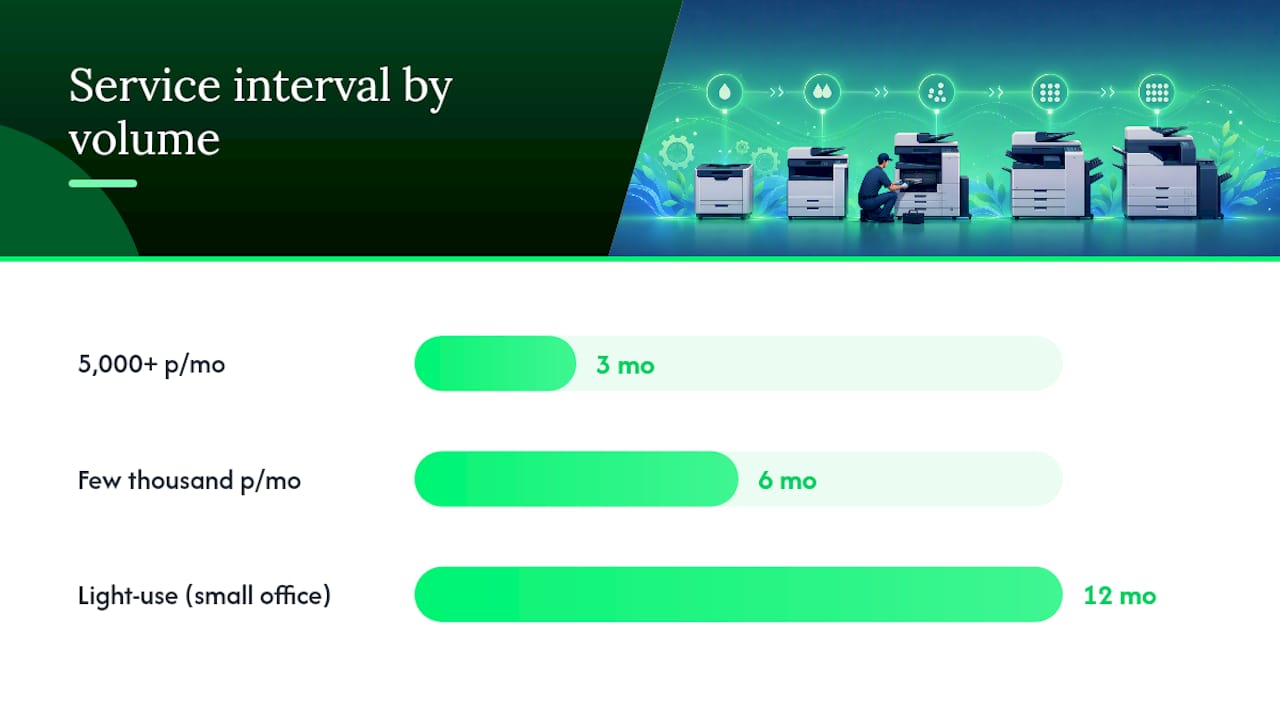
Professional servicing frequency tracks monthly page volume, not the calendar. Devices printing 5,000+ pages a month need a technician roughly every three months. Moderate-use machines, a few thousand pages monthly, do well on a six-monthly cycle. Light-use printers in a small office can often stretch to an annual visit.
A technician’s visit typically covers:
- Deep internal cleaning beyond what staff can safely reach.
- Fuser and transfer belt inspection, plus calibration for colour and alignment.
- Replacement of parts nearing end-of-life before they fail mid-job.
The trade-off that matters: a scheduled service call costs a fraction of an emergency callout, and it avoids the downtime of a machine dying mid print run during a client deadline. Factoring service cadence into your printer’s total cost of ownership makes the annual servicing spend look like the cheaper option it actually is.
Before booking, have the serial number, an error log, and a summary of recent in-house maintenance ready. It cuts diagnosis time significantly.
How do you build a maintenance schedule that people actually follow?
- Set frequency per machine. Match each printer’s tier (daily/weekly/monthly/quarterly/annual) to its role and average monthly page count, not a blanket rule for the whole fleet.
- Put it on a shared calendar. Recurring events beat sticky notes. Assign a primary and a backup person to each recurring task so a sick day doesn’t mean a skipped week.
- Run one maintenance log. A single spreadsheet or shared doc with five fields: date, device, task, person, note. That’s it. Complexity is what kills adherence.
- Review quarterly against simple metrics. Track callout frequency and downtime. If callouts drop after three months, the schedule is working.
Pro Tip: Resist the urge to build an elaborate tracking system. A five-column log that takes ten seconds to fill in gets used. A twenty-field form gets ignored by week two.
If you’re managing more than a handful of devices, a structured approach to printer fleet management makes scaling this from one printer to fifteen far less painful.
Which consumables and parts should you keep in stock?
Toner and ink cartridges get the attention; the parts that actually cause unplanned downtime are the smaller ones. Track drum units, fusers, transfer belts, and maintenance boxes with the same discipline you apply to toner.
- Keep one spare of critical consumables for any device your business can’t function without.
- For a central fleet printer serving the whole office, hold two or more spares given the higher usage volume.
- Wide-format and inkjet devices often use a dedicated maintenance box for waste ink; the Epson T502 and Epson T512 maintenance boxes are common examples worth having on the shelf before the “maintenance box full” warning appears mid-job.
- On firmware, stage every update on one machine first and record how to roll it back if something breaks.
When should you stop troubleshooting and call a technician?
Some symptoms are worth escalating immediately rather than attempting a third DIY fix.
- Jams that recur straight after cleaning, or sensor errors that won’t clear.
- Unusual smells, grinding noises, or anything that suggests an internal part is failing.
- Devices running 5,000+ pages a month with repeated part failures, a sign the usage tier has outgrown the current service plan.
- Any electrical fault, smoke, or safety concern. Stop immediately and call an authorised technician.
Before the visit, gather the device’s model and serial number, recent error logs, and your maintenance log entries for the past month. It turns a guessing exercise into a five-minute diagnosis.
Who backs this schedule: Global Office Machines’ role in keeping it running
Global Office Machines is an Australian B2B office equipment dealership and service provider with a national footprint across NSW, VIC, QLD, WA and SA, built specifically around the full equipment lifecycle rather than a single sale. That means the consumables, spare parts, and technician visits this schedule depends on come from one place instead of three.
Beyond sales, Global Office Machines runs managed print services, break-fix repairs, and maintenance box and spare parts delivery, the practical backbone that turns a maintenance schedule from a document into something that keeps running. For businesses trying to control print spend while sticking to a service cadence, that operational depth is what separates a schedule you can actually execute from one that looks good in a policy document.
Why the single owner matters more than the schedule itself
The schedule you choose matters less than who’s accountable for running it. I’ve seen well-designed maintenance plans fail for one reason: everyone assumed someone else would do the daily check. Assign one named owner per device, with a backup, and keep the log dead simple. Adapt the tiers to your own volume, and if a machine needs professional attention, get a tailored service plan rather than guessing.
Stock up and book your next service with Global Office Machines
Global Office Machines gets you the exact consumables this schedule calls for without hunting across three suppliers. You can order HP #955 Yellow Ink, HP #975A Black Ink, or an Epson T502 maintenance box for next-business-day delivery, and book a technician for your quarterly or annual service through the same team that supplied the machine.
If your fleet has outgrown light-use servicing, or a machine keeps hitting the same fault your daily checklist can’t fix, request a service quote through Shop and get a maintenance plan matched to your actual monthly page volume, not a generic annual default.