

A printer duty cycle is the manufacturer’s rated maximum number of pages the device can produce in a single month. Think of it as a technical ceiling, not a daily operating target. The single most useful thing you can do with that number is compare it to your actual monthly page count, then check the printer’s recommended monthly print volume (RMV) — the figure that tells you how hard you can push the machine day-to-day without shortening its life.
Two numbers matter on every spec sheet:
-
Duty cycle: The upper limit, derived from lab stress testing.
-
Recommended monthly print volume (RMV): The sustainable operating range the manufacturer actually intends for regular use.
The gap between them is wider than most buyers expect. A printer rated at 50,000 pages/month duty cycle might carry an RMV of just 3,000–5,000 pages/month. Size to the RMV, not the duty cycle.
Key Takeaways
The RMV, not the duty cycle, is the number that determines whether a printer survives its intended lifespan in your office.
| Point | Details |
|---|---|
| Duty cycle is a ceiling | It is the manufacturer’s lab-tested maximum, not a sustainable daily target. |
| Use RMV for sizing | RMV typically sits at 5–20% of the duty cycle; size your purchase to RMV, not the headline figure. |
| Measure before you buy | Pull page-counter data and identify your peak month before selecting a device. |
| Add a growth margin | Apply at least a 15–20% growth factor to your peak volume when calculating the RMV you need. |
| GOM for audits and supply | GOM provides fleet audits, correctly sized hardware, genuine consumables, and on-site service across Australia. |
Table of Contents
-
Duty cycle vs. recommended monthly print volume: which number should you use?
-
Maintenance practices that protect your printer from workload damage
-
GOM helps you size, supply, and service your print fleet correctly
What does a printer’s duty cycle actually measure?
Manufacturers publish duty cycle as the maximum pages a device can produce per month after controlled stress testing under idealised lab conditions. The number reflects the machine’s physical limits — motor cycles, fuser heat cycles, paper-feed mechanisms — pushed to their rated edge in a clean, climate-controlled environment.
The catch: there is no single industry standard for how manufacturers run those tests. One vendor might run continuous single-page jobs on standard 80gsm paper at 20°C. Another might use a different coverage percentage or paper weight. That means duty-cycle figures across brands are not directly comparable — a 30,000-page rating from one manufacturer does not equal a 30,000-page rating from another.
On a spec sheet, duty cycle usually appears under “Specifications” or “Technical Details,” labelled as “Monthly Duty Cycle” or “Maximum Monthly Print Volume.” The RMV, when listed, typically sits nearby as “Recommended Monthly Print Volume” or similar phrasing.
Pro Tip: When procuring for a business, ask the vendor to confirm the RMV in writing, not just the duty cycle. If they can only quote the duty cycle, that is a signal to dig deeper into the datasheet or contact the manufacturer’s technical line directly.
Duty cycle vs. recommended monthly print volume: Which number should you use?
The RMV is the number that actually governs your day-to-day decisions. Ricoh’s procurement guidance frames it clearly: RMV represents the pages the manufacturer considers safe for regular use, while the duty cycle is the outer boundary the machine can theoretically reach under ideal conditions.
A practical rule of thumb is that the RMV often sits at a small fraction of the duty cycle, indicating a recommended operating range much lower than the maximum. That gap exists because manufacturers build in headroom for component wear, varying paper types, high-coverage print jobs, and real-world environmental conditions that lab tests do not replicate.
| Printer class | Typical duty cycle | Typical RMV | RMV as % of duty cycle |
|---|---|---|---|
| Home inkjet | 3,000 pages/month | 100 pages/month | ~10% |
| Small-office laser | 3,000–10,000 pages/month | 500 pages/month | ~10–15% |
| Mid-range business MFP | 20,000–50,000 pages/month | 2,000–6,000 pages/month | about 10–15% |
| Production/plotter | 100,000+ pages/month | 10,000–30,000 pages/month | ~10–15% |
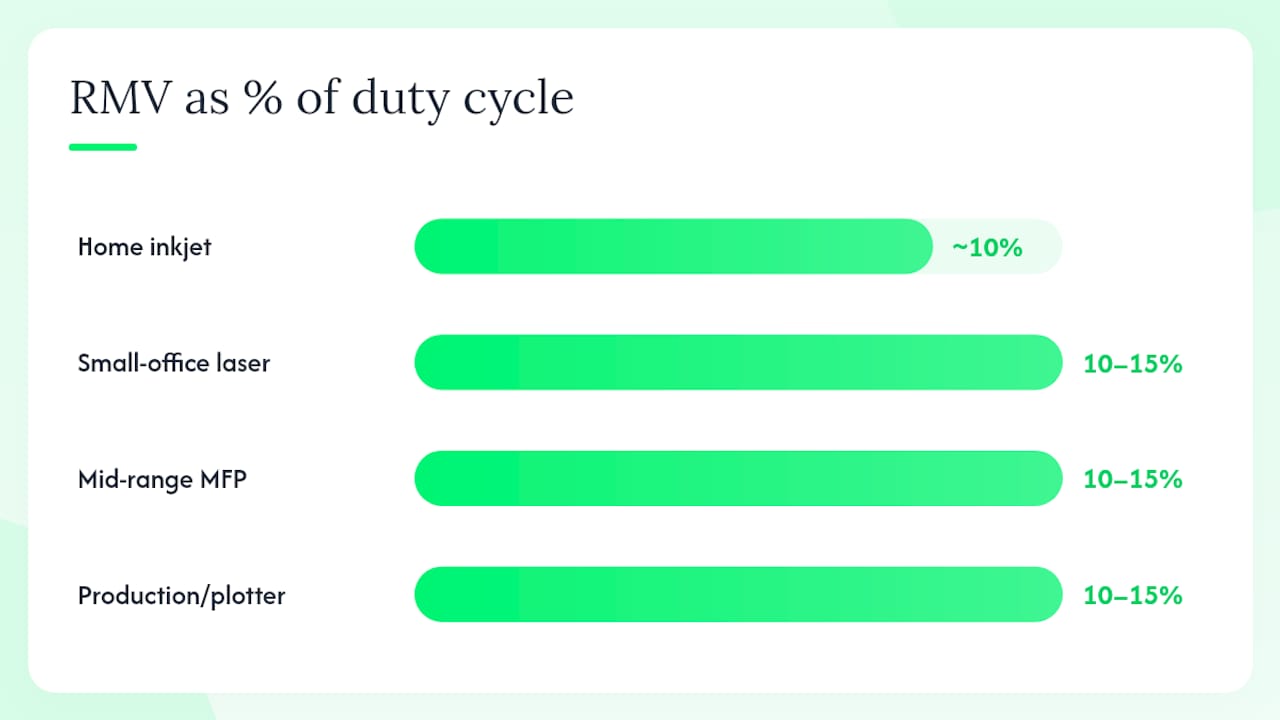
For procurement decisions, always size to the RMV. Choosing a printer whose RMV comfortably covers your actual monthly volume — with room to grow — protects both the hardware and any service warranty. Relying on the duty cycle as a target is the single most common mistake in office printer procurement.
What happens when you regularly exceed the duty cycle?
Pushing a printer past its duty cycle is not a one-time event with a clean recovery. The damage accumulates.
-
Accelerated consumable wear: Fusers, drums, and feed rollers degrade faster than their rated replacement intervals. You end up replacing them more often, at higher cost.
-
More frequent service calls: Overworked mechanisms jam, misalign, and fail. A machine running at 150% of its duty cycle can generate service calls at two to three times the normal rate.
-
Increased downtime: Every unplanned repair means staff waiting; in a busy office, that has a real productivity cost.
-
Warranty and service contract risk: Most manufacturer warranties and managed print service agreements include usage clauses. If a technician’s diagnostic shows the machine has been run well above its rated limits, repair costs may fall back on you.
The RICOH 132 MF is a good example of a device where the published duty cycle and RMV diverge significantly — exceeding the RMV consistently on a machine like this accelerates fuser wear in particular, because the fuser assembly is sized for the rated sustainable volume, not the theoretical maximum.
Pro Tip: Check your printer’s internal page counter monthly. Most laser printers and MFPs display a lifetime page count under Settings > Reports or Admin > Maintenance. If the monthly delta is creeping toward or past the RMV, that is your early warning. Print-server logs and toner reorder frequency are two additional signals worth tracking.
How to calculate the duty-cycle class you actually need
The goal is to arrive at a target RMV that covers your real usage with a safety margin. Here is a straightforward method:
-
Measure current monthly pages. Pull the page counter from your existing printer (Settings > Reports on most devices) or check your print-server logs. If neither is available, count reams of paper consumed per month: one ream of 500 sheets equals 500 pages minimum (more if you print duplex).
-
Identify your peak month. Seasonal spikes — end-of-financial-year reporting, tax time, proposal season — can push volume 30–50% above the monthly average. Use the highest month in the last 12, not the average.
-
Apply a growth factor. ENERGY STAR’s copier buying guide recommends accounting for projected growth when sizing. A conservative 15% growth factor suits a stable team; a growing business or a team moving from paper-light to paper-heavy workflows warrants 30–50%.
-
Translate to an RMV target. Your adjusted peak volume is the minimum RMV you need. Choose a printer whose published RMV exceeds that number by at least 20%.
-
Back-calculate the duty-cycle bracket. If your target RMV is 3,000 pages/month, you need a printer whose duty cycle is at least 20,000–30,000 pages/month (using the 10–15% RMV-to-duty-cycle ratio as a guide).
Procurement checklist:
-
Pull page-counter data from the current device before shopping.
-
Record the single highest-volume month in the past year.
-
Add your growth factor (15–50% depending on circumstances).
-
Confirm the target printer’s RMV in the datasheet, not just the duty cycle.
-
Verify the service contract covers your projected volume.
Typical duty-cycle ranges by printer class
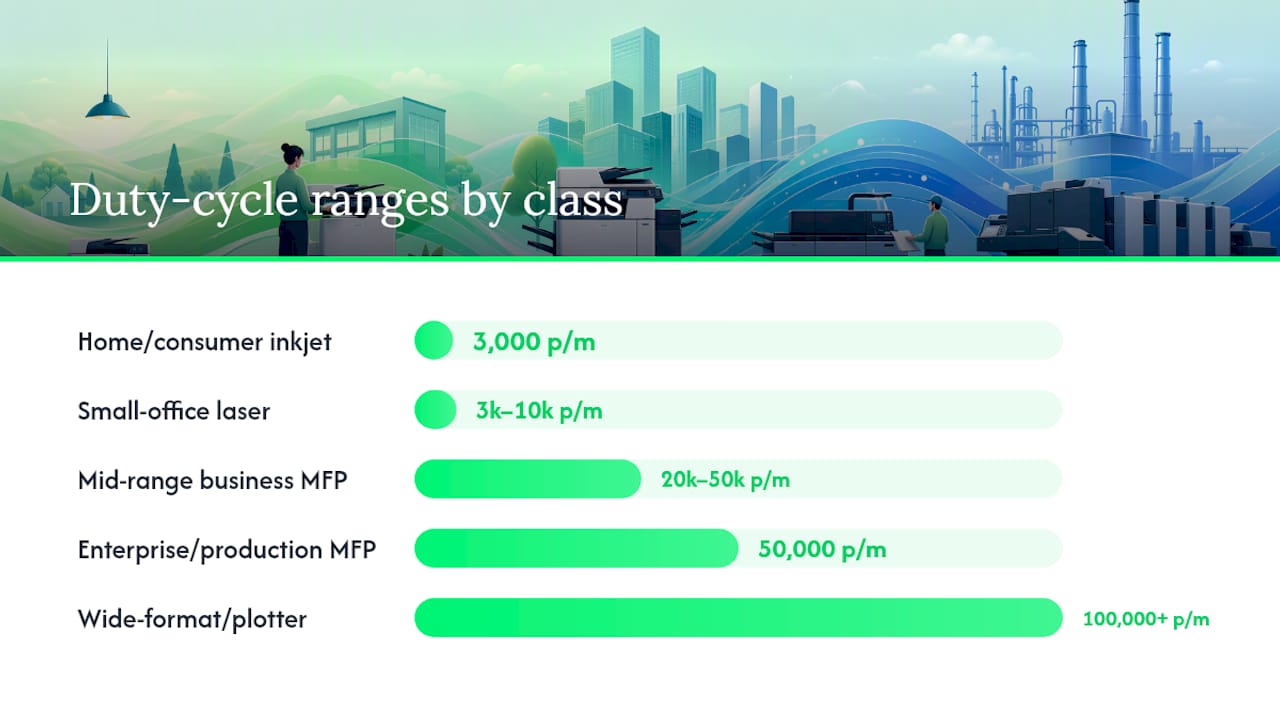
Small-office printers typically carry duty cycles of roughly 3,000–10,000 pages per month; mid-range business units commonly sit in the 20,000–50,000 range; production machines are rated considerably higher. Knowing which bracket your workload falls into saves time when filtering spec sheets.
| Printer class | Duty cycle range | Best suited for |
|---|---|---|
| Home/consumer inkjet | 3,000 pages/month | Occasional home use, low actual monthly pages |
| Small-office laser | 3,000–10,000 pages/month | Teams of 2–8, up to ~1,500 pages/month actual |
| Mid-range business MFP | 20,000–50,000 pages/month | Offices of 10–30 staff, 2,000–6,000 pages/month actual |
| Enterprise/production MFP | 50,000 pages/month | Large offices, print rooms, 10,000–20,000 pages/month actual |
| Wide-format/plotter | 100,000+ pages/month | Engineering, architecture, high-volume graphics |
A mid-range business MFP with a 30,000-page duty cycle and a 3,000-page RMV covers a 20-person office printing 150 pages per person per month, with room to spare. That is the class most Australian small-to-medium businesses should be looking at, not the entry-level laser that looks attractive on price but carries an RMV of 500 pages.
Maintenance practices that protect your printer from workload damage
Staying below the RMV is the single most effective thing you can do. But how you operate and maintain the machine within that range also matters.
Consumable and service schedule:
-
Replace drums, fusers, and feed rollers at or before the manufacturer’s recommended page yield — not when they fail. Waiting for failure on a high-volume machine means one bad day wipes out weeks of savings on deferred maintenance.
-
Schedule preventive service annually for low-volume devices, every six months for machines running above 60% of their RMV. Genuine consumables, such as Ricoh GC41K black cartridges, are engineered to the device’s rated yield; compatible alternatives can vary.
-
Keep firmware updated. Manufacturers regularly push updates that adjust fuser temperature curves, feed timing, and sleep-mode behaviour — all of which affect component life.
Operational settings that reduce wear:
-
Enable duplex printing as the default. It halves the number of paper-feed cycles for two-sided jobs, which is one of the highest-wear operations on any printer.
-
Set internal and draft documents to economy/draft mode. Lower toner density means less fuser heat per page and longer fuser life.
-
Configure sleep and auto-shutoff timers. A machine that powers down after 15 minutes of inactivity runs fewer idle heat cycles per day.
Workflow controls:
-
Route all print jobs through a central print queue or print-management software. This gives you visibility into who is printing what, flags unusual volume spikes, and lets you enforce quotas before a single department pushes the whole fleet toward its limit.
-
Managed print services with remote monitoring can alert you when a device’s monthly counter is tracking toward its RMV ceiling — before the machine starts showing wear symptoms.
Pro Tip: The single highest-impact operational change in most offices is enabling duplex printing by default.
Why most buyers get this wrong, and what to do instead
Most procurement decisions anchor on duty cycle because it is the big, impressive number on the spec sheet. A 100,000-page duty cycle sounds like it can handle anything. The RMV — quietly listed at 5,000 pages/month — is the number that actually governs whether the machine survives three years of daily use.
The other common mistake is measuring average monthly volume without accounting for peaks. An office that prints 2,000 pages in a quiet month and 6,000 in June for end-of-financial-year reporting needs a printer sized for 6,000-plus, not 2,000. Sizing to the average and then hammering the machine every June is a reliable path to a fuser replacement every 18 months instead of every four years.
One more thing worth saying plainly: a service agreement matters as much as the spec sheet. The Toshiba leasing guide for Australian businesses makes the same point: align your lease or service terms to your projected volume, including seasonal peaks, or you will pay for it in overage fees and unplanned repairs.
Measure first. Size to the RMV with a growth margin. Then lock in a service plan that matches the workload.
GOM helps you size, supply, and service your print fleet correctly
Getting the duty cycle and RMV right at the point of purchase is exactly where most Australian businesses save the most money over a printer’s lifetime.
GOM’s team can audit your current fleet’s page counters, identify devices running above their RMV, and recommend correctly sized replacements from its range of business printers, MFPs, and wide-format plotters, including the HP DesignJet T950 36-in for high-volume environments and the HP DesignJet T830 36-inch MFP for offices that need scan and copy alongside high-capacity printing. Genuine consumables are delivered Australia-wide, and on-site repair and managed print services keep your fleet running within its rated limits. Browse the full range and book a service at Shop.
Sources
-
Understand the duty cycle of a printer when purchasing — Ricoh UK
-
Explained: Duty Cycle, Throughput, and Print Resolution in Production Printers — Minosha