

A print policy for business is a short, written set of rules covering who can print, what defaults apply and how output gets tracked. It exists to control cost, reduce security exposure and cut paper waste. Start with three moves this week: run a quick usage audit, switch default settings to duplex and mono, and name one person who owns the policy.
TL;DR:
A print policy should cover all devices, users, and locations to prevent loopholes that undermine cost, security, and sustainability goals.
Default settings like duplex and monochrome should be standard across all devices, with color printing restricted to approved cases and requiring manager approval.
Implementing secure release, usage quotas, and automated supplies management strengthens enforcement and reduces waste and security risks.
Start with a fleet audit, name an owner, pilot defaults, and measure results at 30 and 90 days to ensure ongoing compliance and adjustments.
Effective enforcement relies on dedicated ownership, proper reporting tools, driver lock settings, and clear exception procedures, not just policy creation.
Table of Contents
-
Enforcing and monitoring the policy: tools and technical controls
-
Common challenges in enforcing print policies (and fixes that work)
-
The real bottleneck isn’t the policy; it’s the follow-through
What does a print policy for business actually cover?
A print policy for business is a formal document that standardises printing behaviour across devices, users and locations. It typically defines who can print what, on which device, with what default settings, so nobody is left guessing whether the colour laser on level three is for everyone or just the design team.
Scope matters more than most managers assume. A policy needs to cover every device on the network, every user group (including contractors and guests), and every site if the business has more than one office. Skip a location, and you have just created a loophole someone will find within a month.
The business case comes down to three things:
-
Cost control — Unrestricted colour and single-sided printing quietly inflates toner and paper spend every month.
-
Security — Sensitive documents sitting in an output tray are a data breach waiting to happen.
-
Sustainability — Paper and consumable waste adds up fast across a fleet of a dozen machines or more.
A single-page policy is often enough for a five-person office with one multifunction printer. Once you are running multiple devices across departments or sites, that same approach stops working, and you need a formal, monitored programme with reporting behind it.
Core elements every business print policy should include
Every policy needs the same skeleton, whether you are writing it for a ten-person office or a 500-seat enterprise fleet. Here is what belongs in it, in the order it usually gets drafted:
-
Purpose, scope and ownership. State why the policy exists, which devices and users it covers, and name the person accountable for it.
-
Default settings. Duplex printing and monochrome should be the default on every device, with resolution set to a standard suitable for internal documents rather than presentation quality.
-
Colour rules. Restrict colour to approved use cases (client-facing material, design work) and require a quick approval step for anything outside that list.
-
Security controls. Require authentication before a job releases, and think carefully about where devices physically sit relative to sensitive workflows like HR or finance.
-
Operational rules. Set quotas where relevant, decide whether departments get charged back for usage, and define who orders consumables and how.
-
Sustainability and disposal. Cover paper sourcing, recycling of toner cartridges, and end-of-life handling for retired hardware.
Setting duplex and mono as the default, and putting colour behind an approval step, is one of the highest-impact changes a business can make — it costs nothing to implement and shows up in the toner bill within a month.
Pro Tip: Write the policy itself as one page. Push the detailed procedures, like how to request a colour exception, into a separate quick-reference sheet. A shorter document gets read; a twelve-page rulebook gets ignored.
Practical policy templates and examples you can copy
You do not need to draft this from scratch. These five fragments cover the clauses most businesses need, ready to adapt into your own document.
-
Default settings: “All network printers default to double-sided, black-and-white printing. Users may override this manually for individual jobs where colour or single-sided output is genuinely required.”
-
Secure release: “Documents containing personal, financial or confidential information must be sent to secure print release queues and collected using a PIN or access card at the device.”
-
Colour approval: “Colour printing outside marketing and design teams requires manager approval via [internal request form/email]. Approved requests are logged monthly for review.”
-
Department quotas: “Each department is allocated a monthly page quota, reviewed quarterly. Usage beyond quota is charged back to the department’s cost centre.”
-
Abandoned jobs and disposal: “Uncollected print jobs are purged from the queue after 24 hours. Retired toner cartridges are returned to the supplier’s recycling program; end-of-life devices are disposed of through an approved e-waste channel.”
Short, specific fragments like these are what actually get adopted. Policies built around measurable, concrete rules and backed by basic training tend to stick far better than long, abstract rulebooks.
How do you roll out a print policy without it stalling?
Start with data, not opinion; for instance, reviewing the Australian promotional products pattern emphasises the importance of clear policies and core rules. Queensland Government’s print services guidance recommends beginning with a fleet audit, naming a responsible officer, centralising the print budget and tracking usage before rolling out any rules — a sequence that holds whether you are running three printers or three hundred.
-
Audit the fleet. Count devices, note age and running costs, and pull usage reports for a typical month. You cannot fix what you have not measured.
-
Secure executive sponsorship and name an owner. A policy with a single accountable owner and visible management backing is far more likely to actually change behaviour than one that exists only as a document.
-
Pilot the defaults. Roll duplex and mono defaults out to one floor or department first, gather feedback, and fix the friction points before going wider.
-
Communicate and train. A short email and a one-page quick-reference guide beat a policy buried in the intranet nobody opens.
-
Measure and iterate. Pull a follow-up usage report at 30 and 90 days and compare it against your baseline audit.
Fleet audits are the step most businesses skip, and it is the one that gives you the numbers to justify everything else to finance. Reviewing your printer fleet’s total running costs alongside a practical fleet management approach makes the audit far faster than starting from a blank spreadsheet.
Enforcing and monitoring the policy: tools and technical controls
A policy without enforcement is a memo. Print accounting software is what turns rules into measurable outcomes, and it needs to give you per-user and per-department reporting, quota alerts, and colour-usage breakdowns at a minimum.
-
Look for software that reports by user, device and cost centre, not just fleet-wide totals.
-
Deploy printers via TCP/IP or a small print server rather than auto-discovery, since generic drivers and auto-discovered queues cause inconsistent default behaviour that quietly undoes your duplex and mono rules.
-
Put secure print release (PIN or card-based) on any device near HR, finance or legal workflows, and tie access permissions to role rather than location alone. Our secure print release implementation guide covers the setup in more detail.
-
Automate supplies ordering and predictive maintenance alerts so consumables get replaced before a job fails, not after someone calls IT.
-
Consider managed print services once the fleet grows past a size where manual tracking becomes unreliable, generally once you are juggling more than a handful of devices across departments or sites.
Pro Tip: If you’re still using whatever driver Windows auto-installs, check your default settings device by device. It’s a common way for duplex defaults to silently revert to single-sided after a firmware update.
How Global Office Machines can help with policy enforcement
Turning a written policy into daily practice usually needs infrastructure most businesses do not build themselves. There are providers that run fleet assessments, managed print services and offer refurbished programs that give cost-conscious businesses a sustainability-focused alternative to buying new hardware outright.
We handle usage reporting, secure release configuration, consumables and servicing, which takes the enforcement burden off internal IT. That is worth considering once your fleet has grown past what one administrator can realistically monitor by hand, particularly if you are weighing new hardware like the HP DesignJet T650 large-format printer for a specialist department that sits outside the standard policy.
Handling exceptions: guest printing and high-priority jobs
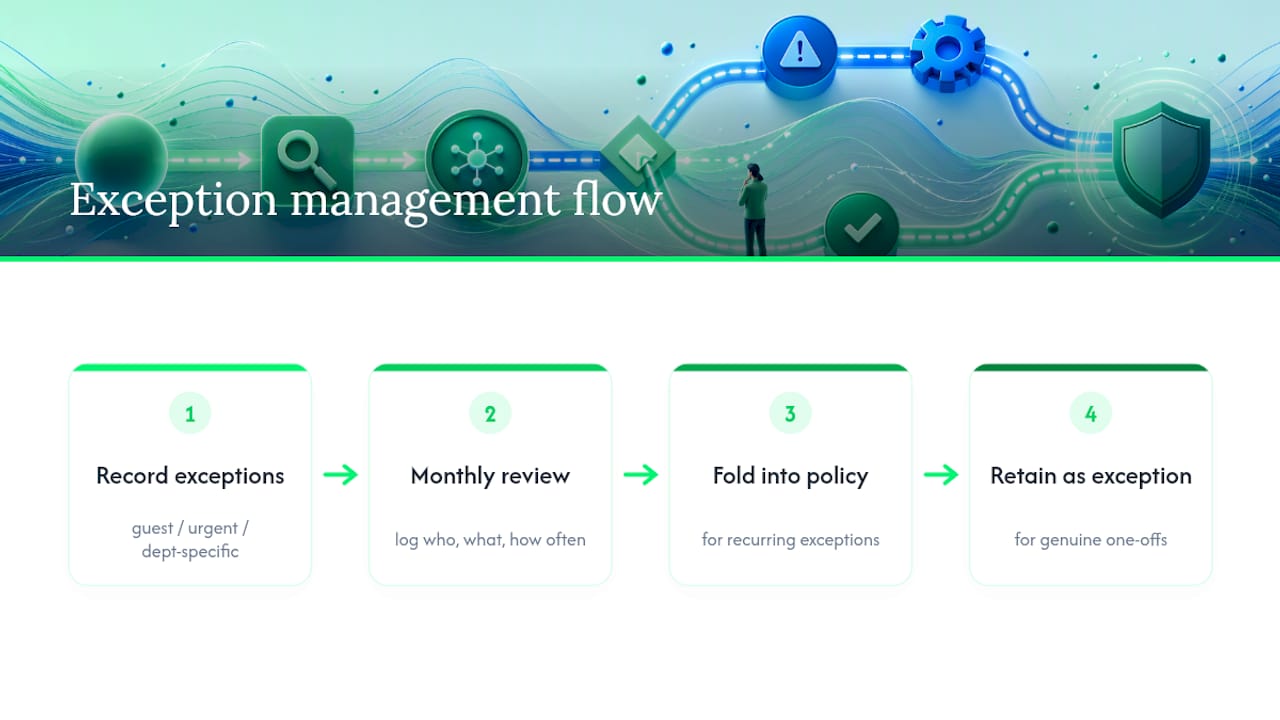
Every policy needs a documented exceptions process, or staff will simply route around the rules whenever something urgent comes up. Guest and visitor printing is the most common gap: set up a separate, time-limited guest queue with tighter quotas and no access to sensitive folders, rather than handing visitors credentials to the main network.
High-priority jobs, board packs, legal documents, and urgent client proposals need a fast lane that does not require sending an email and waiting for approval. A simple written rule works well here: jobs tagged urgent by a manager get released immediately from the standard queue, with colour and quota restrictions waived on a per-job basis rather than switched off for that user permanently.
Department-specific exceptions (design teams needing colour by default, finance needing extra security on every job) belong in an appendix to the main policy rather than in the core document itself. That keeps the primary policy short while still giving each team clear rules that fit how it actually works.
Log every exception. A monthly review of who requested what, and how often, tells you within a quarter whether an exception has become a habit that needs folding into the default policy, or a genuine one-off that does not need a permanent rule change.
Reviewing and updating your print policy over time
A print policy is not a set-and-forget document. Devices get replaced, departments grow, and new security risks appear that the original policy never anticipated. Build a review into the calendar rather than waiting for a problem to force it.
A quarterly check against your usage reports catches drift early, colour creeping back up, quotas being ignored, a department that has quietly stopped using secure release. A full annual review is where you reassess the fleet itself: are there devices due for replacement, has the business added a new site, does the ‘Green+’ refurbished option make sense for the next hardware refresh?
Tie the review to a trigger, not just a date. A new office opening, a security incident, or a jump in consumables spend should all prompt an out-of-cycle look at the policy rather than waiting for the next scheduled date. Keep a simple changelog at the bottom of the policy document itself, noting what changed and why, so the next person to inherit ownership of the policy is not starting from zero.
Common challenges in enforcing print policies (and fixes that work)
The biggest challenge is not writing the policy; it is getting people to follow it once the novelty wears off. Three problems come up again and again.
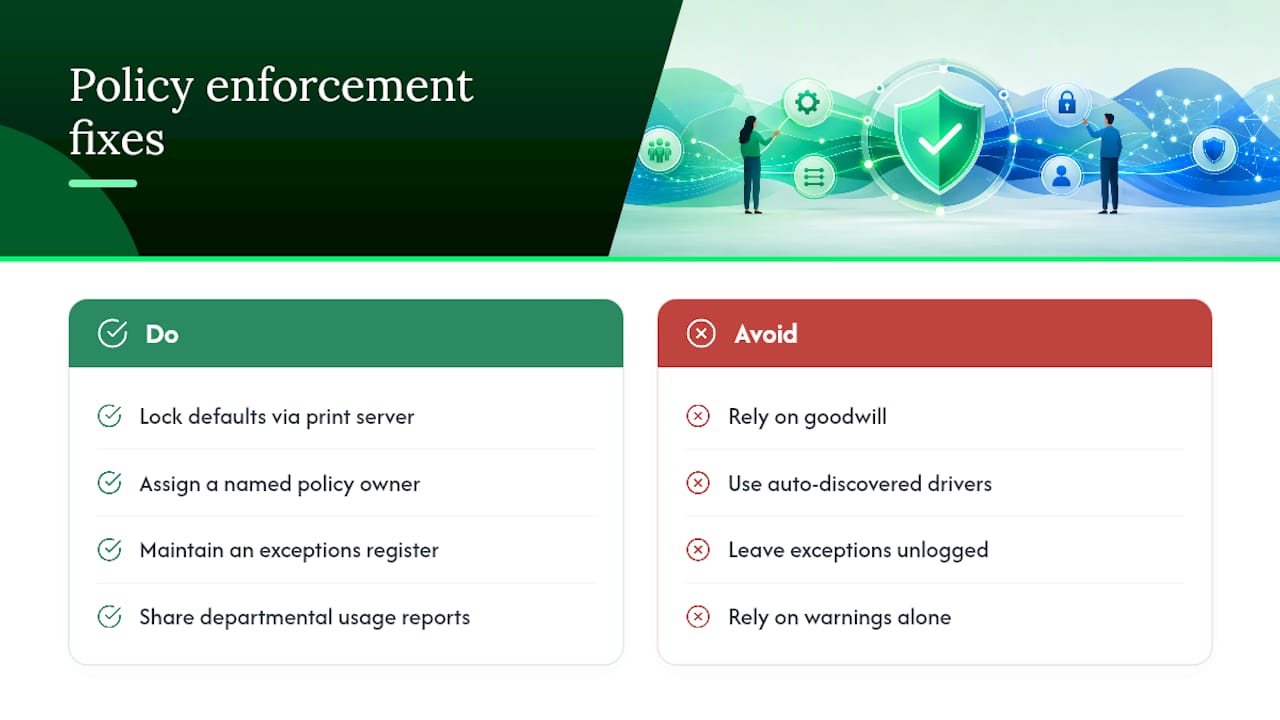
Staff quietly override defaults. People revert to single-sided or colour printing out of habit, not defiance. Fix it at the driver level rather than relying on goodwill: locking defaults through a print server rather than auto-discovered drivers keeps duplex and mono settings consistent across every workstation, which removes the temptation entirely.
No one owns enforcement. A policy without a named, accountable owner drifts within weeks. This is the same finding that applies to rollout: sponsorship and ownership are what separate a policy that works from one that sits in a shared drive unread.
Exceptions pile up unmanaged. Every unlogged exception becomes a precedent the next person points to. A simple exceptions register, reviewed monthly, stops this before it becomes the norm.
Resistance usually fades once staff see the reporting. Showing a department its own usage numbers, especially colour and paper costs, tends to shift behaviour faster than a written warning ever does.
The real bottleneck isn’t the policy; it’s the follow-through
Most businesses that fail at this don’t fail because they wrote a bad policy. They fail because nobody owned it after week one. Start with the audit data, not a guess, and name a single owner before you touch the default settings.
Your six-point checklist: audit usage, set duplex and mono defaults, pilot on one team, train with a one-page guide, measure at 30 and 90 days, then iterate based on what the numbers actually show.