

No, using third-party or compatible ink doesn’t automatically strip you of your consumer rights. Under Australian Consumer Law, your consumer guarantees survive regardless of what ink you use, unless the seller or manufacturer can actually prove that specific ink caused the fault. Warranties are voluntary promises sitting on top of the law, not a replacement for it. Before you accept a knockback, gather your evidence and put the seller on notice in writing.
TL;DR:
- Consumer guarantees remain valid regardless of third-party or compatible ink, unless the seller can prove it caused the fault.
- Most warranty exclusions listed by brands like Epson and Canon include used or expired consumables, damage from wear and tear, or contamination from incompatible inks.
- A seller cannot refuse a warranty claim based solely on compatible ink use without diagnostic evidence linking it to the fault.
- Proper documentation, including photographs, logs, and retaining failed cartridges, strengthens your position in a dispute.
- Firmware updates can alter ink compatibility, so check release notes and historical alerts before applying updates to office printers.
Table of Contents
- What does Australian Consumer Law actually say about ink cartridge warranty claims?
- What do Epson and Canon warranty terms say about compatible ink?
- Can a seller refuse a claim just because you used compatible ink?
- Practical evidence checklist to protect your warranty claim
- How do firmware updates affect third party ink compatibility?
- What remedies can you get under the ACL for a printer fault?
- How we help businesses manage consumables and warranty risk
- Where to get genuine consumables and printer support
- GOM’s take: the warranty fear is doing more work than it should
- FAQ
What does Australian Consumer Law actually say about ink cartridge warranty claims?
Consumer guarantees and manufacturer warranties are two different things, and mixing them up is where most printer owners lose ground in a dispute. A consumer guarantee is a statutory right built into every sale of goods over $100, covering things like acceptable quality and fitness for purpose. A manufacturer’s warranty, by contrast, is a voluntary promise the company chooses to offer on top of that. The ACCC is explicit that consumer guarantees are automatic and cannot be excluded, restricted, or replaced by warranty wording, no matter what the fine print says.
This matters because a warranty document might state a two-year term, but your guarantee rights can run longer if that’s reasonable for the type of product. A $2,000 office multifunction printer failing at 30 months isn’t automatically “out of luck” just because a written warranty expired at 24. NSW Government guidance confirms consumer guarantees apply regardless of the manufacturer’s warranty terms and remain the primary protection.
A few things worth locking in:
- Consumer guarantees cannot be excluded by a store or manufacturer, in any circumstances.
- The “reasonable period” for a guarantee depends on price, product type, and how it’s marketed, not a fixed number of months.
- If you’re unsure whether a refusal is lawful, Consumer Affairs Victoria and the ACCC both take complaints and offer free guidance.
Pro Tip: Keep your original purchase receipt and warranty card together electronically. If a dispute drags on for months, a scanned copy beats a fading thermal receipt every time.
What do Epson and Canon warranty terms say about compatible ink?
Manufacturer warranty documents almost always carve out consumables, and ink or toner sits right at the top of that list. This isn’t unique to any one brand. Epson Australia’s warranty terms specify conditions around consumables and shelf life, and note that non-genuine consumables can affect what’s covered under the express warranty. Canon Australia’s warranty page similarly excludes consumables and user-replaceable parts from certain cover, while setting out how to lodge a claim.
Typical exclusions you’ll find across most printer brands include:
- Consumables themselves (ink, toner, drums) once they’re used or past a “best before” date.
- Damage attributed to normal wear and tear rather than a manufacturing fault.
- Faults linked to unauthorised repairs or modifications.
- Failures the manufacturer can show were caused by an incompatible or contaminated product.
Under Consumer Affairs Victoria’s rules, a warranty against defects must be written in plain language, name the required contact details, and state clearly that ACL guarantees still apply on top of it. Skim past the marketing copy and check for that wording before you assume a warranty is worthless.
Can a seller refuse a claim just because you used compatible ink?
Not on suspicion alone. A retailer or manufacturer needs to show an actual causal link between the third-party ink and the fault before refusing a remedy under the ACL. That’s a higher bar than most service desks lead customers to believe, and it’s the piece of the puzzle most warranty disputes hinge on.
Legitimate technical concerns do exist. Chemical incompatibility can degrade printhead components over time. Poorly manufactured cartridges can leak or contaminate ink lines. Clogging from low-quality formulations can, in rare cases, cause genuine hardware failure. But these require diagnostic evidence, such as a technician’s inspection report identifying contamination or residue, not a generic “we don’t cover third-party ink” line at the counter.
- A blanket refusal with no inspection or written finding is unlikely to hold up under the ACL.
- Ask for the specific technical reason in writing, not a verbal brush-off.
- If the fault pattern matches a known manufacturer defect (not ink-related), that strengthens your position considerably.
Pro Tip: If a service desk refuses a claim verbally, ask them to put the reason in writing. Written refusals tend to get more careful and more accurate than a phone conversation.
Practical evidence checklist to protect your warranty claim
Most disputes are won or lost on paperwork, not persuasion. Businesses that document a fault properly from the first sign of trouble put themselves in a far stronger position when a claim gets contested.
- Stop using the printer once a fault appears. Continued use can muddy the diagnostic picture and give a seller room to argue user error.
- Keep the failed cartridge. Don’t bin it. It’s the physical evidence a technician needs to assess.
- Photograph error codes, streaking, or print defects, and print a standard diagnostic test page as a dated record.
- Log the timeline: purchase date, cartridge batch number, any firmware updates applied, and maintenance history.
- Request written diagnostic findings from whoever inspects the machine, and keep all correspondence in one file.
For office fleets, separate your consumable supplier invoices from your hardware service records. Lumping them together makes it easy for a service desk to wave the whole issue away as “out of warranty” when only the consumable side is actually in dispute.
Pro Tip: A simple shared spreadsheet logging cartridge batch numbers and firmware dates across your fleet saves hours when a claim needs backing up.
How do firmware updates affect third party ink compatibility?
Firmware is where things get murkier, and it’s worth watching closely if you manage more than a handful of devices. In 2018, the ACCC accepted a court-enforceable undertaking from HP over a “Dynamic Security” feature that blocked some printers from working with non-HP cartridges without adequate disclosure. HP agreed to compensate affected customers and improve how it disclosed this behaviour.
The lesson for Australian businesses: a firmware update can quietly change what ink your printer will accept, and that’s a separate consumer law issue from a straightforward hardware fault.
- Check release notes before applying any firmware update on networked office printers.
- Watch for ACCC notices if a brand has a history of compatibility restrictions.
- If a firmware push suddenly blocks cartridges that worked fine the week before, that’s worth raising with the manufacturer directly.
Our guide on printer security best practices covers how to manage firmware changes across a fleet without losing visibility over what’s being pushed to your devices.
What remedies can you get under the ACL for a printer fault?
The remedy you’re entitled to depends on how serious the fault is. For a major failure, the ACCC’s guidance confirms you can choose a refund or a replacement. For a less serious issue, the seller can usually offer a repair within a reasonable timeframe first.
Responsibility can sit with the seller, the importer, or the manufacturer, and working out who’s on the hook isn’t always obvious from the box.
- Contact the seller first. Under the ACL, they’re generally your first point of call, not the manufacturer.
- Request a written diagnosis if the seller disputes the cause, quoting the specific fault and any evidence.
- Escalate to the manufacturer or importer if the seller won’t act and the product is covered by their name.
- If it’s still unresolved, lodge a complaint with the ACCC or your state consumer affairs body, such as Consumer Affairs Victoria.
Keep every receipt and repair quote in this process. Under Product Safety Australia’s guidance, evidence like this is what actually moves a stalled claim forward.
How we help businesses manage consumables and warranty risk
Global Office Machines keeps consumable supply, diagnostics, and hardware servicing as distinct functions, deliberately. That separation matters because it stops a consumable dispute from getting tangled up with an unrelated hardware issue, which is exactly the kind of confusion that erodes a customer’s ACL rights.
For businesses managing a fleet of devices, that means clean paperwork: consumable invoices that stand apart from service records, and diagnostics that identify the actual cause of a fault rather than a guess. If you’re running a mixed fleet across several sites, that clarity becomes the difference between a five-minute resolution and a month-long back-and-forth. Our SLA guidance for businesses with multiple printers covers what to demand from any supplier on this front.
Where to get genuine consumables and printer support
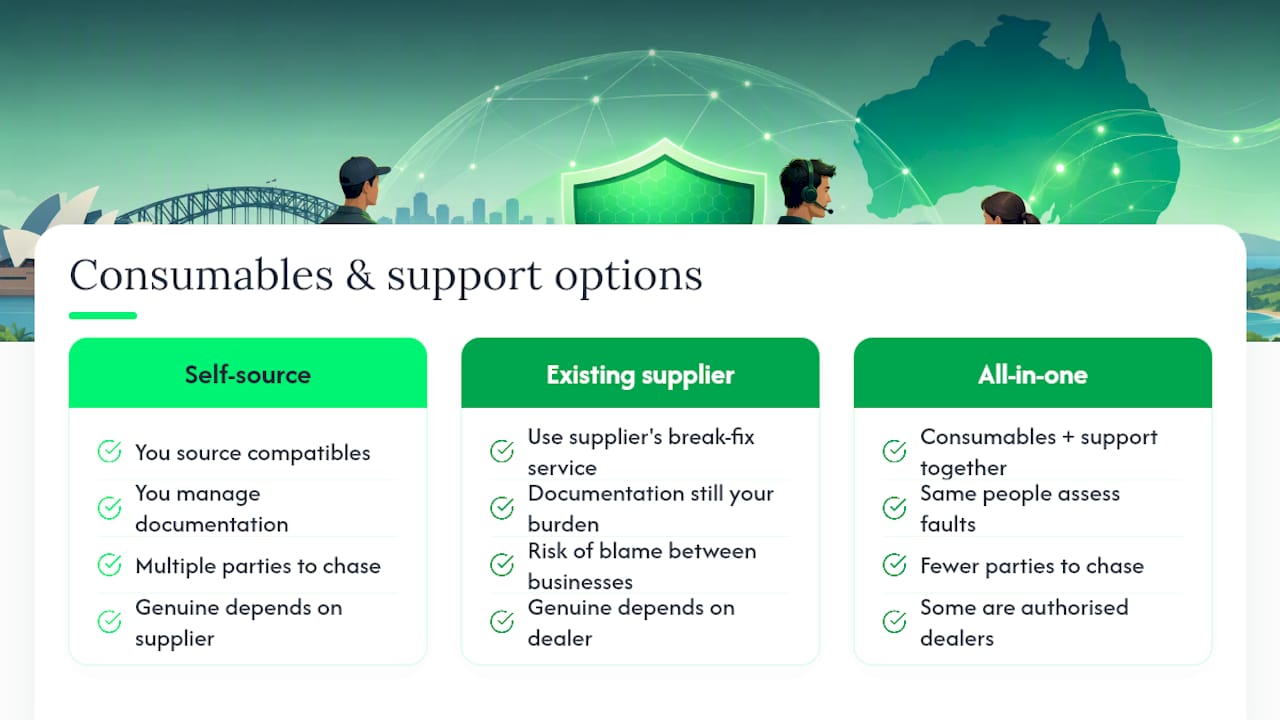
There are a few paths open to you here. You can keep sourcing compatible cartridges and manage the documentation yourself, use your existing supplier’s break-fix service, or move to a setup where consumables and hardware support come from one place. Each has trade-offs, but the paperwork burden of proving causation on a disputed claim is real, and it falls entirely on you if your ink and your service provider are unrelated.
Global Office Machines sells genuine and compatible toners and consumables alongside managed print services and diagnostics, so a fault gets assessed by the same people who supplied the ink, not passed between two businesses pointing at each other. That’s the practical advantage for time-poor office managers: fewer parties to chase, and a diagnostic trail that actually holds up if a claim needs escalating. Some suppliers act as authorised dealers for major brands including Epson, Canon, HP, and Kyocera, ensuring genuine stock availability if that is preferred for a specific device.
If your printer’s already showing signs of trouble, don’t wait for it to get worse. Check your warranty documentation for consumable clauses, then head to the GOM shop to arrange a diagnostic or order genuine replacement consumables before the fault escalates into a hardware claim.
GOM’s take: the warranty fear is doing more work than it should
The biggest misconception in this whole space isn’t legal, it’s psychological. Plenty of Australian businesses assume a printer manufacturer’s warning about “non-genuine consumables” is a hard legal wall, when it’s really just a starting position designed to discourage a phone call. The ACL doesn’t work that way, and the HP precedent is proof that even a global manufacturer can get pulled up by the ACCC for overreaching on this exact issue.
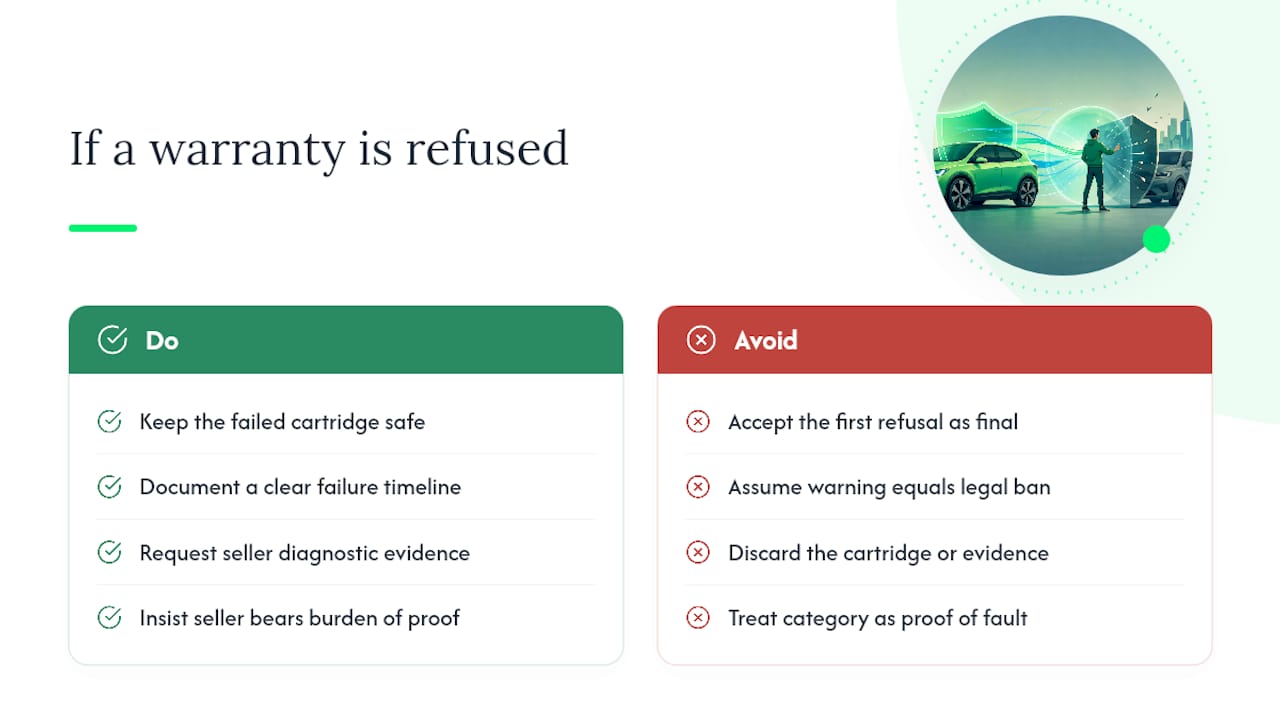
What actually decides these disputes isn’t which ink you bought. It’s whether you kept the failed cartridge, whether you can show a clear timeline, and whether the business you’re dealing with can produce actual diagnostic evidence rather than a policy line. Most consumers fold at the first refusal because they don’t realise the burden of proof sits with the seller, not with them.
The category itself isn’t the problem. Compatible ink works fine in the overwhelming majority of cases, and manufacturers know it, which is exactly why disputes get resolved with a repair or a replacement once genuine evidence is on the table. Businesses that treat a warranty knockback as the final word are leaving money and working equipment on the table for no good reason.
FAQ
Is it okay to use non-genuine ink cartridges?
Yes, using non-genuine or compatible ink is legal in Australia and doesn’t strip away your consumer guarantee rights under the ACL. A seller can only refuse a remedy if they can show the specific ink actually caused the fault, not simply because it wasn’t the original brand.
What are the generic ink cartridges compatible with Epson printers?
Compatibility depends on the exact printer model, since Epson uses different cartridge formats across its EcoTank and standard ranges. Check the model number against the cartridge packaging or supplier listing before buying, and note that Epson’s warranty terms treat consumable compatibility as a factor in express warranty coverage.
Does HP block third-party ink?
HP has previously used firmware features that restricted non-HP cartridges, and the ACCC took action against HP in 2018 for not disclosing this clearly, resulting in compensation for affected customers. Always check firmware release notes before updating a networked HP device if you rely on compatible cartridges.
How often does ink need to be replaced?
This depends heavily on print volume, ink type, and cartridge size, so there’s no single fixed interval. Higher-yield cartridges and pigment-based inks typically last longer between changes than standard dye-based cartridges in low-volume home printers.
Does Global Office Machines sell genuine ink cartridges?
Yes, Global Office Machines stocks genuine and compatible toners and consumables for major brands including HP, Epson, Canon, and Kyocera. Current pricing is available directly on the site for each product listing.