

A printer service level agreement is a contract that bundles maintenance, consumables, and support into one predictable arrangement, usually priced per page or as a fixed monthly fee. Any business running more than a handful of devices, or printing heavily enough that breakdowns actually hurt productivity, should have one. Done properly, it means fixed costs and one phone call instead of a scramble every time a machine jams.
TL;DR:
- Response times for critical faults should be around four hours, with next-business-day resolution for non-critical issues, to minimize downtime.
- Contracts with long durations should include clear termination rights, renewal notices, and audit provisions to prevent ongoing commitments to poor service.
- Vague commitments, high minimum billing, or unsupported parts clauses are warning signs that can lead to unexpected costs and extended resolution times.
- An SLA should specify device details, consumables included, and reporting procedures, including raw data access for verification; fleet monitoring enhances compliance.
- Managed agreements suit offices with five or more devices or high-volume printers, while smaller teams might benefit more from outright purchasing or leasing with support options.
Table of Contents
- What does a printer service level agreement cover?
- What SLA metrics actually matter?
- What contract length and exit terms should you check?
- What red flags should you look for in a printer SLA?
- How does a professional supplier actually structure an SLA?
- When should you choose an SLA over leasing or ad-hoc repairs?
- How Global Office Machines supports a printer SLA
What does a printer service level agreement cover?
A well-structured SLA folds hardware maintenance, consumables, and monitoring into a single line item. Australian managed print arrangements typically supply the printers or multifunction devices themselves, toner and drums, replacement parts, on-site labour, and fleet monitoring software, according to Toshiba’s guide to managed print services. Paper is almost always excluded, and it pays to confirm that in writing before you sign anything.
Two pricing structures dominate the market:
-
Cost-per-page (CPC): you pay a set rate per printed page, covering toner, parts and labour, which suits businesses with fluctuating or high monthly volumes.
-
Fixed monthly fee: a flat charge regardless of volume, better for offices with steady, predictable print runs.
-
Minimum billing: many contracts set a floor charge even if you print below a threshold, which can quietly erode the savings CPC promises for lower-volume offices.
Low-volume offices tend to do better on a fixed fee with a modest device count. Medium and high-volume operations generally save more under CPC, provided the minimum billing clause isn’t set high enough to cancel out the benefit.
What SLA metrics actually matter?
Response time and time-to-fix are the two numbers that decide whether an SLA is worth the paper it’s printed on. Response time is how long before an engineer acknowledges the fault; time-to-fix is how long until the machine is actually working again. Industry practice typically separates these by severity.
- Critical faults (a device down completely): four-hour response is a common benchmark for business-hours coverage.
- Non-critical faults (a jam, a quality issue): next-business-day is standard.
- Uptime target: expressed as a percentage of scheduled operating time the device must be available, tracked through fleet monitoring data rather than taken on faith.
- First-time-fix rate: the percentage of callouts resolved on the first visit, which hinges on whether engineers carry adequate parts stock.
Pro Tip: Ask for the first-time-fix rate before you ask for the response time. A fast callback from an engineer who doesn’t have the right part in the van still leaves you down for another day. Operational metrics like first-time-fix percentage and the parts an engineer carries on the truck materially affect how much downtime you actually experience, according to Xenith’s breakdown of MPS service level agreements. Escalation procedures should be spelled out too. What happens if the first response deadline is missed? Who do you call, and what’s the support window, business hours only or extended?
What contract length and exit terms should you check?
Managed print contracts commonly run for several years, and that length matters more than most office managers realise when they’re comparing a headline monthly rate. A long term locks in today’s pricing and today’s service quality for years, which is fine if the provider is good and a real problem if they’re not.
Watch for these clauses specifically:
- Evergreen renewal: many agreements auto-renew unless you give notice inside a specific window, commonly 60 to 90 days before expiry, based on LegalClarity’s review of managed print contracts.
- Termination-for-cause: the right to exit if the provider repeatedly misses agreed SLA targets, not just a token credit.
- Billing cadence and audit rights: confirm how often you’re billed, what triggers a rate review, and whether you can audit page counts against invoices.
- Minimum billing terms: check whether the floor charge applies per device or across the whole fleet.
Pro Tip: Put the renewal notice date straight into your calendar the day you sign, not the month before it’s due. Missing a 60-day window on a five-year contract is how offices end up stuck with a provider they’d rather have left. An SLA should always include measurable remedies and genuine exit rights tied to repeated performance shortfalls, according to Artificer Legal’s analysis of service level agreements — without that clause, your recourse for chronic underperformance can shrink to a modest billing credit and nothing else.
What red flags should you look for in a printer SLA?
Some warning signs show up in the fine print, not the sales pitch. If any of the following appear in a proposal, push back before signing:
- “Miscellaneous parts” exclusions with no named list attached, which lets a provider bill separately for almost anything after the fact. Ask for a named-parts list or a pricing matrix instead of accepting the vague label.
- Vague uptime or response commitments that aren’t tied to a measurable percentage or a specific hour count.
- High minimum billing that erases the savings a cost-per-page model is supposed to deliver for smaller or lower-volume devices.
- No loaner equipment clause, which means a broken device could sit unfixed for days with no backup supplied.
- Long gaps between fault report and replacement decision, with no defined trigger for when a repeated fault becomes a swap-out.
Common practice among providers is to list miscellaneous parts as excluded from standard coverage. Decision-makers should always ask exactly what falls under that label before signing, because it’s the single most common source of surprise invoices on an otherwise clean-looking contract.
How does a professional supplier actually structure an SLA?
A properly scoped agreement names the specifics rather than gesturing at them. A typical scope document lists the exact devices covered by model and serial number, states which consumables are included (toner, drums, and any specialised print heads), and sets a reporting cadence, usually monthly.
Clause language worth requesting looks like this:
- “Critical fault response within four business hours; time-to-fix within one business day for network-attached devices.”
- “Toner and drum replenishment triggered automatically at 20% remaining capacity, based on fleet monitoring data.”
- “Monthly usage and uptime report supplied within five business days of month end.”
Insisting on access to the reporting cadence and the raw fleet-monitoring data itself is what actually lets you verify SLA compliance, rather than taking the provider’s word for it, per Toshiba’s guidance on managed print services. A fleet audit like the one covered in printer fleet management guidance is a sensible first step before you even start comparing SLA quotes.
When should you choose an SLA over leasing or ad-hoc repairs?
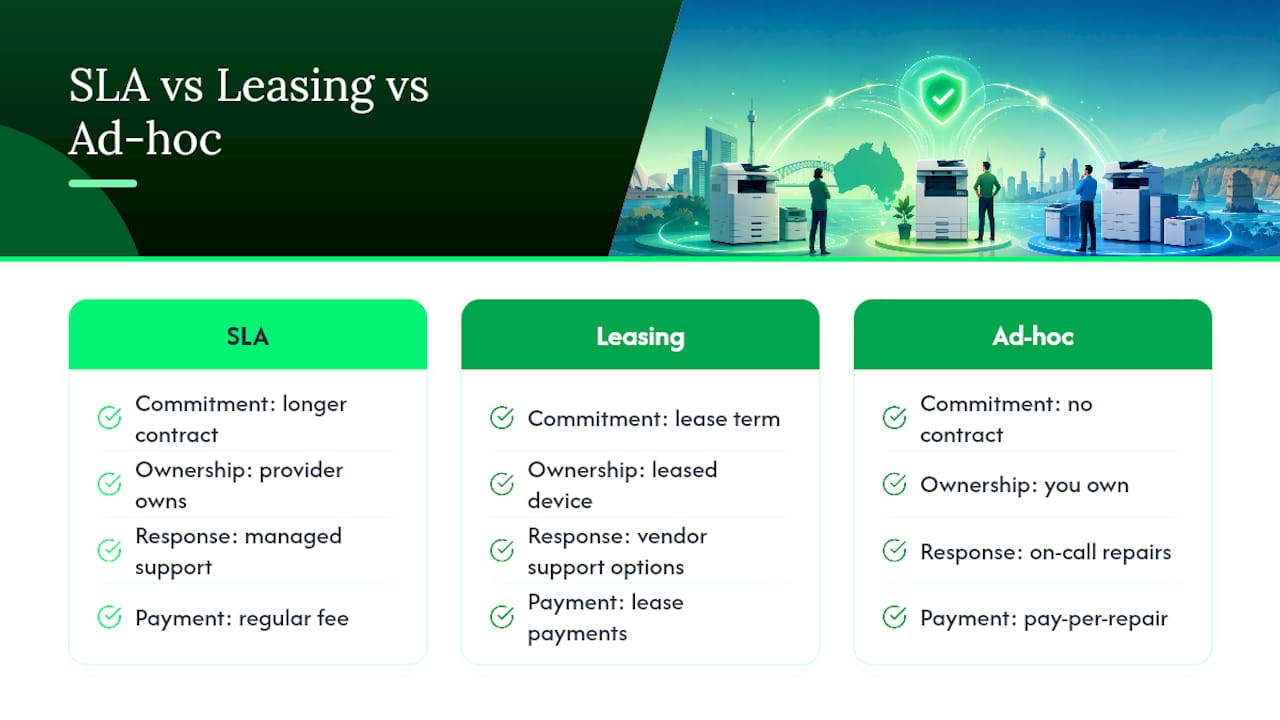
An SLA earns its cost once you’re running enough devices, or enough monthly volume, that unplanned downtime starts hitting real productivity. As a rough rule, offices with five or more networked devices, or any single high-volume machine central to daily operations, tend to come out ahead with a managed agreement over calling a repairer only when something breaks.
Smaller operations with one or two low-volume printers often do better buying outright and paying for repairs as needed. Leasing plus ad-hoc service can also beat an SLA where usage is genuinely unpredictable and a long contract term feels risky. Total cost of ownership shifts again once refurbished equipment enters the picture. A Green+ style renewed device costs less upfront and less to insure against loss, which changes the maths on whether a full SLA or a lighter support arrangement makes more sense for your fleet.
— Matthew
How Global Office Machines supports a printer SLA
If you’re ready to move from research to a signed agreement, Global Office Machines is the direct alternative to piecing together a contract yourself from a generic template. It combines authorised-brand hardware, consumable supply, and national service coverage across NSW, VIC, QLD, WA and SA under one arrangement, so the device, the toner, and the maintenance call all come from the same accountable source instead of three different suppliers passing the blame.
Enterprise-grade devices like the HP Colour LaserJet Managed E77830Z are typical of what gets supplied under a managed agreement, and consumables such as HP #975A black ink can be provisioned automatically as part of the same contract rather than ordered separately every time stock runs low. Request a print assessment or ask for sample SLA terms from Global Office Machines before your current contract’s renewal window closes.