

For most offices, a mono laser multifunction printer is the right call if you print mostly text documents, while colour laser or tank inkjet suits offices needing regular colour output. The decision that actually matters isn’t the badge on the front; it’s the duty cycle rating against your real monthly volume and the three-year total cost of ownership (TCO) behind it. Some suppliers can run that comparison and quote against it.
TL;DR:
Most offices handling high monthly volumes should select a printer with a duty cycle at least three times their average page count to ensure durability and savings.
Choosing a mono laser multifunction printer is usually most cost-effective for text-heavy workloads, while color laser or tank inkjet models suit offices requiring frequent color printing.
Checking features like an automatic document feeder of at least 50 sheets, standard duplex printing, and secure print release helps prevent workflow delays and safeguard sensitive information.
The three-year total cost of ownership often exceeds the initial purchase price, with supplies and maintenance comprising most long-term expenses.
Supplier support and local availability of parts significantly influence the printer’s lifespan and operational costs, making trusted dealer relationships crucial.
Table of Contents
-
Why does supplier support matter as much as the printer itself?
-
Ready to compare printers and TCO with Global Office Machines?
What type of office printer should you buy?
Every printer category trades speed, running cost, and output quality differently, and the right pick depends entirely on what crosses your desk each month.
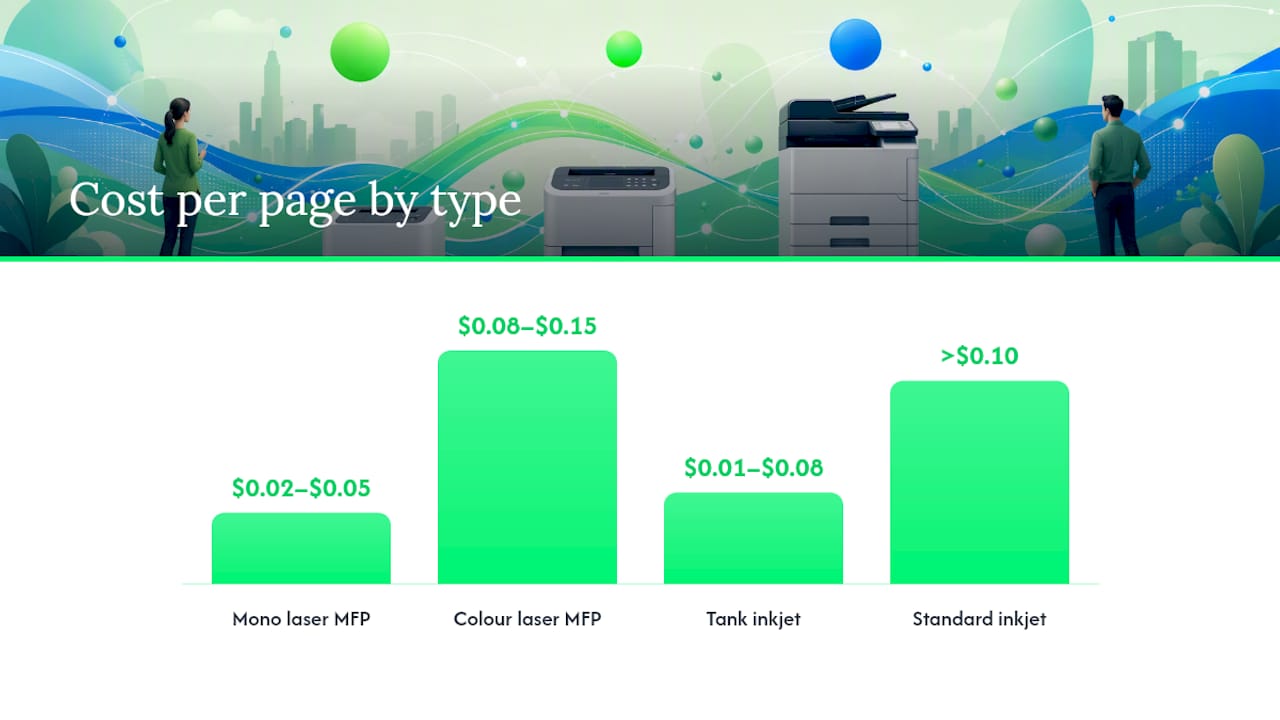
Mono laser printers and MFPs are the default for offices that print mostly text: invoices, contracts, internal memos. They run at 20 to 45 pages per minute, hold a cost-per-page (CPP) of roughly $0.02 to $0.05, and the toner sits fine for weeks without drying out, which matters if your printer goes quiet over a long weekend. Mono laser MFPs are typically the best all-round choice for businesses printing between 200 and 2,000 pages a month.
Colour laser printers step up when marketing materials, coloured reports, or client-facing documents are a weekly occurrence. Speeds are similar to mono units, but CPP climbs to $0.08 to $0.15 per colour page once you factor in four toner cartridges instead of one.
Standard inkjet printers suit very light, occasional printing, think a two-person home office. They’re cheap to buy but expensive to run long term, with CPP often exceeding $0.10 for colour once starter cartridges run dry.
Tank inkjet printers, the category made mainstream by Epson EcoTank and Canon MegaTank, refill from bottles instead of cartridges. This drags colour CPP down to somewhere between $0.01 and $0.08 depending on the model, and tank systems handle moderate colour volumes well, roughly 200 to 800 colour pages a month. The catch is speed: tank inkjets are generally slower than laser equivalents, so a busy front desk will feel the difference.
Multifunction devices (MFPs) combine print, scan, and copy in one box, and for the vast majority of small offices this is the sensible default rather than a bonus feature. A standalone scanner and separate printer both take desk space and both need maintaining; one MFP with a decent ADF handles both jobs at once.
Here’s how the categories stack up at a glance:
-
Mono laser MFP: Fast, cheapest CPP, best for text-heavy offices, poor colour quality.
-
Colour laser MFP: Fast, moderate CPP, strong for client documents and marketing collateral.
-
Standard inkjet: Cheap upfront, high running cost, fine for very low volume.
-
Tank inkjet: Low CPP for colour, slower output, good for design-adjacent small offices.
If your office genuinely needs both fast mono output and decent colour, a colour laser MFP usually beats running two separate machines, both on running cost and on desk space.
Which office printer features actually matter?
Specs sheets are full of numbers that don’t move the needle day to day. A handful genuinely do, and they’re the ones worth arguing over with a supplier before you sign anything.
-
ADF capacity of 50 sheets or more. PCMag’s testing benchmark for business printers recommends at least a 50-sheet automatic document feeder with single-pass duplex scanning. Anything smaller means someone standing at the machine feeding pages in batches, which adds up to real lost time across a week.
-
Duplex printing as standard, not optional. Two-sided printing cuts paper use roughly in half and should be a built-in function, not an add-on tray you have to buy separately.
-
Paper tray capacity of 500 to 1,000 sheets total. Shared offices with several people printing throughout the day need enough input capacity that nobody’s refilling trays mid-morning; Tech Kingdom’s guide on choosing office printers points to 500 or more sheets as the practical threshold for multi-user environments.
-
Ethernet plus Wi-Fi, not one or the other. Ethernet gives you a stable, secure connection for the main office network; Wi-Fi covers laptops and visitors. Add mobile and cloud printing support (AirPrint, Mopria) so staff can print from phones without installing drivers.
-
Secure print release, job PINs, and data encryption. In any shared office, print jobs sitting in an output tray are a genuine privacy risk. Requiring a PIN or badge tap at the device before a job prints keeps payroll runs and client files off the wrong desk. Global Office Machines’ guide to secure print release covers what a proper rollout looks like for Australian offices.
Pro Tip: Ask any shortlisted supplier whether secure print release is built into the printer’s firmware or bolted on through separate software. Built-in is simpler to manage and rarely needs an extra licence fee down the track.
ADF capacity and single-pass duplex scanning pay off disproportionately for offices that scan multi-page contracts or compliance documents regularly. If that’s a weekly task rather than occasional, don’t compromise on this spec to save a few hundred dollars.

How do you size a printer to your monthly print volume?
Match the printer’s rated duty cycle to a multiple of your average monthly page count, ideally at least three times higher, to avoid frequent replacements or underutilising expensive enterprise hardware.
Manufacturers publish a maximum monthly duty cycle, the absolute ceiling a printer can handle without failing, but that isn’t the number to size against. Run a device consistently near its rated maximum, and you’ll see premature part failures, jammed rollers, and shortened drum life.
Most spec sheets carry a second, quieter figure: recommended monthly page volume. That’s the pace the manufacturer expects the machine to sustain comfortably, and it’s usually a fraction of the maximum duty cycle. Size against that number, not the headline one. If a model only publishes a maximum, treat at least three times your real monthly volume as a floor rather than a target — and ask the supplier for the recommended figure because they can get it.
Volume bands make this concrete:
-
Under 500 pages a month: A compact inkjet or entry-level mono laser handles a two-to-four person office comfortably.
-
500 to 2,000 pages a month: Mid-range laser or LED printers suit a growing team of five to fifteen people with regular document turnover.
-
2,000 to 5,000 pages a month: Workgroup laser MFPs are built for this, typically a busy office of fifteen to forty staff sharing one or two devices.
Volume alone doesn’t tell the whole story. Multi-user offices where several people hit “print” at the same time need faster first-page-out times, not just higher duty cycles. Scan-heavy teams, legal practices, accounting firms, anyone digitising paperwork, should size up the ADF and scanning speed independently of print volume. And any device that sits idle for long stretches, a satellite office printer used twice a week, does better with laser toner than inkjet, since ink left sitting in cartridges for weeks tends to dry out and clog print heads.
Buying one size too small is the single most common mistake in office procurement. Undersized hardware forces repeated replacement cycles that cost more over three years than paying up front for the next class up. Global Office Machines’ breakdown of duty cycle sizing walks through the maths in more detail if you want to check a specific model against your volume.
One more distinction worth knowing: on many laser devices, the toner cartridge and the imaging drum are separate consumables with different lifespans, so check both when you’re costing a model.
How do you calculate the real cost of an office printer?
The purchase price is the smallest number in the whole decision. Run a three-year total cost of ownership calculation and the picture usually flips: the cheapest printer on the shelf is often the most expensive machine to own.
The formula is straightforward:
Three-year TCO = purchase price + (monthly volume × 36 months × cost-per-page) + estimated maintenance + energy costs over three years
Cost-per-page itself is calculated at a standard 5% page coverage, meaning a fairly typical mix of text and light graphics. The formula is cartridge or toner price divided by rated page yield at that coverage, and it’s the number that actually separates cheap-to-buy from cheap-to-run.
| Printer category | Typical CPP (mono/colour) | Note on starter supplies |
|---|---|---|
| Entry inkjet | $0.05–$0.10 mono, $0.12–$0.25 colour | Starter cartridges are often half-filled |
| Tank inkjet | $0.01–$0.03 mono, $0.02–$0.08 colour | Bottles included usually cover several months |
| Mono laser | $0.02–$0.05 mono | Starter toner often rated 1,000–2,000 pages |
| Colour laser | $0.03–$0.06 mono, $0.08–$0.15 colour | Colour toners deplete faster than black |
Take a mid-range mono laser MFP at $700 upfront, printing 1,500 pages a month at $0.03 CPP. Over 36 months, that’s $1,620 in supplies alone, plus maybe $150 in servicing and $60 in energy, landing total three-year ownership near $2,530. Compare that against a $400 entry inkjet at the same volume with a $0.09 CPP: supplies alone hit $4,860 over three years — three times the laser’s running cost, despite the lower sticker price.
Supplies and maintenance typically overtake the original hardware price by year two of ownership. Kyocera’s TCO guidance for print devices puts that multiplier at two to three times the purchase price across a typical three-year lifecycle, which is exactly why upfront price is the wrong number to lead a buying decision with.
Energy use rarely swings the total by much, but it’s worth checking the Energy Star or equivalent efficiency rating on any device that sits powered on all day, since standby draw across a fleet of machines adds up over a year. Global Office Machines’ full TCO formula breakdown covers maintenance contract pricing in more depth if you’re comparing quotes from multiple suppliers.
What should you check before buying an office printer?
A shortlist is only useful once you’ve pressure-tested it against the numbers that actually predict three years of ownership cost, not just the spec sheet a salesperson hands you.
-
Confirm the rated duty cycle against your real monthly volume, not the vendor’s suggested “ideal” range, which is often optimistic.
-
Ask for the starter cartridge or toner yield in pages, not just “included ink”, since half-filled starter supplies are common and skew any first-month cost comparison.
-
Check ADF specs match your scanning habits, sheet capacity and single-pass duplex if you handle multi-page documents regularly.
-
Verify network ports and secure-print support are built in — Ethernet, Wi-Fi, and PIN-based print release, rather than requiring paid add-on software.
-
Get warranty terms and service response times in writing, including whether onsite support is included or charged separately.
When talking to a supplier, ask directly: what’s the delivery and installation cost, how available are spare parts for this model, can you show me a sample CPP calculation at my volume, and what’s the difference between leasing and outright purchase for a business my size? A supplier that can’t answer the CPP question with real numbers isn’t one you want managing your fleet. Procurement teams handling multiple vendor quotes may also find general procurement best practice for Australian businesses useful for structuring the comparison.
Watch for red flags: vague or unquoted CPP figures, proprietary cartridges from a single source with no clear long-term availability, missing Ethernet ports on anything marketed as “business class,” and no secure job release option at all.
Why does supplier support matter as much as the printer itself?
The printer you buy is only half the equation. Who backs it for the next three to five years often decides whether your total cost of ownership holds up or blows out.
Some suppliers operate as authorised dealers for major manufacturers such as HP, Kyocera, FUJIFILM Business Innovation, Lexmark, Epson, and OKI, with service footprints across multiple Australian states. That matters practically: genuine parts availability, warranty honoured without disputes, and a technician who’s actually seen your model before.
For businesses wanting new hardware at a lower entry cost, Global Office Machines’ Green+ program refurbishes and re-engineers used machines for resale at up to 70% off new pricing, a sustainability-minded alternative worth considering for a second device or a satellite office that doesn’t need top-tier volume capacity.
Managed print services (MPS) become worth considering once you’re running:
-
A fleet of five or more devices across one or more sites.
-
Regulated document workflows where compliance and audit trails matter.
-
Distributed offices where a single failed printer can stall a whole team’s output.
MPS contracts shift toner replenishment, servicing, and uptime monitoring onto the supplier, converting an unpredictable repair bill into a fixed monthly cost. For offices juggling document-heavy compliance work, a document workflow partner covering scanning integration, such as this overview of legal and compliance document systems, can complement an MPS setup by tightening how scanned files move through the business.
What the sizing rules don’t tell you
Every printer buying guide repeats the same advice: match duty cycle to volume, calculate your CPP, buy business-class features. All true, and all missing the part that actually determines whether you’re happy with the purchase in year two.
Conventional wisdom treats printer buying as a spreadsheet exercise, and mostly it is one. What it undersells is how much the supplier relationship changes the maths after the sale. A $700 mono laser with a responsive dealer behind it and same-week parts availability will outlast and outperform a $500 machine bought online with no local support, even if the spec sheets look identical on paper. Duty cycle numbers assume the machine gets serviced properly; TCO calculations assume supplies stay available for the model’s whole life. Neither assumption holds with every seller.
Our honest read: buy one size up from what the volume calculator tells you, not down. Offices grow faster than people plan for, and the gap between a mid-range and workgroup laser MFP is usually a few hundred dollars, not a few thousand. Spend that gap once rather than replacing hardware in eighteen months.
Ready to compare printers and TCO with Global Office Machines?
Global Office Machines gives you something most online printer retailers don’t: a real three-year cost comparison before you commit, backed by an actual dealership relationship rather than a one-off transaction. As an authorised dealer for HP, Kyocera, FUJIFILM Business Innovation, Epson, and other major brands, Global Office Machines sells new hardware alongside Green+ refurbished machines at up to 70% off, plus genuine and compatible consumables delivered nationwide.
If you’re weighing a mono workgroup MFP against a colour laser for a growing team, the HP LaserJet M5035x multifunction printer is a solid mid- to high-volume mono option worth quoting against your own numbers. Request a quote, run your monthly volume against Global Office Machines’ TCO calculation, or ask about managed print contracts if you’re managing more than a handful of devices; whatever stage you’re at, get the real running cost before you buy, not after.
Sources
FAQ
What printer should I buy for office use?
For document-heavy offices, a mono laser MFP with a 50-sheet ADF and duplex scanning is the most cost-effective choice. If regular colour output is part of the job, step up to a colour laser or tank inkjet depending on your volume.
What is the best home office printer to buy?
A compact mono laser or tank inkjet printer suits most home offices printing under 500 pages a month, since tank systems keep colour running costs low without the volume a business needs to justify a laser MFP.
What type of printer is best for office use overall?
Mono laser multifunction printers remain the best all-round option for most small to mid-sized offices, combining low cost-per-page, reliable duty cycles, and toner that doesn’t degrade during idle periods.
How do I know what printer size my office actually needs?
Calculate your average monthly page volume, then choose a printer with a rated duty cycle at least three times that figure. This keeps the machine running well inside its comfortable operating range instead of near its ceiling.
Is it cheaper to buy a new printer or use Global Office Machines’ Green+ refurbished range?
Green+ refurbished machines from Global Office Machines cost up to 70% less than buying new, making them a practical option for a second device or lower-volume satellite office without sacrificing reliable business-grade performance.