

Most thermal printheads run for six months to five years depending on the environment, while inkjet and wide-format heads in heavy production often need replacing within months. The single biggest factor is discipline: regular, manufacturer-specified cleaning combined with the right media stretches life dramatically. Replacement timing ultimately comes down to the symptoms you’re seeing, not a fixed calendar date.
TL;DR:
Proper maintenance and using high-quality media can extend thermal printhead life from months to several years, especially in clean environments.
Abrasive labels, excessive platen pressure, and electrostatic discharges significantly accelerate head wear and increase failure risk.
Regular cleaning every two rolls of media or after every 5,000 cards can prevent most premature failures and identify when a head needs replacement.
Different printhead technologies, such as thermal versus piezoelectric, require tailored maintenance routines focused on abrasion protection or nozzle cleaning.
Replacing a printhead promptly when quality issues persist is more cost-effective than continuous patching or ignoring gradual wear.
Table of Contents
-
Does printhead build quality actually change how long it lasts
-
Thermal vs piezoelectric: different technologies, different maintenance needs
What shortens or extends printhead lifespan
Printhead wear comes down to a handful of engineering realities. Failure analysis of thermal inkjet printheads identifies three primary breakdown mechanisms: bubble cavitation (micro-shockwaves from the boiling and collapsing ink), thermal fatigue (repeated heating and cooling cracking the resistive layer), and electromigration (metal atoms slowly displaced by current, thinning conductive traces until they fail). Cavitation and electromigration tend to cause sudden failure. Thermal fatigue is progressive, showing up as gradually declining print quality over months.
On thermal heads specifically, glaze wear is the dominant field-life killer. The overglaze coating protects the resistive elements from abrasion, and abrasive label stock or excessive platen pressure can wear through it two to four times faster than quality paper stock does.
-
Electrostatic discharge (ESD): A jolt as small as 1,000 volts, well below what you can feel, can rupture a resistive element during media loading.
-
Chemical corrosion: Adhesive residue from labels and harsh cleaning solvents degrade contacts over time.
-
Environmental exposure: Dust ingress and high humidity accelerate wear on both thermal and inkjet heads.
-
Poor-quality consumables: Cheap paper, ribbon, or ink can cut head life by 30 to 60 per cent compared with quality stock, according to Zebra’s own maintenance guidance.
Pro Tip: Ground yourself or use an anti-static mat before loading media into any thermal or label printer. It takes ten seconds, and it’s the cheapest insurance you’ll ever buy against sudden dot failure.
Realistic lifespan by printer type
Manufacturer figures are a starting point, not a promise. They assume the printer runs within every specified parameter: correct media, correct settings, clean environment. Real-world results vary enormously.
-
Thermal POS and label printheads: Rated around 50 kilometres of media under ideal conditions — roughly 250,000 receipts at a typical 200mm receipt length — though that figure moves a lot depending on how long your receipts actually run. In practice, expect six months in a dusty, high-throughput retail environment and five years or more in a clean office setting.
-
Thermal transfer heads: Similar underlying hardware to direct thermal, but ribbon quality and backcoating add another variable. Poor ribbon can accelerate wear even when the media itself is fine.
-
Card printer heads: Rated by card count rather than distance, with cleaning cycles tied to every 5,000 cards printed.
-
Inkjet and wide-format heads: Typically the shortest-lived in heavy production settings, sometimes measured in months rather than years, because cavitation and thermal fatigue accumulate faster under constant high-frequency firing.
The gap between “rated” and “real” life is almost always explained by environment and media choice, not a manufacturing defect.
How to clean and maintain a printhead properly
Cleaning schedule beats cleaning intensity. Zebra recommends cleaning barcode printheads every two rolls of media or one roll of ribbon, and card printer heads every 5,000 cards, with immediate cleaning the moment print quality drops. Skipping these cycles is one of the most common causes of premature failure the industry documents.
-
Power down and ground yourself before opening the printer. Use an anti-static wrist strap or mat if you’re servicing multiple units regularly.
-
Use an approved cleaning solution (isopropyl alcohol wipes or pens designed for printheads) rather than household solvents, which can dissolve protective coatings.
-
Wipe in one direction only, following the element line, never scrubbing back and forth.
-
Check platen rollers and sensors at the same time. A worn or eccentric roller creates uneven pressure that wears one section of the head faster than the rest.
-
Store unused media properly, away from direct sunlight and humidity, since curled or contaminated stock transfers grit straight onto the head.
-
Lower darkness or energy settings where print quality allows. Running a thermal head hotter than necessary accelerates thermal fatigue for no visual benefit.
Job layout matters more than most people realise. Techniques like image rotation, interleaving, and nozzle smoothing spread wear evenly across the nozzle array instead of hammering the same few elements repeatedly. One documented case study found that image rotation alone yielded around 70 per cent more impressions before failure, purely by avoiding concentrated firing patterns. Combined with disciplined cleaning and quality paper, businesses commonly move from the lower end of that range to the upper end — from the one-to-two years typical of a poorly maintained head in an average environment to three to five years or more. Environment sets the range you’re working within; maintenance decides where inside it you land.
Signs your printhead needs replacing, not cleaning
Two failure patterns look different and mean different things. Gradual glaze wear shows up as a faint, widening band of missing or faded print, usually starting at the edges of the element line and creeping inward. Sudden ESD-style damage looks completely different: crisp, sharp white lines or missing dots that appear overnight with no warning, often in the same position every print.
-
A matte or frosted band across part of the print area, visible under good light, signals the protective overglaze has worn through.
-
Persistent vertical white lines that survive a proper clean, repeated across multiple print jobs, point to physical element damage rather than dirt or debris.
-
Repeated quality loss straight after cleaning is the clearest replacement trigger there is. If a clean fixes it for a day and it’s back tomorrow, the head itself is failing, not the maintenance routine.
Weigh the cost of a new head against continued patch-cleaning. If you’re servicing the same unit weekly with no lasting improvement, you’re paying in labour what a replacement would cost outright.
Daily, weekly and monthly maintenance checklist
Print quality problems rarely appear out of nowhere. A short routine catches most issues before they become replacement decisions.
-
Daily: Run a test print, check visually for streaks or fading, and confirm media is clean and free of dust or curling.
-
Weekly: Clean the head according to your printer’s specific interval (per-roll, per-ribbon, or per-card-count as applicable).
-
Monthly: Inspect the platen roller for wear or eccentric movement, and check ambient humidity and dust levels around the unit.
-
The moment quality declines: Stop printing, clean the head, run a test, and note whether the fault pattern matches a specific job or media batch.
-
If cleaning doesn’t resolve it: That’s your signal to book professional diagnostics or order a replacement head rather than repeating the same clean indefinitely.
Where professional support and OEM-equivalent parts fit in
Not every business wants to manage printhead diagnostics in-house, and that’s a fair call once a fleet of devices is involved. A supplier who stocks genuine and OEM-equivalent parts, such as the HP 713 DesignJet printhead replacement kit or Canon PF-03 wide format printhead, gives you a like-for-like swap rather than an unspecified aftermarket part of unknown build quality.
-
Ask any provider about turnaround time on diagnostics and replacement parts.
-
Confirm whether calibration and platen inspection are included after a printhead swap, not just the part itself.
-
Check what warranty applies to the replacement head and the labour.
-
Consider whether a managed print service or refurbished option (like Green+ renewed equipment) suits your budget better than buying new outright.
Coordinated replacement of the platen roller alongside the printhead is worth raising too, since an eccentric roller is a common reason a freshly replaced head wears unevenly and fails again early.
What a printhead actually does
A printhead is the component that converts digital instructions into physical marks on paper, labels or film. In thermal printers, it’s a row of tiny resistive elements that heat up in precise patterns, either burning an image directly into heat-sensitive paper (direct thermal) or melting wax or resin from a ribbon onto the label (thermal transfer). In inkjet and wide-format printers, the head instead fires microscopic droplets of ink through nozzles, using heat (thermal inkjet) or a vibrating crystal (piezoelectric) to force each drop out at the right moment.
Every print job is really thousands of these tiny firing events happening in rapid succession across the width of the head. That repetition is exactly why wear accumulates unevenly: whichever elements or nozzles fire most often age fastest, which is the entire reason job-layout techniques like nozzle smoothing exist.
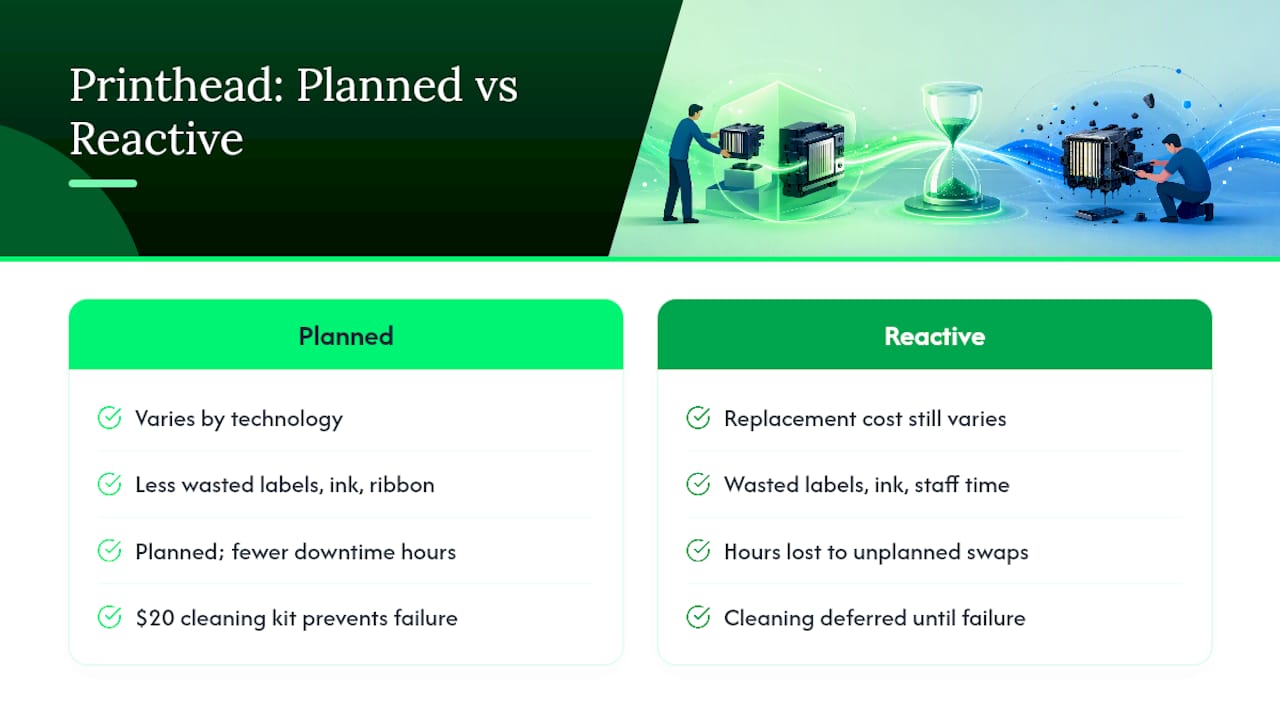
The printhead sits at the mechanical heart of the machine, but it’s also usually the single most expensive consumable-adjacent part in the whole device, more so than toner, ink cartridges or ribbon. That’s the practical reason maintenance discipline pays for itself: a $20 cleaning kit and a five-minute weekly routine protects a component that can cost several hundred dollars to replace.
Does printhead build quality actually change how long it lasts
Material choice is not a marketing detail; it’s an engineering decision that predicts field life. Thermal printheads come in two main build types: thin film and thick film. Thin film heads use a more precise, tightly packed resistive layer suited to high-resolution printing on premium, low-abrasion media; think barcode labels and receipts in a clean retail counter. Thick film heads use a coarser, more robust resistive layer designed to tolerate abrasive stock and dustier environments, common in industrial and warehouse settings.
Matching the wrong build to the wrong environment is a quiet, common cause of underperformance. A thin film head running abrasive shipping labels in a warehouse will wear through its overglaze far faster than the same head printing clean barcode labels in an office. Conversely, a thick film head in a pristine office environment isn’t wrong, just possibly more than the job needs.
For inkjet and piezoelectric heads, build quality shows up differently, mostly in how well the nozzle plate and internal channels resist cavitation damage and corrosion from pigment-based inks over time. Cheaper aftermarket heads sometimes use lower-grade nozzle plate coatings, which is part of why OEM or OEM-equivalent parts tend to outperform unspecified generic alternatives in real-world durability, even when the sticker price looks tempting.
The practical takeaway for a buyer or office manager: when sourcing a replacement, check whether the part is rated for your specific media type and duty cycle, not just whether it physically fits the printer.
What replacing a printhead actually costs you
Printhead replacement cost varies widely by technology and format, but the pattern is consistent: it’s rarely the cheapest consumable in the printer, and it’s almost always cheaper than the downtime and reprint costs that come from ignoring early warning signs. A failing head doesn’t just produce ugly prints; it produces wasted labels, wasted ink or ribbon, and wasted staff time troubleshooting a problem that a $20 cleaning kit could have prevented months earlier.
Wide-format and technical printing carry the highest stakes, since a single wasted print run on large-format media can cost more in paper and ink than the cleaning routine that would have avoided it. Products like the Canon PF-10 wide-format printhead sit at a price point that makes the case for maintenance obvious once you compare it against a few months of routine cleaning supplies.
There’s also an opportunity cost that rarely makes it onto a spreadsheet: every hour a printer is down for an unplanned head swap is an hour staff aren’t printing invoices, labels, or technical drawings. Businesses running label printers, POS terminals or plotters at volume should treat printhead replacement as a planned line item, not a surprise. Budgeting for it, and pairing that budget with a maintenance routine that pushes replacement further out, is the more sustainable approach than reacting only once print quality has already visibly failed.
Rental and managed print arrangements sometimes fold consumable and part replacement into a predictable monthly fee, which suits businesses that would rather not track individual printhead cycles across a fleet of machines.
Thermal vs piezoelectric: different technologies, different maintenance needs
Thermal and piezoelectric printheads fail differently, which means they need different maintenance approaches. Thermal heads rely on resistive elements heating and cooling thousands of times per print job. That cycle is inherently what causes thermal fatigue, so their maintenance focus is almost entirely about protecting the overglaze from abrasion and managing heat settings. Lower darkness settings, quality media, and scheduled cleaning intervals directly address the specific way thermal heads age.
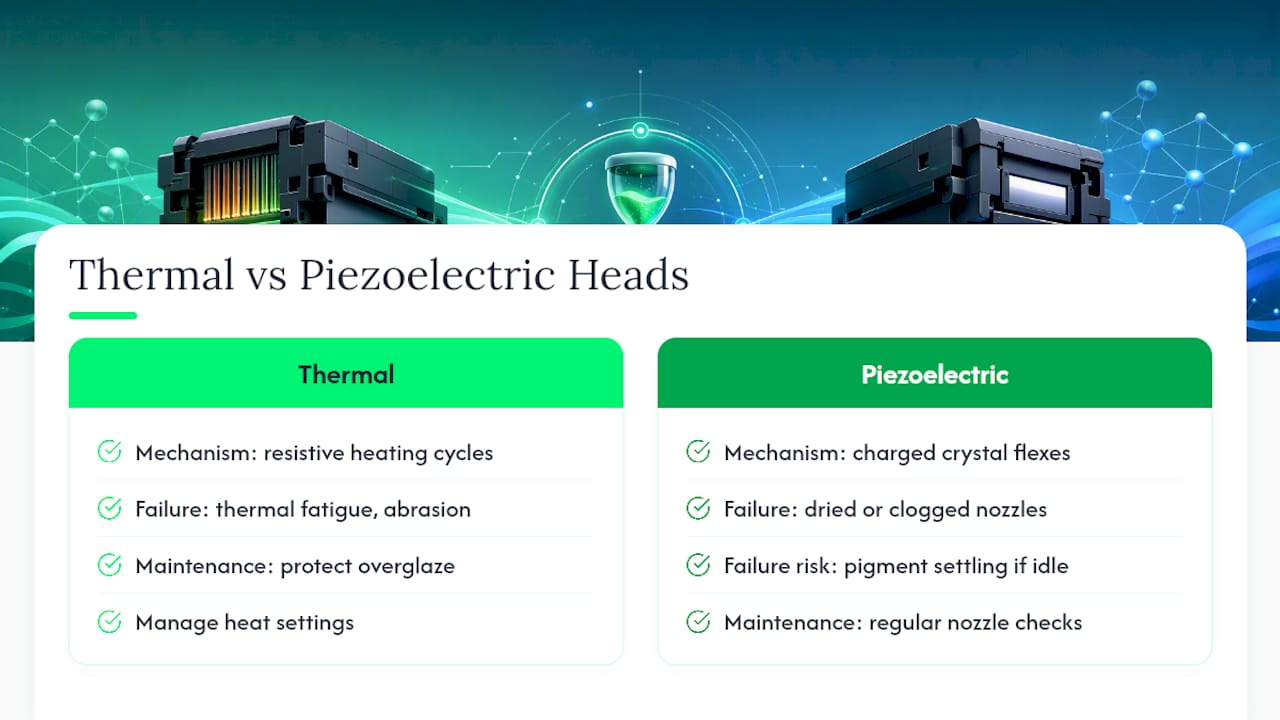
Piezoelectric heads work differently. Instead of heat, they use an electrically charged crystal that flexes to force ink droplets out of the nozzle. This avoids the boiling and cavitation that plague thermal inkjet heads, which is why piezoelectric technology often has a reputation for longer service life in production printing. But piezoelectric heads bring their own vulnerability: dried or clogged nozzles, especially with pigment-based inks that settle if the printer sits idle. Their maintenance priority shifts toward regular nozzle checks, purge cycles and correct ink storage rather than abrasion control.
Thermal inkjet heads (a third category, distinct from thermal transfer/direct thermal label printheads) sit in between: they use heat like thermal label printers but fire liquid ink like piezoelectric heads, which is exactly why cavitation, thermal fatigue and electromigration all apply to them simultaneously.
The practical upshot for anyone managing mixed fleets: a maintenance checklist built for label printers won’t cover the nozzle-clog risks of a wide-format piezoelectric plotter, and vice versa. Match the routine to the technology, not just the brand.
Get more mileage out of every printhead you own
If there’s one pattern across every field report and engineering study on this topic, it’s that businesses treat printheads as a fit-and-forget part when they’re really a wear item that responds directly to how well you look after it. The gap between a printhead that dies in six months and one that lasts five years usually isn’t luck or a manufacturing lottery; it’s cleaning discipline, media quality, and matching the right build to the right environment.
There are suppliers stocking genuine and OEM-equivalent printheads, maintenance consumables, and quality print media, alongside break-fix and managed print service options for businesses that would rather have a professional keep an eye on it. If you’re weighing up a replacement head against a new device altogether, the HP DesignJet T650 24-inch A1 printer is worth a look. If it’s simply time to top up consumables, genuine HP 713 ink and printhead supplies keep your existing DesignJet running to spec rather than fighting substandard alternatives.
A field note on what actually breaks printheads
Most premature printhead failures I’ve seen traced back to two things: skipped cleaning cycles and someone reaching for whatever media was cheapest that week. The engineering failure modes are real and well documented, but in practice, discipline beats hardware quality more often than people expect. A mid-range head cleaned on schedule will usually outlast a premium head that never gets touched.
If you take one thing from this, make it the cleaning calendar, not the shopping list. Pair that with authorised parts when replacement time comes, and you’ll get more predictable results than chasing marginal spec differences between heads.
Sources
This article draws on manufacturer maintenance guidance from Zebra, field-life data from the POS at MP Parts guide, engineering failure analysis published on ScienceDirect, and print production best practice from Memjet. Readers wanting more on print resolution and nozzle behaviour may also find this explainer on DPI in print production useful background.
-
Extend thermal printhead life by 2–3× — POS at MP Parts guide
-
Failure analysis and lifetime of thermal inkjet printheads — ScienceDirect
FAQ
How long should a printhead last?
It depends heavily on type and environment. Thermal printheads typically run six months in dusty retail settings to five years or more in clean offices, while inkjet and wide-format heads in heavy production often need replacement within months.
How often do printheads need to be cleaned?
Zebra recommends cleaning barcode printheads every two rolls of media or one roll of ribbon, and card printer heads every 5,000 cards, with immediate cleaning whenever print quality drops.
Is a 10-year-old printer still good?
A ten-year-old printer can still perform well if the printhead has been maintained and replaced as needed, but ageing electronics, discontinued parts availability, and outdated connectivity often make replacement more practical than repeated component swaps by that age.
Is it worth replacing a printhead?
Usually yes, if cleaning no longer resolves persistent white lines or repeated quality loss. Replacement cost is almost always lower than the ongoing waste, downtime, and labour spent troubleshooting a head that’s genuinely failed.