

Plotter media splits into six working families: uncoated and coated bond, vellum and translucent stock, gloss or satin photo paper, tracing paper, Mylar or polyester film, and non-paper media like vinyl and canvas. Global Office Machines stocks the bond paper most CAD offices run daily, with weights across the category spanning roughly 75 to 260 GSM depending on finish. The buying rule is simple: match the media family to your device type, your ink chemistry, and what the print needs to survive.
- CAD and technical drawings — uncoated bond, 75–90 GSM
- Client presentations and renderings — coated bond or satin photo, 90–260 GSM
- Field and archival work — Mylar/polyester film
- Outdoor signage — vinyl or scrim, laminated
Key Takeaways
Choosing the right plotter paper comes down to matching GSM, finish and ink chemistry to the specific job, not defaulting to whatever roll is already loaded.
| Point | Details |
|---|---|
| Six media families exist | Bond, vellum/translucent, gloss/satin photo, tracing, Mylar/polyester film, and non-paper media each suit different jobs. |
| GSM signals feed and stiffness | Uncoated bond runs 75–90 GSM; photo and satin stocks commonly run 180–260 GSM. |
| Ink chemistry dictates media choice | Pigment ink suits film and archival work; dye ink suits everyday bond and photo printing. |
| Core and width must match the device | Most wide-format plotters take a 2-inch or 3-inch core, and the two are not interchangeable. |
| Test before bulk buying | Global Office Machines supplies genuine, compatible plotter paper and ink nationally, with sample orders available before large roll purchases. |
Table of Contents
- What are the main plotter paper types?
- Plotter paper types explained: specs, strengths and trade-offs
- How does finish and weight change what you see on the page?
- Choosing the right roll size, width and core for your plotter
- Which ink and printer combinations work with each media type?
- How should you store and handle plotter rolls to cut waste?
- What does an authorised dealer add to your procurement process?
- Order plotter paper and ink with confidence, not guesswork
- Frequently asked questions
What are the main plotter paper types?
Six families cover almost every wide-format job. Each one behaves differently on the roll and under the nozzle, so knowing the shorthand saves a reprint later.
- Uncoated bond (75–90 GSM) — the workhorse for line drawings and construction sets.
- Coated bond (90–120 GSM) — sharper colour for maps and technical renders.
- Vellum/translucent — semi-transparent stock for overlays and light tables; curls if stored badly.
- Gloss/satin photo (180–260 GSM) — richest colour, used for hero presentation prints.
- Tracing paper — thin, translucent, mostly a legacy CAD stock now.
- Mylar/polyester film and vinyl/canvas — non-paper media for field durability and signage; needs pigment ink and often lamination.
Get the family wrong and you’ll see it fast: ink that won’t dry on film, or a translucent overlay too opaque to read against a light box.
Plotter paper types explained: specs, strengths and trade-offs
Bond paper is where most procurement budgets sit, and it splits cleanly on coating. Uncoated bond, typically 75–90 GSM, is the everyday stock for construction sets and RFIs — cheap, fast-feeding, and forgiving of pen plotters because there’s no coating to scuff. Coated bond runs heavier, usually 90–120 GSM, and adds a light surface treatment that holds ink dots tighter for colour maps and schematic renders where uncoated stock would bleed at the edges.
Photo and satin papers sit at the top of the weight range, commonly 180–260 GSM, and that extra body is doing real work: it resists show-through, holds saturated colour, and gives presentation prints the stiffness clients expect when a rendering gets pinned to a boardroom wall, as explained in school yearbook paper options explained for staff. The trade-off is cost and slower drying, particularly with dye-based inks on gloss finishes.

Vellum and translucent stocks are a different animal entirely. They’re designed to be seen through, not just printed on, which makes them the standard for light-table overlays and multi-layer presentation sets. Handle them wrong (high humidity, flat storage in a hot studio) and they curl at the edges before they even reach the plotter.
Mylar and polyester film go further still. These aren’t paper at all. They’re built for field durability and long-term archival storage, and they demand pigment inks rather than dye, because dye-based inks sit on the film surface rather than absorbing into it and smear far more easily outdoors. Vinyl, canvas and backlit films round out the non-paper category, built specifically for signage, banners and lightboxes rather than desk-based reviewing.
| Media type | Typical GSM/thickness | Finish | Best use | Ink compatibility |
|---|---|---|---|---|
| Uncoated bond | 75–90 GSM | Matte | CAD, construction sets | Dye or pigment |
| Coated bond | 90–120 GSM | Light coat | Colour maps, renders | Pigment preferred |
| Vellum/translucent | Light, translucent | Matte translucent | Overlays, light tables | Dye or pigment |
| Gloss/satin photo | 180–260 GSM | Gloss/satin | Client presentations | Dye or pigment |
| Mylar/polyester film | Film thickness varies | Matte or clear | Field durability, archival | Pigment only |
| Vinyl/canvas/backlit | Heavy, film-based | Matte, gloss or backlit | Outdoor signage, lightboxes | Pigment (often laminated) |
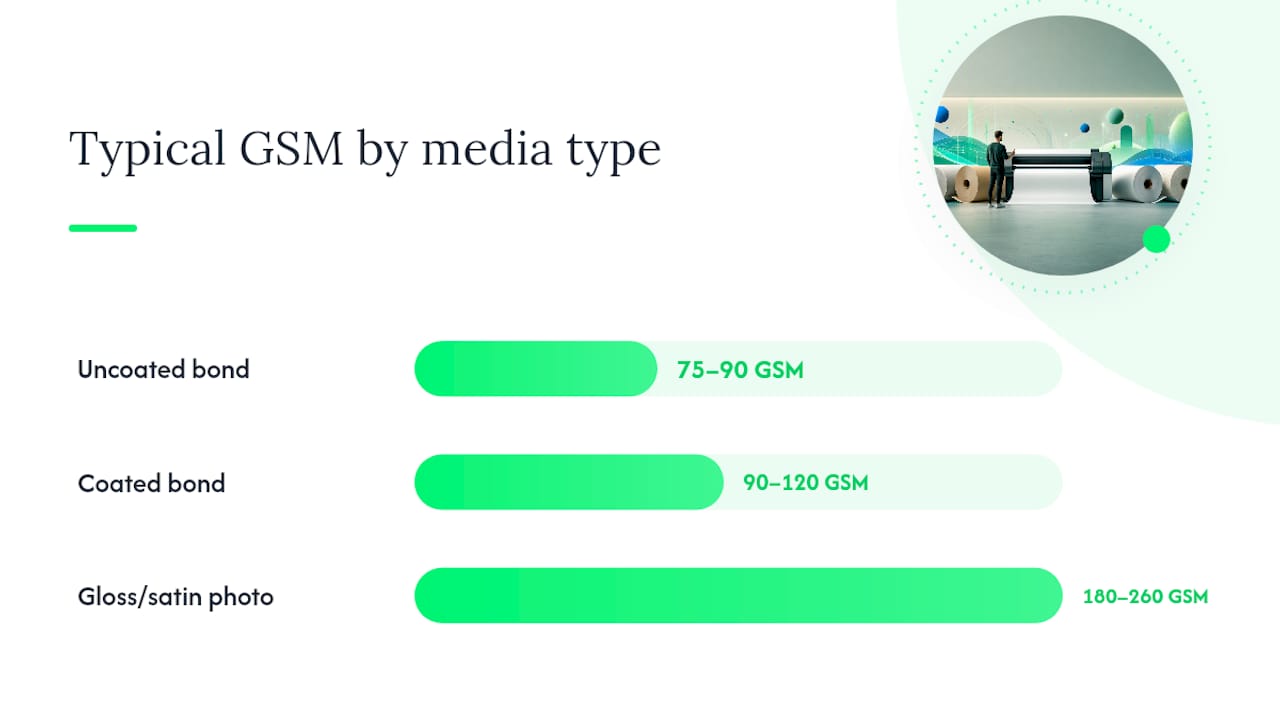
Professionals working across CAD, engineering and cartography group media this same way, and the pattern holds regardless of brand: weight and coating dictate the job, not the marketing name on the roll.
How does finish and weight change what you see on the page?
GSM is really a proxy for stiffness. Heavier stock feeds through wide-format devices with less flutter, which matters more than most buyers expect on long unattended print runs. Lighter uncoated bond feeds fast and cheap but shows more dot gain, meaning fine CAD linework can look slightly softer than the same file on coated stock.
Coating changes the chemistry, not just the surface feel. A coated bond or a satin photo stock holds ink close to the surface, so dye inks produce sharper edges and less bleed than the same file printed uncoated. Brightness and opacity matter most when a set involves overlays or multi-sheet handouts, because a dull or overly opaque stock flattens colour contrast between layers.
- Heavier GSM = better feed reliability, more stiffness
- Coated stock = sharper dot definition, less bleed
- Higher brightness = better contrast for overlays and multi-page sets
Pro Tip: Reach for coated bond when a drawing set is going to client review as a working document, but switch to satin or gloss photo stock the moment the print itself is the deliverable, like a rendered concept board.
Choosing the right roll size, width and core for your plotter
Getting the roll wrong costs more in downtime than in dollars. Before ordering, confirm three things:
- Maximum media width your plotter accepts, matched to the paper sizes you print most (A1 or A0 equivalents).
- Core diameter the device takes, since most wide-format printers use either a 2-inch or 3-inch core and the two aren’t interchangeable.
- Roll length suited to your print volume, so you’re not swapping rolls mid-job or tying up cash in oversized stock.
Keep a spare roll on hand for high-volume devices, and if you run dual-roll printers such as the HP DesignJet XL 3600, pair a bond roll with a presentation stock so you’re never switching media mid-batch.
Which ink and printer combinations work with each media type?
Ink chemistry decides more than most buyers realise. Inkjet plotters need media with either good absorption or a surface coating to handle dye or pigment ink properly, while older pen plotters do best on smooth, uncoated stock that won’t scuff the pen tip.
Compatibility checklist:
- Confirm whether your printer runs dye or pigment ink (pigment suits film and archival work; dye suits everyday bond and photo printing).
- Check the media has a driver profile or ICC profile for your specific plotter model.
- Match coated media to coated-media ink settings. Mismatched profiles are the top cause of banding.
Troubleshooting checklist:
- Banding or streaking — check nozzle health first, then confirm the correct media profile is selected in the driver.
- Feed jams or skewing — check core fit and confirm the roll isn’t stored curled.
- Bleed or fuzzy lines — switch to a coated stock or confirm ink type matches media coating.
- Slow drying or smudging — reduce humidity in the print room and allow extra cure time on gloss finishes.
Request a sample roll before committing to a bulk order, and test smear resistance and lamination compatibility on your actual device rather than trusting the spec sheet alone.
How should you store and handle plotter rolls to cut waste?
Store rolls horizontally, in their original wrap, away from direct sunlight and in stable humidity. Heat and moisture swings are the single biggest cause of curl and wasted stock.
- Keep rolls in original packaging until loaded.
- Use the correct core chuck size to avoid slippage during feed.
- Sample a new stock on one job before committing a full batch order.
- Track remnants and recycle offcuts where your facility supports it.
Pro Tip: Batch similar jobs onto the same roll before switching media. Every media change costs a few minutes of setup and a strip of wasted paper on most wide-format devices.
What does an authorised dealer add to your procurement process?
Buying through an authorised dealer removes most of the guesswork from media procurement. Global Office Machines supplies genuine and compatible plotter paper, ink cartridges and hardware nationally, backed by:
- Authorised dealer status across major brands, including HP
- National delivery from Sydney-based operations
- Genuine consumables with compatibility assurance
- Managed print options and the Green+ refurbished programme
Practical upside: consolidated invoicing, warranty support and the ability to request a compatibility check or sample roll before committing to a bulk order rather than discovering a mismatch after the print run starts.
A procurement view on mixed-device fleets
Standardise on one CAD bond and one presentation stock across a mixed fleet before chasing unit-cost savings on a third media type. The real cost isn’t the paper. It’s the reprint risk and storage sprawl that come from running five SKUs to save a few cents each.
Order plotter paper and ink with confidence, not guesswork
Global Office Machines gives procurement teams a faster path to the right media than trawling manufacturer spec sheets alone: request a sample roll, confirm your core and width against your device, and get it delivered nationally without chasing multiple suppliers for paper, ink and hardware separately.
That matters most when you’re matching pigment ink to film stock or coated bond to a specific driver profile. Before running a full batch, test the HP #975X Black Ink or HP #975X Yellow Ink against your exact media and device, since feed and drying behaviour genuinely vary between printer models. If you’re running a refurbished HP DesignJet under the Green+ programme, the same testing rule applies before you commit to a bulk roll order. Head to the Global Office Machines shop to request a sample or place your order.
Frequently asked questions
What is the most common plotter paper type for CAD drawings? Uncoated bond, typically 75–90 GSM, is the standard choice for CAD line drawings and construction sets because it feeds reliably and costs less than coated alternatives.
What plotter paper type works best for client presentations? Coated bond or satin photo paper, usually 90–260 GSM, gives sharper colour and a more polished finish than uncoated bond for renderings and presentation boards.
Can I use the same ink across all plotter paper types? Not always. Pigment inks are needed for film and archival stocks like Mylar or polyester, while dye inks work well on everyday bond and photo paper.
What plotter paper is best for outdoor signage? Vinyl, scrim or canvas media, often laminated, handles outdoor exposure far better than standard photo paper, which isn’t built for weather durability.
How do I know which core size my plotter needs? Check your device’s manual or media specifications. Most wide-format plotters take either a 2-inch or 3-inch core, and Global Office Machines can confirm compatibility before you order.