

Compatible toner cartridges can be perfectly safe for most business printing, but the risk is real and it depends almost entirely on who made the cartridge. Poor-quality compatibles cause toner leakage, contaminate internal components and, in rarer cases, damage a fuser or drum. Reputable suppliers, industry guides note, produce compatibles that perform much like OEM cartridges. Cheap, uncertified ones cause the majority of reported failures.
The main failure modes worth knowing before you buy:
- Leaks and contamination — toner escapes a poorly sealed cartridge and coats the drum, rollers or fuser.
- Chip and firmware errors — the printer refuses to recognise the cartridge, especially after a manufacturer update.
- Poor fusing — toner smears or flakes because the chemistry doesn’t match the printer’s heat settings.
- Yield shortfalls — the cartridge runs out well before the page count advertised.
Pro Tip: If a compatible cartridge causes damage, your printer’s OEM warranty typically won’t cover that specific fault — but a reputable supplier’s own warranty should. Check this before you buy, not after something breaks.
Key Takeaways
Compatible toner cartridges are only as reliable as the supplier who manufactures and sells them, not the mere fact that they’re third-party.
| Point | Details |
|---|---|
| Verdict on safety | Compatible toner can be safe, but leakage, chip errors and fusing problems come almost entirely from poor-quality suppliers. |
| Warranty gap | Damage caused specifically by a third-party cartridge often falls outside OEM warranty cover, so check supplier warranties first. |
| Certification matters | Ask for ISO/IEC 19752 or 19798 yield testing before trusting a supplier’s page-count claims. |
| Test before committing | Run compatibles on non-critical jobs first and keep an OEM cartridge on hand during the trial. |
| Where GOM fits | Global Office Machines sells both genuine and compatible consumables backed by supplier warranties across major printer brands. |
Table of Contents
- What are compatible, remanufactured and refilled toner cartridges?
- Real-world signs of compatible toner damage
- Why compatible toner problems happen in the first place
- How to choose lower-risk compatible toner
- When you should stick with OEM toner
- Why this guidance holds up
- The conventional advice on toner is backwards
- Get lower-risk toner without the guesswork
- Frequently asked questions
What are compatible, remanufactured and refilled toner cartridges?
The terms get used loosely, but they describe genuinely different products. A compatible cartridge is a brand-new, third-party-manufactured unit built to fit a specific printer model without using the original manufacturer’s parts. A remanufactured cartridge takes a used OEM shell, cleans it, replaces the toner and worn components, then resells it. A refilled cartridge is the simplest and riskiest: the same shell, just topped up with toner, often without replacing the drum or seals.
The differences matter because they affect toner particle size, seal quality and chip design, all of which influence how the cartridge behaves inside your machine. Quality varies enormously across compatibles because supply chains and quality control standards differ from one manufacturer to the next:
- Some compatible manufacturers run their own ISO-certified testing.
- Others assemble cartridges with minimal tolerance checks and no consistent chip programming.
Real-world signs of compatible toner damage
The problems readers actually run into fall into four categories, and they don’t all carry the same level of risk.
- Toner leakage and contamination. Loose toner escapes the cartridge shell and settles on the drum, transfer roller or fuser assembly. Manufacturer guidance points to poorly sealed compatibles as the main cause, and once toner reaches the fuser, it can bake onto the roller and cause streaking on every print afterwards.
- Print-quality failures. Streaks, grey background shading, patchy colour and inconsistent density are the most common complaints. Colour mismatch is a particular problem for compatibles in colour laser printers, where toner chemistry needs to match precise temperature and charge specifications.
- Mechanical faults. Loose gears, a squeaking sound during printing, or paper feed problems often trace back to a cartridge that doesn’t sit correctly in the carriage. Debris from a poorly built cartridge can jam feed mechanisms over time.
- Chip and firmware issues. “Cartridge not recognised” messages, incorrect toner-level readings and cartridges that get blocked after a firmware update are increasingly common. Reviews of third-party toner performance trace most of these back to chip incompatibility rather than the toner itself.
Most print-quality issues are fixable, a cleaning cycle or cartridge swap usually sorts them. Contamination inside the fuser or drum assembly is the one that gets expensive, because those parts often need professional replacement rather than a simple fix.
Why compatible toner problems happen in the first place
Toner chemistry is more finicky than most buyers assume. Particle size, melting temperature and electrical charge all have to be tuned to a specific printer’s fuser and drum. Get the chemistry slightly wrong and you get smearing, poor adhesion or toner that simply won’t fuse properly onto the page.
Build tolerances matter just as much. A cartridge assembled with loose seals or an ill-fitting casing is the direct cause of the leaks Lenovo’s technical guidance describes, because toner escapes through gaps that a tighter OEM tolerance would never allow.
Chips are where the newest problems live. Many printers now use chip communication to verify cartridge authenticity and track toner levels, and region-locked or outdated chip firmware is a recurring cause of “not recognised” errors after a manufacturer pushes a firmware update. Suppliers who proactively update their chip designs when a printer brand changes firmware avoid most of this friction; suppliers who don’t leave customers stuck mid-print run.
Printer design plays a role too. Machines with:
- Permanent printheads (rather than replaceable ones built into the cartridge) carry more risk, because printhead damage isn’t a $30 fix.
- Exposed drum units are more vulnerable to contamination from loose toner particles.
- Tight tolerances between the cartridge and fuser assembly are less forgiving of a cartridge that’s even slightly out of spec.
How to choose lower-risk compatible toner
The cartridge itself matters less than who sold it to you. Run through this checklist before you buy:
- Check for ISO/IEC certification. Suppliers who test to ISO/IEC 19752 for mono cartridges or ISO/IEC 19798 for colour publish realistic page-yield figures rather than inflated marketing numbers. Ask for the certification directly if it’s not listed.
- Look for a printer-damage warranty. A reputable supplier stands behind its product if a cartridge causes hardware damage. If a seller won’t put that in writing, treat it as a warning sign.
- Ask how they handle firmware updates. Suppliers who track manufacturer firmware changes and update their chips accordingly avoid the “not recognised” problem that catches out buyers of cheaper alternatives.
- Test before you commit fleet-wide. Run a compatible cartridge on non-critical print jobs first, then inspect the printer interior for loose toner after the first few hundred pages.
- Keep an OEM cartridge on hand during the trial period. If something goes wrong mid-job, you’re not stuck waiting on a replacement.
Pro Tip: Don’t disable automatic firmware updates as a workaround unless you fully understand the security and support trade-offs. It’s a decision worth making deliberately, with a supplier who can talk you through the risk, not a default setting to flick off.
When you should stick with OEM toner
Compatible toner earns its savings on everyday, high-volume mono printing. It’s a worse bet in a handful of specific situations:
- New printers still under full manufacturer warranty — one damage dispute can cost more than years of toner savings.
- Colour-critical or client-facing work, where a mismatched hue is the difference between a professional document and an embarrassing one.
- Devices with permanent printheads or expensive repair parts, where a cartridge fault risks a much costlier fix than the printer’s original components.
- Managed print contracts, where consumable choice is often already locked in as part of the service agreement.
If downtime costs your business more than the toner ever saved, OEM is the safer call every time.
Why this guidance holds up
Global Office Machines has spent years supplying, servicing and troubleshooting office print fleets across multiple states, which means the failure patterns described above aren’t theoretical, they’re what actually shows up in service calls. The business is an authorised dealer for HP, Kyocera, Fuji Xerox, Lexmark, Epson, OKI, Kodak Alaris, Microsoft and 3CX, giving it direct visibility into how OEM and third-party consumables behave across different printer architectures.
- Global Office Machines sells both genuine and compatible consumables, rather than pushing one category exclusively.
- Its Green+ program refurbishes and resells renewed machines at up to 70% off, an approach to cost savings that doesn’t compromise on build quality.
A cartridge is only as reliable as the supplier standing behind it. That single fact explains almost every compatible toner horror story worth taking seriously.
The conventional advice on toner is backwards
Most guides on this topic tell readers to simply “avoid compatibles” or “always buy OEM,” which is lazy advice dressed up as caution. The actual evidence points somewhere more useful: the cartridge category isn’t the risk factor, the supplier is. A compatible cartridge from a manufacturer running ISO-tested production lines and offering a genuine printer-damage warranty is a fundamentally different product to a refilled shell bought on price alone, even though both get marketed under the same “compatible” label.
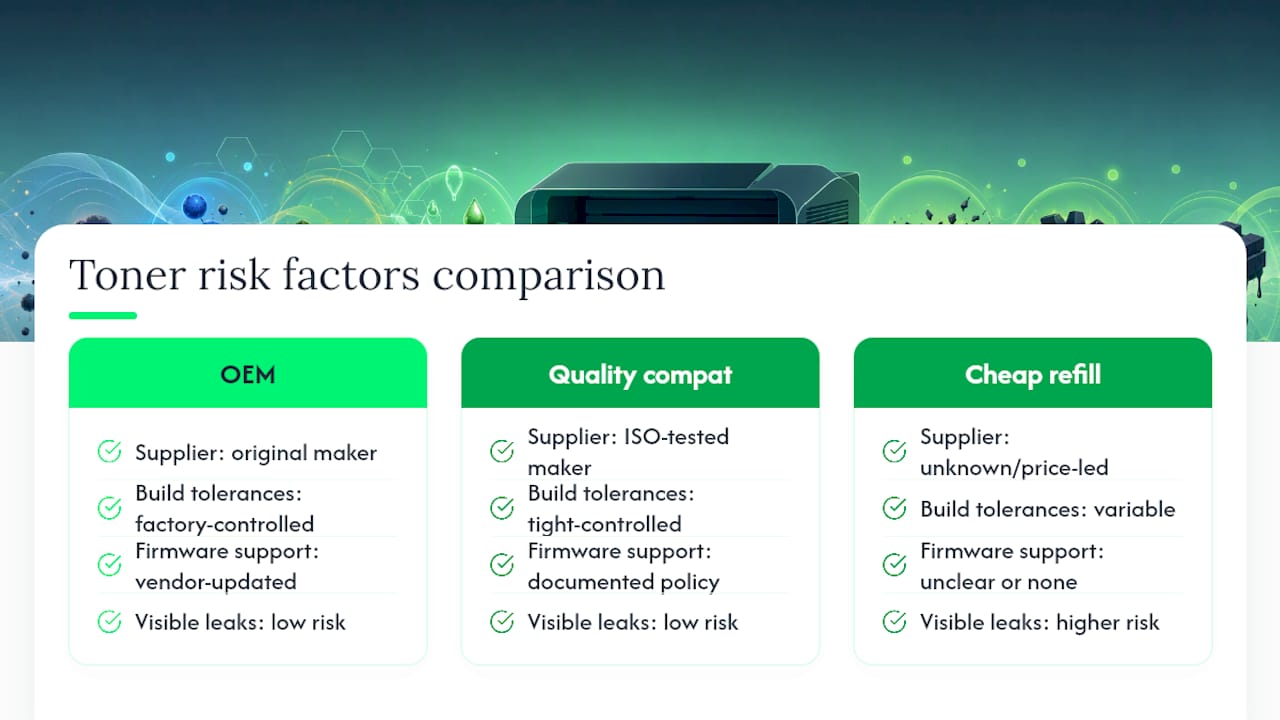
What gets underrated is the firmware question. Buyers fixate on toner leaks, which are visible and dramatic, while the quieter risk, a chip that stops working after a routine update, causes more actual downtime for small businesses. Prioritise a supplier who can tell you clearly how they handle firmware changes before you ever ask about page yield. That’s the detail that separates a cartridge that just works from one that leaves you scrambling for a replacement mid-invoice run.
Get lower-risk toner without the guesswork
Global Office Machines stocks both genuine and certified compatible toner, ink, drums and printheads, so you’re never choosing between savings and peace of mind. Every product comes with clear warranty terms and nationwide delivery, which means you can trial a compatible cartridge on your next print run without wondering who’s on the hook if something goes wrong.
If you’re weighing up a compatible cartridge for a new printer or a colour-critical job, browse genuine options like the HP #975A Black Ink or HP #955 Yellow Ink to keep as a fallback while you test. For teams managing firmware or recognition issues on existing hardware, Techbug’s troubleshooting guidance is a useful operational reference. Head to the Global Office Machines shop to check stock, compare genuine and compatible options side by side, and get a warranty-backed cartridge sent out today.
Frequently asked questions
Does using compatible toner void my printer warranty? Not automatically. Manufacturer guidance confirms that using a compatible cartridge doesn’t void your whole printer warranty, but if that specific cartridge causes damage, the manufacturer can exclude that fault from cover. This is why a supplier’s own printer-damage warranty matters so much.
Can compatible toner really damage my printer? Poor-quality compatibles can, mainly through leaks that contaminate the drum or fuser, or chips that trigger recognition errors. High-quality compatibles from certified suppliers carry far less of this risk.
Why does my printer say “cartridge not recognised” after a firmware update? This usually happens when a manufacturer updates firmware and a compatible cartridge’s chip hasn’t been updated to match. Reputable suppliers update their chip designs when this happens; cheaper suppliers often don’t.
Are cheaper compatible cartridges always riskier? Not always, but price is often a proxy for missing quality control. A cartridge with no visible certification, no warranty and no returns policy is the one most likely to cause the leaks and misreads described above.
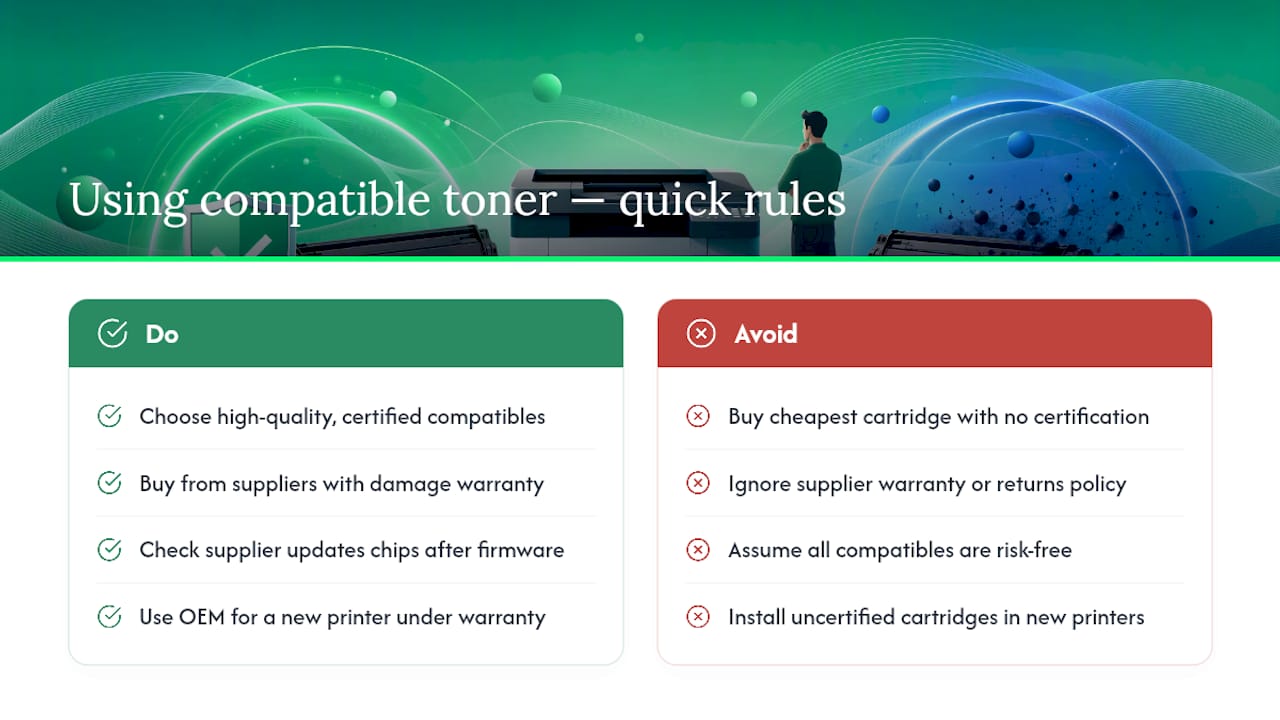
Should I avoid compatible toner in a new printer? It’s worth being more cautious here. While the printer is under full manufacturer warranty, an OEM cartridge removes any ambiguity about who pays if something goes wrong.