

Buying your printers, copiers or consumables from an authorised dealer keeps your manufacturer warranty intact, guarantees genuine parts and firmware, and puts a local, factory-trained technician on the other end of the phone when something breaks. That combination is what actually drives down cost over the life of the machine, not the sticker price you see at checkout. The core authorised dealer benefits for a business buyer break down into five things:
- A manufacturer-backed warranty that survives a claim, because the paperwork trail proves the machine came through an approved channel
- Guaranteed genuine parts, consumables and firmware updates, so print quality and device security don’t degrade over time
- Local, factory-trained service with realistic response times, which matters more than almost anything else when a machine goes down mid-quarter
- Confidence the equipment meets Australian electrical and safety standards, with the compliance paperwork to prove it
- A lower total cost of ownership across the equipment’s working life, even when the upfront price is higher than a grey-market alternative
Key Takeaways
Authorised dealers protect warranty eligibility, guarantee genuine parts and firmware, and cut total cost of ownership through faster local service, even when the upfront price is higher than unauthorised alternatives.
| Point | Details |
|---|---|
| Warranty traceability | Manufacturers need serial-number proof of an authorised sale before honouring any warranty claim. |
| Genuine parts and firmware | OEM consumables and verified firmware protect print yield, security and device lifespan. |
| Local service response | Factory-trained technicians and local parts stock shorten repair times and reduce downtime cost. |
| Compliance verification | Always request RCM labelling and compliance certificates before accepting an equipment delivery. |
| Global Office Machines | Authorised dealer for major brands with national service coverage and a Green+ refurbished programme offering inspected machines at significant discounts. |
Table of Contents
- What are the real authorised dealer benefits for business buyers?
- Why do grey-market and overseas printer purchases carry hidden risk?
- How do you verify a seller is a genuine authorised dealer?
- What belongs in a total cost of ownership calculation?
- Do authorised dealers offer better pricing and service plans?
- Can you trade in or upgrade equipment through an authorised dealer?
- How do authorised dealers manage recalls and firmware updates?
- What does the evidence actually tell buyers to prioritise?
- Why choose Global Office Machines as your authorised dealer
What are the real authorised dealer benefits for business buyers?
Every one of those five points has a paper trail behind it, and that paper trail is exactly what separates an authorised purchase from a punt on an unverified seller.
Start with the warranty. Manufacturers only honour warranty claims when they can trace the machine’s serial number back to an approved sale. An authorised dealer issues the documentation that proves the sale went through the right channel, which is the paperwork you’ll need the day a fuser unit fails or a mainboard dies. Buy the same model through an unverified reseller and you may find the manufacturer simply won’t look at the serial number, regardless of how new the machine is.
Genuine consumables and firmware matter more than most procurement checklists give them credit for. Toner and ink built to OEM specification protect print yield and stop premature wear on drums, printheads and rollers. Firmware updates aren’t cosmetic either. They patch security vulnerabilities and keep the device compatible with your network and print management software. A dealer with proper OEM ties pushes those updates as a matter of course. A grey-market seller usually can’t, because they were never given access to the update channel in the first place.
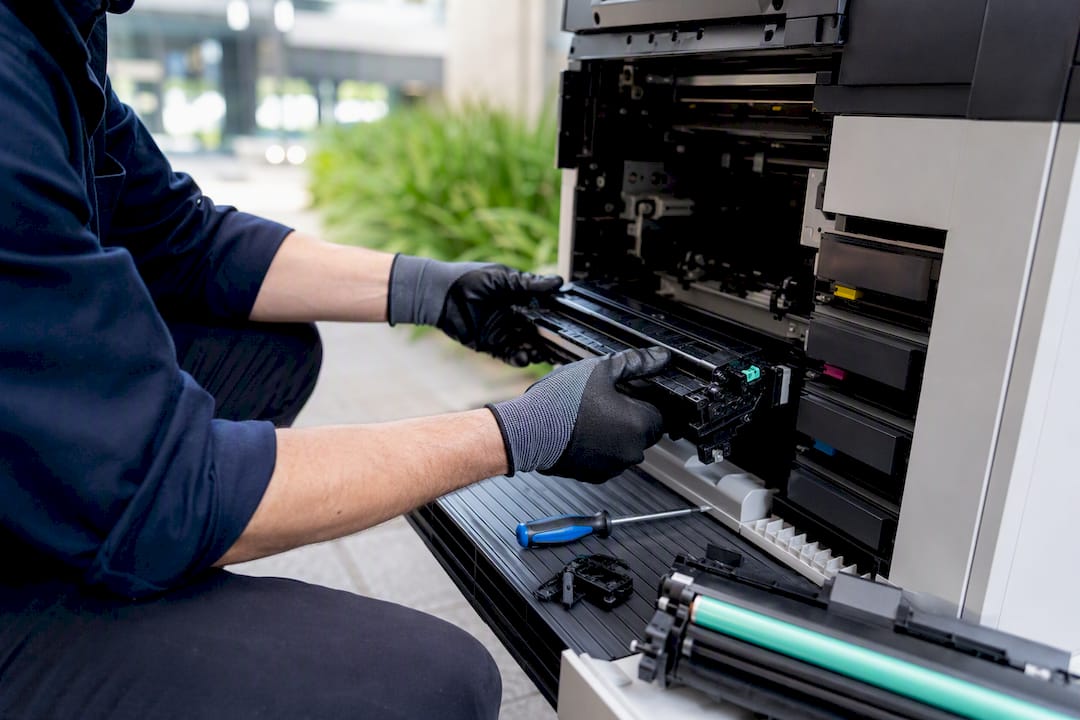
Then there’s the service side, which is where downtime actually gets decided. Authorised dealers employ factory-trained technicians, stock spare parts locally, and in many cases offer loaner equipment while your unit is being repaired. That combination is what shortens mean-time-to-repair. Compare that with the retail model, where you buy a box off a shelf and you’re on your own for maintenance agreements, billing support and consultative advice. Local dealer relationships tend to fill that gap in ways a pure retail transaction never will.
Firmware and security patching also has a supply-chain dimension buyers often miss. Authorised channels can trace a device from factory to your loading dock, which matters if a vulnerability is ever discovered in a specific production batch. Grey-market stock frequently has no such traceability, so you’re relying on hope rather than a documented chain of custody.
If budget is the real constraint, a validated refurbished programme is worth serious consideration before you default to the cheapest new unit available. Ask any dealer offering renewed stock for documented testing and inspection records before you commit, because a refurbished machine without paperwork is just a used machine with better marketing.
Pro Tip: Before signing off on any printer or copier purchase, ask the seller for the manufacturer’s authorised-partner listing and a written note confirming the specific serial number is covered under warranty. If they can’t produce either, treat the price as a warning sign, not a bargain.
Why do grey-market and overseas printer purchases carry hidden risk?
The savings on an overseas or unverified listing rarely survive contact with reality, and the risks aren’t just theoretical.
Australian electrical standards differ from many overseas markets in plug configuration, internal voltage handling and compliance labelling. A device imported without the correct Regulatory Compliance Mark can fail inspection, and in some cases represents a genuine safety hazard rather than a paperwork technicality. Regulatory guidance is blunt about this: online buyers of electrical equipment should request rating-label photos and compliance certificates before they hand over payment, and contact the relevant safety regulator if anything looks off.
Firmware and regional-model mismatches cause a second layer of trouble. A printer built for a different regional market can run different firmware, use a different serial-number structure, or simply refuse to talk properly to Australian print management systems. Parallel-imported equipment carries a real risk of compatibility failure, and once a device is bricked by a firmware conflict, the manufacturer has no obligation to help you fix it.
Grey-market stock can look identical to authorised stock on the outside, but manufacturers routinely exclude it from warranty coverage and extended-warranty programs, which means the “saving” disappears the first time the machine needs a service call.
The hidden costs stack up fast: customs delays, a replacement unit while you wait, and the productivity loss of a print room down for days rather than hours. None of that shows up on the original invoice.
How do you verify a seller is a genuine authorised dealer?
Run this checklist before you approve a purchase order or sign a lease agreement.
- Ask for manufacturer authorisation evidence. Most major brands publish an authorised-partner directory. If the seller isn’t on it, ask why.
- Request a serial-number warranty check. A genuine dealer can confirm, in writing, that the specific unit you’re buying is covered.
- Ask for photos of the compliance label. You want to see the Regulatory Compliance Mark and rating plate before delivery, not after.
- Confirm a local, registered business presence. Look for an ABN, a physical service address, and a stated service-level agreement, including how loaner equipment works during a repair.
- Request consumables supply proof. Ask where toner and ink come from, and whether it’s genuine OEM stock or a compatible alternative sold as genuine.
- Check refurbishment paperwork on renewed stock. If you’re buying through a programme like Green+, ask for the inspection and testing report, not just a warranty card.
- Clarify commercial terms up front. Response times, spare-parts stocking levels and how meter reads or billing work should all be spelled out before you sign anything.
Pro Tip: Keep a copy of the authorisation evidence and compliance label photos with your purchase order. If a warranty dispute ever comes up, you’ll want that paperwork on hand rather than chasing it after the fact.
What belongs in a total cost of ownership calculation?
Sticker price is the least useful number in a procurement decision. A proper total cost of ownership figure includes downtime cost, service response time, consumables yield per page, ongoing firmware and security maintenance, and eventual disposal or refurbishment value.
An authorised dealer contract should spell out several commercial protections beyond price:
- Guaranteed service-level agreements with a stated response window, not a vague “best effort” promise
- Confirmed local parts availability, so a repair doesn’t stall waiting on an overseas shipment
- Loaner equipment provisions for when a device needs extended repair time
- Flexible leasing or rental terms that let you scale equipment up or down as headcount changes
There are edge cases where an unauthorised purchase might be defensible, mainly very low-volume or genuinely disposable equipment where a failure has no real business impact. For anything running daily print volumes that matter to operations, that calculus rarely holds. It’s also worth noting that authorised dealers are typically the ones equipped to support government and enterprise procurement, because they carry registered supplier numbers and can offer the tailored commercial terms that public-sector and larger contracts demand.
Do authorised dealers offer better pricing and service plans?
Authorised status isn’t just about compliance paperwork, it’s also your access point to pricing and service arrangements that simply aren’t available anywhere else. Manufacturers reserve certain promotional pricing tiers, bundled consumables deals and extended warranty options exclusively for their approved sales channels, because those channels are the ones equipped to honour the terms.
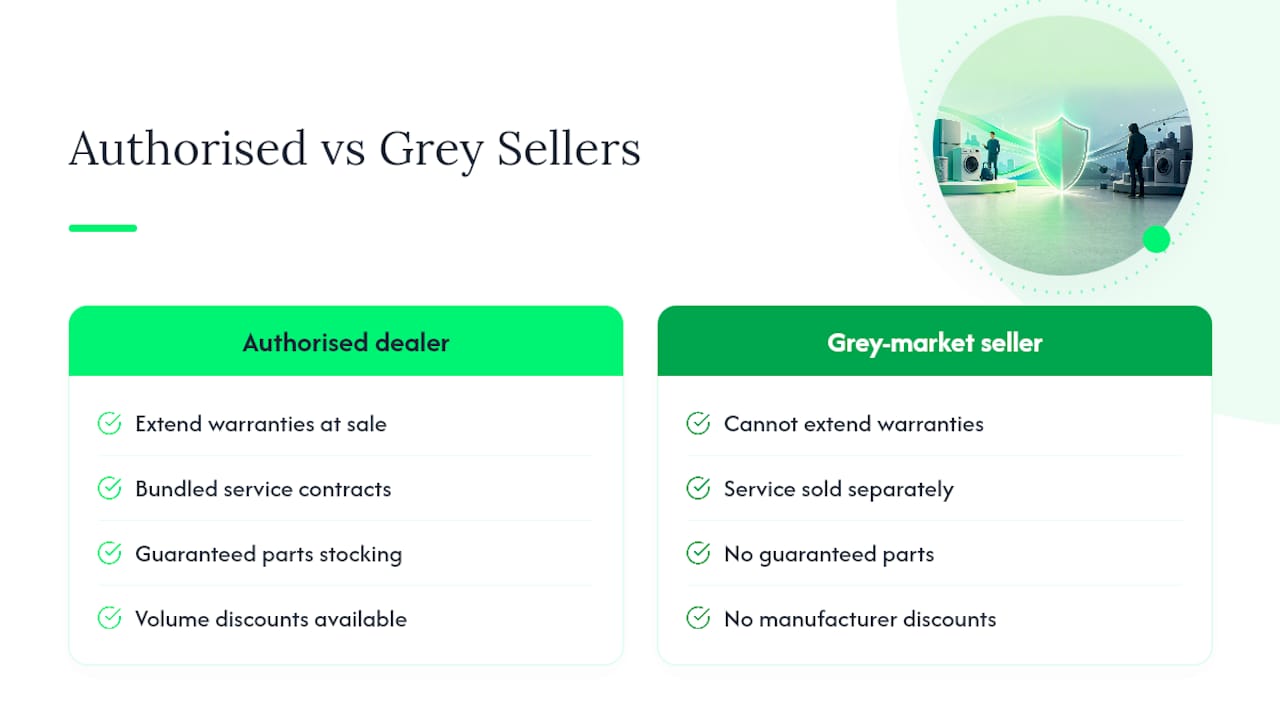
This shows up in a few practical ways for a business buyer. Authorised dealers can often extend a base one-year warranty into a longer coverage period at the point of sale, something a grey-market seller has no authority to offer. They can also bundle service contracts, covering things like scheduled maintenance visits and guaranteed parts stocking, into the purchase price rather than leaving you to negotiate a separate agreement after the fact. Manufacturer relationships also give authorised dealers early visibility into special pricing programmes, including volume-based discounts for businesses buying multiple units or upgrading a fleet.
For high-volume print environments specifically, this often extends to per-page supply contracts with remote meter-reading built in, which keeps consumable costs predictable and removes a chunk of administrative overhead from your monthly routine. None of that is available if you’ve bought outside the authorised channel, because the dealer offering it has to be accountable to the manufacturer for the terms they extend.
Can you trade in or upgrade equipment through an authorised dealer?
Trade-in and upgrade pathways are one of the most underused authorised dealer perks, largely because most buyers don’t think to ask until the equipment is already failing. An authorised relationship gives a dealer visibility into your existing fleet, purchase history and warranty status, which makes a structured trade-in or upgrade conversation possible in the first place.
In practice, this means a business running an ageing fleet of copiers or plotters can negotiate a trade-in value against newer equipment, rather than disposing of old units separately and buying new ones from scratch. It also means upgrade paths are smoother: if your print volumes have grown past what your current device was specified for, an authorised dealer can recommend a genuinely appropriate step up, informed by your actual usage data rather than a generic sales pitch. A grey-market or unauthorised seller has none of that history to work from, and typically has no trade-in mechanism to offer at all.
This is also where a refurbished pathway like Green+ becomes relevant again from a different angle: trading an older unit into a documented refurbishment programme rather than sending it to landfill is a lower-cost, more sustainable way to manage a fleet upgrade, provided the receiving dealer can show the inspection and testing process behind whatever machine you’re being upgraded to.
How do authorised dealers manage recalls and firmware updates?
When a manufacturer issues a recall or a critical firmware patch, the speed and reliability of that update reaching your device depends entirely on which channel you bought through. Authorised dealers are plugged directly into manufacturer notification systems, which means they’re told about a recall or security patch at the same time as the manufacturer’s own service network, not weeks later through word of mouth.
That direct line matters because recalls tied to a specific serial-number range or production batch require serial-number traceability to action properly. An authorised dealer can identify exactly which units on your account are affected and organise the fix, whether that’s a technician visit, a replacement part or a firmware push, without you having to chase it yourself. A grey-market purchase has no such traceability, which means you might never even be notified that your specific unit falls inside an affected batch.
Firmware updates outside of recall situations follow the same logic. Authorised dealers can push manufacturer-verified firmware that’s been tested against your specific model and region, protecting both device security and network compatibility. That’s a meaningful part of the ongoing value of buying through the right channel, not just a one-off benefit at the point of sale.
What does the evidence actually tell buyers to prioritise?
Most procurement guidance leads with price, and that’s exactly backwards. The evidence throughout this piece points to warranty traceability and service response time as the two variables that decide whether a printer purchase turns out to be a good decision twelve months later, not the number on the invoice.
The conventional advice, get three quotes and pick the cheapest, falls apart the moment you factor in downtime. A machine that’s $200 cheaper but takes five days to get a technician on site because there’s no local parts stock isn’t cheaper at all once you count the lost productivity. What the article’s research supports is a simpler discipline: verify the channel before you compare the price. Ask for the authorisation evidence, the serial-number warranty check and the compliance label photos as a first filter, then compare pricing only among sellers who clear that bar.
Where I’d push back on common wisdom is the assumption that refurbished always means compromise. A properly documented Green+ machine, with inspection records to back it, can outperform a cheap new unit bought through a shaky channel. Prioritise the paper trail first. Everything else follows from that.
— Matthew
Why choose Global Office Machines as your authorised dealer
Global Office Machines is an authorised dealer for HP, Kyocera, Fuji Xerox, Lexmark, Epson, OKI, Kodak Alaris, Microsoft and 3CX, with a national service footprint across NSW, VIC, QLD, WA and SA and a registered supplier number for government contracting.
That combination matters for procurement teams specifically because it removes the guesswork this whole article has been about: the warranty documentation, the genuine parts, the compliance paperwork, and a local technician who actually shows up, all come standard rather than requiring a separate verification process. Browse current stock, including genuine consumables like HP #955 yellow ink, through the GOM shop. If you’re managing hardware across multiple sites and want local backup on top of manufacturer support, Techbug’s hardware services are worth knowing about too. To start a procurement conversation, request authorisation documents, ask for a site assessment, or get a straight total cost of ownership quote before your next equipment refresh is due.